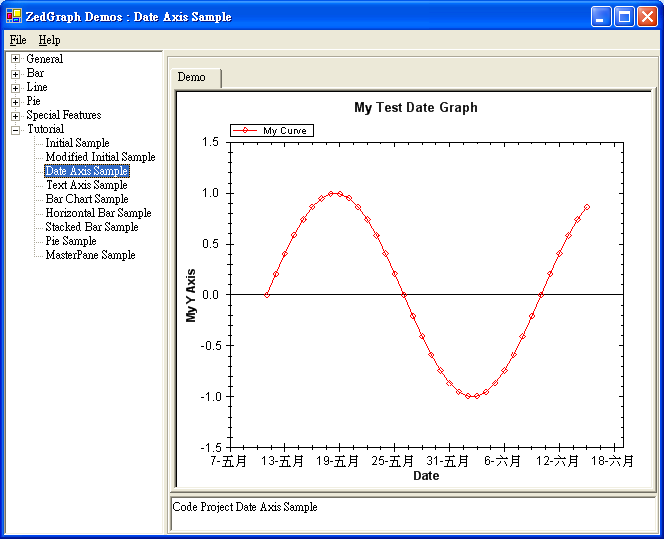
關鍵在於使用 XDate 結構代表日期時間,並將 XAxis.Type 設為 AxisType.Date。
PointPairList list = new PointPairList();
for (int i = 0; i < 36; i++)
{
    // XDate 建構式:年、月、日
    double x = (double)new XDate(1995, 5, i + 11);
    double y = Math.Sin((double)i * Math.PI / 15.0);
    list.Add(x, y);
}

LineItem myCurve = myPane.AddCurve("My Curve", list, Color.Red, SymbolType.Diamond);
myPane.XAxis.Type = AxisType.Date; // 關鍵:啟用日期軸
base.ZedGraphControl.AxisChange();
XDate 相當於 .NET 的 DateTime,隱含轉換為 double (OADate 格式) 供 ZedGraph 內部運算。
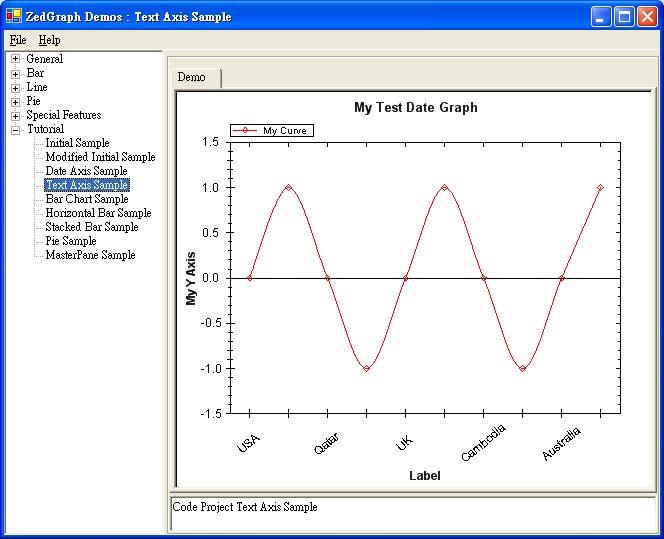
適用於離散類別資料(如國家名稱)。需設定 AxisType.Text 並指派 TextLabels 陣列。
string[] labels = { "USA", "Spain\nMadrid", "Qatar", "Morocco", "UK", "Uganda",
                    "Cambodia", "Malaysia", "Australia", "Ecuador" };
double[] y = new double[10];
for (int i = 0; i < 10; i++)
    y[i] = Math.Sin((double)i * Math.PI / 2.0);

// X 值傳 null,由索引決定位置
LineItem myCurve = myPane.AddCurve("My Curve", null, y, Color.Red, SymbolType.Diamond);
myCurve.Line.IsSmooth = true; // 平滑曲線

myPane.XAxis.Type = AxisType.Text;
myPane.XAxis.TextLabels = labels;
myPane.XAxis.ScaleFontSpec.Angle = 40; // 標籤傾斜 40 度避免重疊
base.ZedGraphControl.AxisChange();
| 特性 | 日期軸 (Date) | 文字軸 (Text) |
|---|---|---|
| X 值型別 | XDate (double) | 索引 (隱含) |
| Axis.Type | AxisType.Date | AxisType.Text |
| 標籤來源 | 自動依日期格式化 | TextLabels 字串陣列 |
| 適用場景 | 時間序列資料 | 離散類別、名稱標籤 |