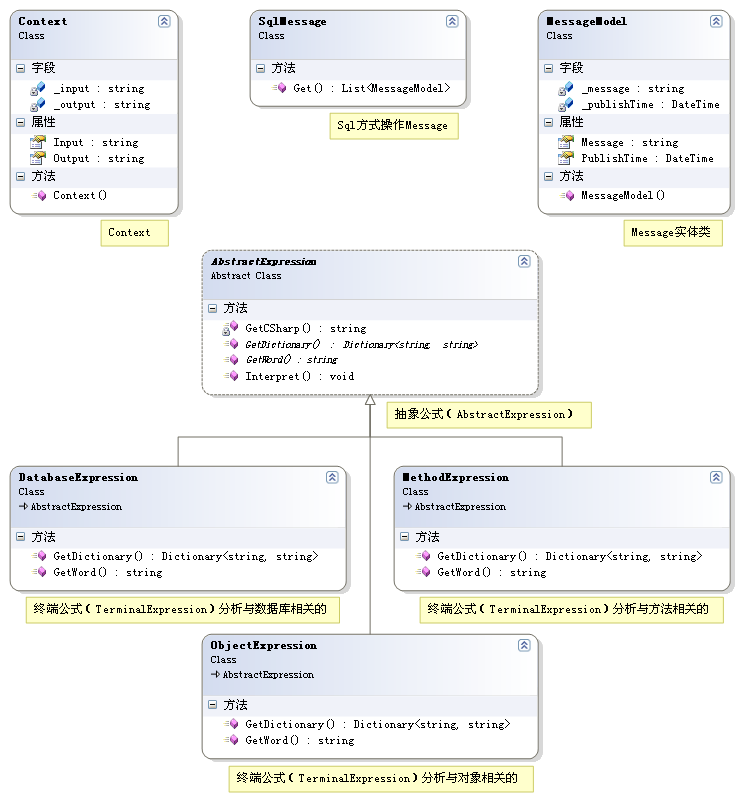
解析方法相關語法(括號內容),映射至 .NET 方法呼叫:
using System;
using System.Collections.Generic;
using System.Text;
using System.Text.RegularExpressions;

namespace Pattern.Interpreter
{
    ///
    /// 終端運算式(TerminalExpression)分析與方法相關的
    ///
    public class MethodExpression : AbstractExpression
    {
        ///
        /// 從輸入內容中取得要解釋的詞
        ///
        /// source
        /// 解析出的詞
        public override string GetWord(string source)
        {
            MatchCollection mc;
            Regex r = new Regex(@"\((.*)\)");
            mc = r.Matches(source);
            return mc[0].Groups[1].Value;
        }

        ///
        /// 獲取與方法相關的字典
        ///
        /// 中文詞彙到 C# 代碼映射
        public override Dictionary<string, string> GetDictionary()
        {
            Dictionary<string, string> d = new Dictionary<string, string>();
            d.Add("獲取", ".Get()");
            return d;
        }
    }
}展示完整解釋流程:中文語法 → 解釋器鏈 → C# 代碼 → 反射執行:
using System;
using System.Data;
using System.Configuration;
using System.Collections;
using System.Web;
using System.Web.Security;
using System.Web.UI;
using System.Web.UI.WebControls;
using System.Web.UI.WebControls.WebParts;
using System.Web.UI.HtmlControls;
using Microsoft.CSharp;
using System.Reflection;
using System.Text;
using System.Collections.Generic;
using Pattern.Interpreter;

public partial class Interpreter : System.Web.UI.Page
{
    protected void Page_Load(object sender, EventArgs e)
    {
        string chinese = "{數據庫}[信息](獲取)";
        Context context = new Context(chinese);

        List<AbstractExpression> l = new List<AbstractExpression>();
        l.Add(new DatabaseExpression());
        l.Add(new ObjectExpression());
        l.Add(new MethodExpression());

        foreach (AbstractExpression exp in l)
        {
            exp.Interpret(context);
        }

        Assembly assembly = Assembly.Load("Pattern.Interpreter");
        MethodInfo method = assembly.GetType("Pattern.Interpreter." + context.Output.Split('.')[0]).GetMethod(context.Output.Split('.')[1].Replace("()", ""));
        object obj = method.Invoke(null, null);

        List<MessageModel> m = (List<MessageModel>)obj;

        Response.Write("中文語法:" + chinese);
        Response.Write("<br />");
        Response.Write("解釋後的C#代碼:" + context.Output);
        Response.Write("<br />");
        Response.Write("執行結果:" + m[0].Message + " " + m[0].PublishTime.ToString());
    }
}中文語法:{數據庫}[信息](獲取)
解釋後的C#代碼:SqlMessage.Get()
執行結果:SQL方式獲取Message 2007-5-1 8:48:07| 優勢 | 說明 |
|---|---|
| 語法擴展性 | 新增運算式類別即可支援新語法規則 |
| 領域專用語言 | 可構建 DSL(如規則引擎、查詢語言、腳本引擎) |
| 關注點分離 | 每個運算式只處理特定語法元素 |
| 動態執行 | 解釋結果可反射執行或進一步編譯 |