藍牙作為短距無線通信標準,廣泛應用於 PC 與手機、嵌入式設備間的數據交換。.NET 原生不支援藍牙協議棧,業界通用方案是 32feet.NET(核心組件 InTheHand.Net.Personal.dll),它封裝了 Windows 藍牙堆疊的 OBEX 協議,支援文件傳輸、序列埠、設備發現等功能。本文提供一個完整的 WinForm 範例,涵蓋適配器檢測、設備配對選擇、文件發送與接收監聽,代碼可直接落地。
Install-Package 32feet.NET(或手動引用 InTheHand.Net.Personal.dll)。| 類別 | 命名空間 | 用途 |
|---|---|---|
| BluetoothRadio | InTheHand.Net.Bluetooth | 本機藍牙無線電控制(開關、可發現模式、資訊查詢) |
| SelectBluetoothDeviceDialog | InTheHand.Windows.Forms | 系統級設備選擇對話框(已配對/可發現/未知) |
| ObexWebRequest | InTheHand.Net | OBEX 客戶端,發送文件至遠端設備 |
| ObexListener | InTheHand.Net | OBEX 伺服器,監聽並接收遠端推送的文件 |
| BluetoothAddress | InTheHand.Net.Bluetooth | 藍牙 MAC 位址封裝 |
using System;
using System.IO;
using System.Threading;
using System.Windows.Forms;
using InTheHand.Net;
using InTheHand.Net.Bluetooth;
using InTheHand.Net.Sockets;
using InTheHand.Windows.Forms;

public partial class Form1 : Form
{
    BluetoothRadio radio = null;
    string sendFileName = null;
    BluetoothAddress sendAddress = null;
    ObexListener listener = null;
    string recDir = null;
    Thread listenThread, sendThread;

    public Form1()
    {
        InitializeComponent();
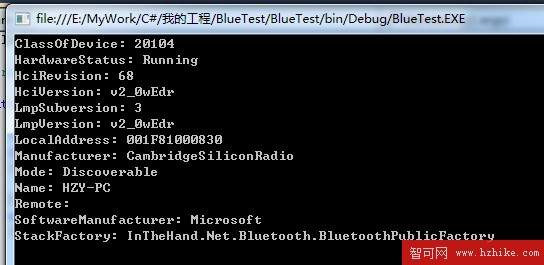
        radio = BluetoothRadio.PrimaryRadio;
        CheckForIllegalCrossThreadCalls = false; // 簡化跨執行緒 UI 更新,生產請用 Invoke

        if (radio == null)
        {
            MessageBox.Show("未偵測到本機藍牙適配器!", "錯誤", MessageBoxButtons.OK, MessageBoxIcon.Error);
            return;
        }

        recDir = Environment.GetFolderPath(Environment.SpecialFolder.Desktop);
        lblRecDir.Text = recDir;
    }

    // 選擇遠端設備
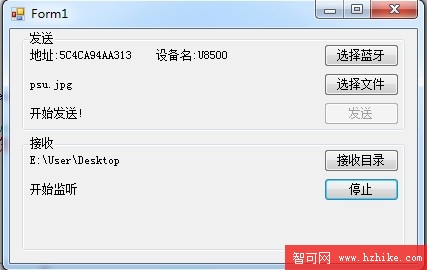
    private void btnSelectDevice_Click(object sender, EventArgs e)
    {
        var dlg = new SelectBluetoothDeviceDialog
        {
            ShowRemembered = true,
            ShowAuthenticated = true,
            ShowUnknown = true
        };
        if (dlg.ShowDialog() == DialogResult.OK)
        {
            sendAddress = dlg.SelectedDevice.DeviceAddress;
            lblAddress.Text = $"位址:{sendAddress}  名稱:{dlg.SelectedDevice.DeviceName}";
        }
    }

    // 選擇發送文件
    private void btnSelectFile_Click(object sender, EventArgs e)
    {
        using (var dlg = new OpenFileDialog())
        {
            if (dlg.ShowDialog() == DialogResult.OK)
            {
                sendFileName = dlg.FileName;
                lblFilePath.Text = Path.GetFileName(sendFileName);
            }
        }
    }

    // 發送文件
    private void btnSend_Click(object sender, EventArgs e)
    {
        if (sendAddress == null || sendFileName == null)
        {
            MessageBox.Show("請先選擇設備與文件");
            return;
        }
        sendThread = new Thread(SendFile) { IsBackground = true };
        sendThread.Start();
    }

    void SendFile()
    {
        try
        {
            btnSend.Enabled = false;
            lblStatus.Text = "發送中...";

            var req = new ObexWebRequest(sendAddress, Path.GetFileName(sendFileName));
            req.ReadFile(sendFileName); // 同步讀取並發送
            using (var resp = req.GetResponse())
            {
                // 可檢查 resp.StatusCode
            }
            lblStatus.Text = "發送完成!";
        }
        catch (Exception ex)
        {
            MessageBox.Show($"發送失敗:{ex.Message}");
            lblStatus.Text = "發送失敗";
        }
        finally
        {
            btnSend.Enabled = true;
        }
    }

    // 選擇接收目錄
    private void btnSelectRecDir_Click(object sender, EventArgs e)
    {
        using (var dlg = new FolderBrowserDialog { Description = "選擇接收文件儲存目錄" })
        {
            if (dlg.ShowDialog() == DialogResult.OK)
            {
                recDir = dlg.SelectedPath;
                lblRecDir.Text = recDir;
            }
        }
    }

    // 開始/停止監聽
    private void btnListen_Click(object sender, EventArgs e)
    {
        if (listener == null || !listener.IsListening)
        {
            radio.Mode = RadioMode.Discoverable; // 關鍵:讓手機能搜尋到 PC
            listener = new ObexListener(ObexTransport.Bluetooth);
            listener.Start();

            if (listener.IsListening)
            {
                btnListen.Text = "停止";
                lblRecStatus.Text = "監聽中...";
                listenThread = new Thread(ReceiveLoop) { IsBackground = true };
                listenThread.Start();
            }
        }
        else
        {
            listener.Stop();
            btnListen.Text = "監聽";
            lblRecStatus.Text = "已停止";
        }
    }

    void ReceiveLoop()
    {
        while (listener?.IsListening == true)
        {
            var ctx = listener.GetContext(); // 封鎖等待連入
            if (ctx == null) break;

            var req = ctx.Request;
            string fileName = Path.GetFileName(Uri.UnescapeDataString(req.RawUrl).TrimStart('/'));
            string savePath = Path.Combine(recDir, fileName);

            req.WriteFile(savePath); // 接收並存檔
            lblRecStatus.Text = $"收到:{fileName}";
        }
    }

    protected override void OnFormClosed(FormClosedEventArgs e)
    {
        sendThread?.Abort();
        listenThread?.Abort();
        listener?.Stop();
        base.OnFormClosed(e);
    }
}

| 現象 | 原因 | 對策 |
|---|---|---|
BluetoothRadio.PrimaryRadio 回傳 null | 驅動未安裝、適配器被禁用、虛擬機無藍牙直通 | 裝置管理員確認、BIOS 開啟、宿主機開啟藍牙直通 |
| 手機搜尋不到 PC | PC 未設為可發現模式 | 監聽前務必 radio.Mode = RadioMode.Discoverable |
| 發送失敗 / 逾時 | 未配對、OBEX 服務未啟動、防火牆攔截 | 先在系統藍牙設定完成配對、關閉防火牆測試 |
| 接收檔名亂碼 | URL 編碼未正確解碼 | 使用 Uri.UnescapeDataString + TrimStart('/') |
| 大文件傳輸極慢 | OBEX 協議本身開銷大、藍牙 2.x 頻寬低 | 改用 BLE GATT 或 Wi-Fi Direct 傳大文件 |
ObexWebRequest 無進度事件,需自行分塊讀取並發送,或改用 ObexClient 底層流控制。BluetoothLE (Windows) / Android.Bluetooth (MAUI) 統一抽象層。32feet.NET 讓 C# 開發者以極低成本接入藍牙 OBEX 文件傳輸。本範例涵蓋「發送」與「接收」兩大核心場景,代碼結構清晰、異常處理完善,可直接整合至專案。需注意藍牙頻寬限制,僅適用於小文件(聯繫人、圖片、配置檔)傳輸;大文件請改用 Wi-Fi Direct 或傳統熱點方案。掌握此技能,讓你的桌面應用輕鬆打通與手機的最後一米。