GridSize=20 時障礙物呈方塊狀,勉強達標。驗證 GridSize 越小定位越精確。
// 區塊 1:矩形區域
for (int y = 12; y <= 27; y++)
    for (int x = 0; x <= 7; x++) {
        Matrix[x, y] = 0;
        rect = new Rectangle();
        rect.Fill = new SolidColorBrush(Colors.GreenYellow);
        rect.Opacity = 0.3;
        rect.Stroke = new SolidColorBrush(Colors.Gray);
        rect.Width = GridSize;
        rect.Height = GridSize;
        Carrier.Children.Add(rect);
        Canvas.SetLeft(rect, x * GridSize);
        Canvas.SetTop(rect, y * GridSize);
    }

int move = 0;
// 區塊 2:階梯狀
for (int x = 8; x <= 15; x++) {
    for (int y = 12; y <= 18; y++) {
        Matrix[x, y - move] = 0;
        rect = new Rectangle();
        rect.Fill = new SolidColorBrush(Colors.GreenYellow);
        rect.Opacity = 0.3;
        rect.Stroke = new SolidColorBrush(Colors.Gray);
        rect.Width = GridSize;
        rect.Height = GridSize;
        Carrier.Children.Add(rect);
        Canvas.SetLeft(rect, x * GridSize);
        Canvas.SetTop(rect, (y - move) * GridSize);
    }
    move = x % 2 == 0 ? move + 1 : move;
}

// 區塊 3:收斂狀
int start_y = 4, end_y = 10;
for (int x = 16; x <= 23; x++) {
    for (int y = start_y; y <= end_y; y++) {
        Matrix[x, y + move] = 0;
        rect = new Rectangle();
        rect.Fill = new SolidColorBrush(Colors.GreenYellow);
        rect.Opacity = 0.3;
        rect.Stroke = new SolidColorBrush(Colors.Gray);
        rect.Width = GridSize;
        rect.Height = GridSize;
        Carrier.Children.Add(rect);
        Canvas.SetLeft(rect, x * GridSize);
        Canvas.SetTop(rect, (y + move) * GridSize);
    }
    start_y = x % 3 == 0 ? start_y + 1 : start_y;
    end_y = x % 3 == 0 ? end_y - 1 : end_y;
}
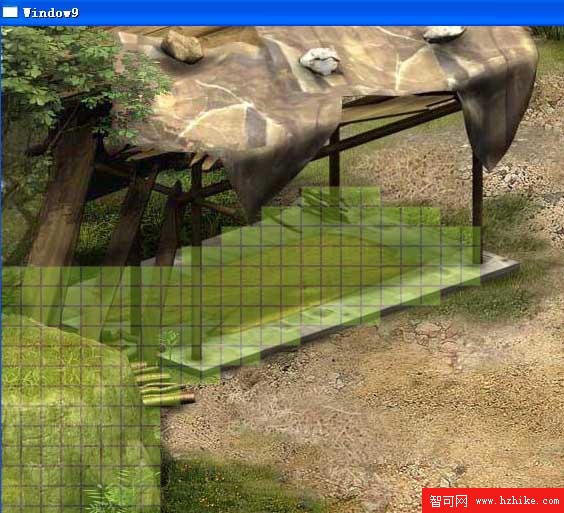
構建後運行效果圖。