函數指針讓函數成為一等公民,可作為參數傳遞、存入數組、動態調用。兩大經典場景:回調函數與跳轉表。
通過函數指針參數注入比較邏輯,實現通用查找:
// 通用節點結構
typedef struct Node {
    void *value;
    struct Node *link;
} Node;

// 通用查找:compare 為回調函數
Node *search_list(Node *node, const void *value,
                  int (*compare)(const void *, const void *)) {
    while (node) {
        if (compare(&node->value, value) == 0) break;
        node = node->link;
    }
    return node;
}

// 具體比較函數(整數版)
int compare_ints(const void *a, const void *b) {
    return *(int*)a == *(int*)b ? 0 : 1;
}

// 調用
Node *found = search_list(head, &target_value, compare_ints);
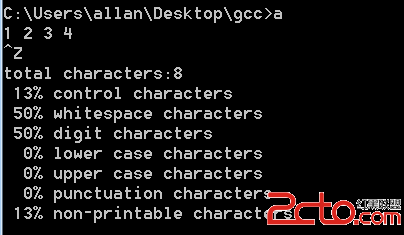
字符分類統計:將分類函數放入數組,按索引直接調用:
// 分類函數表
static int (*test_func[])(int) = {
    iscntrl, isspace, isdigit, islower,
    isupper, ispunct, is_not_print  // 自定義補全
};
#define N_CATEGORIES (sizeof(test_func)/sizeof(test_func[0]))

char *label[] = {"control","whitespace","digit","lower","upper","punct","non-print"};
int count[N_CATEGORIES] = {0}, total = 0;

int main() {
    int ch, cat;
    while ((ch = getchar()) != EOF) {
        total++;
        for (cat = 0; cat < N_CATEGORIES; cat++)
            if (test_func[cat](ch)) count[cat]++;
    }
    for (cat = 0; cat < N_CATEGORIES; cat++)
        printf("%-12s %5d %6.2f%%\n", label[cat], count[cat],
               100.0 * count[cat] / total);
    return 0;
}

// 非打印字符補丁
int is_not_print(int ch) { return !isprint(ch); }
control         12   1.23%
whitespace      45   4.59%
digit           30   3.06%
lower          200  20.41%
upper           80   8.16%
punct           25   2.55%
non-print       10   1.02%
| 維度 | if-else/switch | 跳轉表 |
|---|---|---|
| 代碼行數 | 隨分支增長 | 固定/緊湊 |
| 新增分類 | 修改多處 | 只增數組元素 |
| 運行效率 | O(n) 比較 | O(1) 直接索引 |
| 可維護性 | 邏輯分散 | 數據驅動,邏輯集中 |
typedef int (*CmpFunc)(const void*, const void*); 簡化聲明Ctrl+Z + Enter 發送 EOF