視窗化與全螢幕自適應完美切換,是檢驗遊戲架構合理性的嚴肅考驗。兩種切換模式:
記錄全螢幕與視窗尺寸:
double ScreenWidth, ScreenHeight, WindowWidth, WindowHeight;
private void InitializeGameSetting() {
    ScreenWidth = SystemParameters.PrimaryScreenWidth;
    ScreenHeight = SystemParameters.PrimaryScreenHeight;
    WindowWidth = 800;
    WindowHeight = ScreenHeight * WindowWidth / ScreenWidth; // 依螢幕比例計算高度,適配寬螢幕
}
切換邏輯:
private void ChangeWindowMode(object sender, RoutedEventArgs e) {
    Button btn = e.Source as Button;
    string mode = btn.Content.ToString();
    if (mode == "全螢幕") {
        this.WindowStyle = WindowStyle.None;
        this.WindowState = WindowState.Maximized;
        btn.Content = "視窗";
    } else {
        this.WindowStyle = WindowStyle.SingleBorderWindow;
        this.WindowState = WindowState.Normal;
        btn.Content = "全螢幕";
    }
}
WPF 透過修改 WindowStyle 與 WindowState 輕鬆實現,無需呼叫 Windows API。
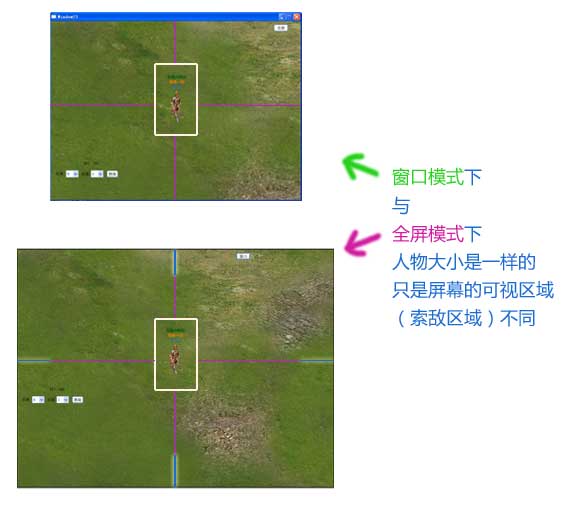
需求分析:切換時所有內容尺寸均改變。障礙物單元格從正方形 GridSize 拆分為 GridSizeX、GridSizeY 以適配寬螢幕。
double ratioX, ratioY;

private void ChangeWindowSize(double currentWidth, double currentHeight, double newWidth, double newHeight) {
    Leader.Action = Actions.Stop; Leader.Direction = 4;
    if (storyboard != null) storyboard.Stop();

    ratioX = newWidth / currentWidth;
    ratioY = newHeight / currentHeight;

    GridSizeX *= ratioX; GridSizeY *= ratioY;
    Carrier.Width = ActualWidth * ratioX;
    Carrier.Height = ActualHeight * ratioY;

    for (int i = 0; i < Carrier.Children.Count; i++) {
        if (Carrier.Children[i] is QXObject) {
            QXObject Obj = Carrier.Children[i] as QXObject;
            Obj.X *= ratioX; Obj.Y *= ratioY;
            Obj.Width_ *= ratioX; Obj.Height_ *= ratioY;
            Obj.CenterX *= ratioX; Obj.CenterY *= ratioY;
            if (Obj is QXSpirit) {
                QXSpirit Spirit = Obj as QXSpirit;
                Spirit.Describtion.Height *= ratioY;
                Spirit.Describtion.SetValue(Canvas.TopProperty, (double)Spirit.Describtion.GetValue(Canvas.TopProperty) * ratioY);
                Spirit.Faction.FontSize *= ratioX;
                Spirit.Clan.FontSize *= ratioX;
                Spirit.SName.FontSize *= ratioX;
            }
        }
    }
}
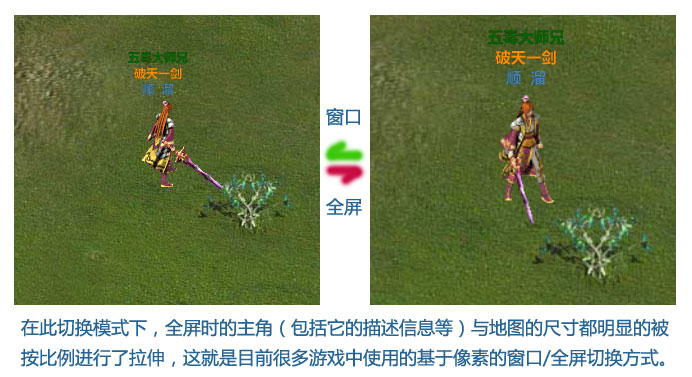
僅 20 幾行代碼實現所有物件按比例縮放。WPF 基於矢量引擎,但像素圖片仍會被像素級拉伸。
看似簡單的功能背後是繁瑣調試,不僅是架構考驗,更是軟體價值體現——滿足多樣客戶需求。下節登場:帥氣主角不再孤單,怪物們都出來吧!