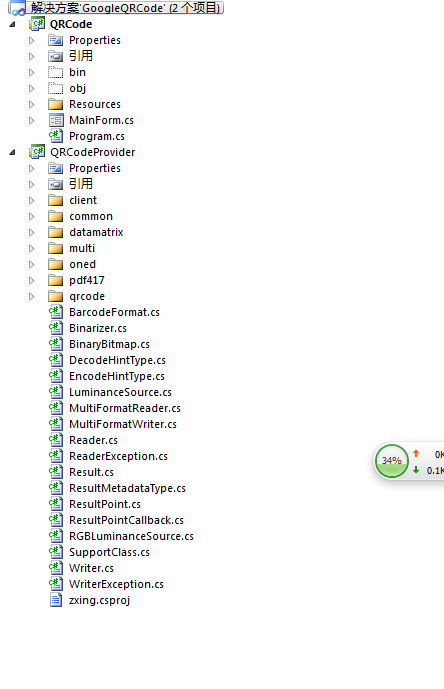
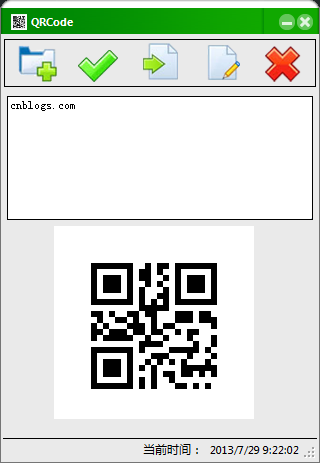
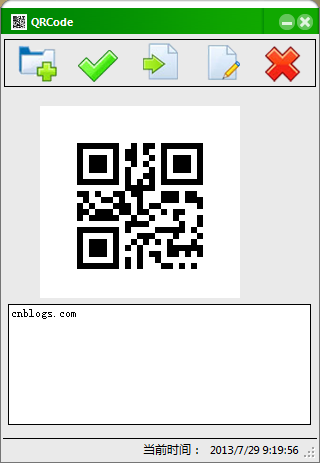
基於 Google 開源 ZXing.NET 函式庫打造的 WinForms 二維碼工具,整合編碼、解碼、儲存、列印、換膚功能。
public MainForm() {
    InitializeComponent();
    skinEngine1.SkinFile = Application.StartupPath + @"\skins\SportsGreen.ssk";
    p1.Visible = true; // 編碼面板

    var tip = new ToolTip {
        AutoPopDelay = 5000, InitialDelay = 1000, ReshowDelay = 500, ShowAlways = true
    };
    tip.SetToolTip(btnOpen, "開啟");
    tip.SetToolTip(btnSave, "儲存");
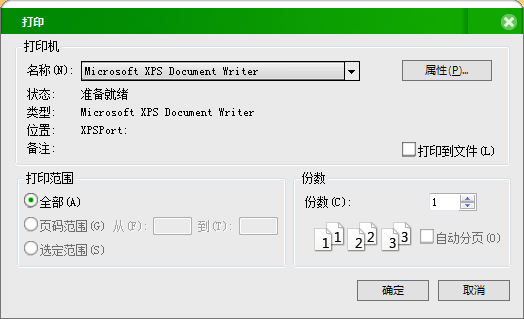
    tip.SetToolTip(btnPrint, "列印二維碼");
    tip.SetToolTip(btnDecode, "解碼");
    tip.SetToolTip(btnExit, "返回產生二維碼");

    // 滑鼠進入/離開切換按鈕圖片(略,見完整碼)
}private void txtContent_TextChanged(object sender, EventArgs e) {
var content = txtContent.Text;
if (string.IsNullOrEmpty(content)) {
MessageBox.Show("請輸入內容", "警告", MessageBoxButtons.OK, MessageBoxIcon.Error);
return;
}
var matrix = new MultiFormatWriter().encode(content, BarcodeFormat.QR_CODE, 200, 200);
var bitmap = ToBitmap(matrix);
picQR.Image = bitmap;
}
public static Bitmap ToBitmap(ByteMatrix matrix) {
var bmp = new Bitmap(matrix.Width, matrix.Height, PixelFormat.Format32bppArgb);
for (int x = 0; x < matrix.Width; x++)
for (int y = 0; y < matrix.Height; y++)
bmp.SetPixel(x, y, matrix.get_Renamed(x, y) != -1 ? Color.Black : Color.White);
return bmp;
}private void btnOpen_Click(object sender, EventArgs e) {
if (p1.Visible) { // 編碼模式:開啟文字檔
if (openFileDialog1.ShowDialog() != DialogResult.OK) return;
var path = openFileDialog1.FileName;
if (path.EndsWith(".txt")) {
txtContent.Text = File.ReadAllText(path, Encoding.Default);
} else { MessageBox.Show("僅支援 .txt 檔案"); }
} else { // 解碼模式:開啟圖片檔
if (openFileDialog1.ShowDialog() != DialogResult.OK) return;
var path = openFileDialog1.FileName;
if (!path.EndsWith(".png")) { MessageBox.Show("僅支援 .png 圖片"); return; }
var img = Image.FromFile(path);
var bmp = new Bitmap(img);
picOpenQR.Image = bmp;
var source = new RGBLuminanceSource(bmp, bmp.Width, bmp.Height);
var binBitmap = new BinaryBitmap(new HybridBinarizer(source));
Result result;
try { result = new MultiFormatReader().decode(binBitmap); }
catch (ReaderException ex) { MessageBox.Show(ex.ToString()); return; }
txtDecoded.Text = result.Text;
}
}private void btnSave_Click(object sender, EventArgs e) {
if (p1.Visible) { // 儲存 QR Code 圖片
saveFileDialog1.Filter = "*.png|";
if (saveFileDialog1.ShowDialog() == DialogResult.OK) {
var path = saveFileDialog1.FileName;
if (!path.EndsWith(".png")) path += ".png";
picQR.Image.Save(path);
}
} else { // 儲存解碼文字
saveFileDialog1.Filter = "*.txt|";
if (saveFileDialog1.ShowDialog() == DialogResult.OK) {
File.AppendAllText(saveFileDialog1.FileName + ".txt", txtDecoded.Text, Encoding.Default);
}
}
}
private void btnPrint_Click(object sender, EventArgs e) {
var dlg = new PrintDialog { Document = printDocument };
if (dlg.ShowDialog() == DialogResult.OK) {
try { printDocument.Print(); }
catch { printDocument.PrintController.OnEndPrint(printDocument, new PrintEventArgs()); }
}
}
private void printDocument_PrintPage(object sender, PrintPageEventArgs e) {
e.Graphics.DrawImage(p1.Visible ? picQR.Image : picOpenQR.Image, 20, 20);
}private void timer_Tick(object sender, EventArgs e) {
lblTime.Text = DateTime.Now.ToString();
}原始碼下載:GoogleQRCode.zip
完整程式(含皮膚):51CTO 下載