在 ADO.NET 中,SqlCommand 是向 SQL Server 發送 T-SQL 命令的核心物件。本文透過兩個完整範例,示範如何使用 ExecuteScalar() 取得單一標量值(如 COUNT、AVG),並強調參數化查詢防止 SQL Injection 的重要性。
CommandText 為 T-SQL 陳述式。@參數名 佔位符,透過 SqlParameter 綁定值,避免字串拼接風險。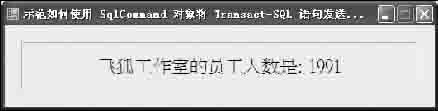
private void CH6_DemoForm003_Load(object sender, EventArgs e)
{
    try
    {
        // 建立連線 (連線字串略)
        using (SqlConnection con = new SqlConnection(connectStringBuilder.ConnectionString))
        {
            SqlCommand foxCMD = new SqlCommand();
            foxCMD.Connection = con;
            foxCMD.CommandType = CommandType.Text;
            foxCMD.CommandText = "SELECT COUNT(*) FROM dbo.飛狐工作室";

            con.Open();
            Int32 total = (int)foxCMD.ExecuteScalar();
            lblInfo.Text = "飛狐工作室的員工人數是:" + total.ToString();
        }
    }
    catch (Exception ex)
    {
        MessageBox.Show(ex.Message, "請注意", MessageBoxButtons.OK, MessageBoxIcon.Warning);
    }
}
private void CH6_DemoForm004_Load(object sender, EventArgs e)
{
    try
    {
        using (SqlConnection con = new SqlConnection(connectStringBuilder.ConnectionString))
        {
            // 建構函式直接帶入 SQL 與連線
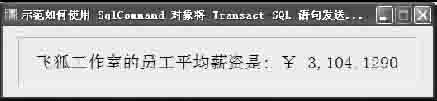
            SqlCommand foxCMD = new SqlCommand("SELECT AVG(目前薪資) FROM dbo.飛狐工作室", con);
            con.Open();
            double avg = Convert.ToDouble(foxCMD.ExecuteScalar());
            lblInfo.Text = "飛狐工作室的員工平均薪資是:" + avg.ToString("$ NT #,##0.0000");
        }
    }
    catch (Exception ex)
    {
        MessageBox.Show(ex.Message, "請注意", MessageBoxButtons.OK, MessageBoxIcon.Warning);
    }
}
若需依條件查詢(如特定部門),切勿字串拼接:
string sql = "SELECT COUNT(*) FROM dbo.員工 WHERE 部門 = @Dept";
SqlCommand cmd = new SqlCommand(sql, con);
cmd.Parameters.AddWithValue("@Dept", "研發部"); // 自動推斷型別
// 或明確指定型別
// cmd.Parameters.Add("@Dept", SqlDbType.NVarChar, 50).Value = "研發部";
con.Open();
int count = (int)cmd.ExecuteScalar();
SqlConnection、SqlCommand、SqlDataReader 正確釋放非受控資源。SqlException 可取得錯誤碼,區分連線失敗、語法錯誤、死結等情況。ToString("格式") 直接產生貨幣、日期等人類可讀字串。SqlCommand.ExecuteScalar() 是取得聚合值最高效的方式。結合參數化查詢與 using 區塊,能寫出安全、效能佳、資源管理正確的資料存取程式碼。這是 ADO.NET 開發的基石技能,值得反覆練習至熟練。