C# 透過 System.Runtime.InteropServices 命名空間提供的 P/Invoke 機制,可直接呼叫非受控 C++ DLL 匯出的函式。本文以最簡單的「加法」與「無參數函式」為例,完整展示從 C++ DLL 建立到 C# 呼叫的全流程。
DLLTut.h#ifndef _DLLTUT_DLL_H_
#define _DLLTUT_DLL_H_
#if defined DLL_EXPORT
#define DECLDIR __declspec(dllexport)
#else
#define DECLDIR __declspec(dllimport)
#endif
extern "C" {
DECLDIR int Add(int a, int b);
DECLDIR void Function(void);
}
#endif
DLLTut.cpp#include "DLLTut.h"
extern "C" {
DECLDIR int Add(int a, int b) { return a + b; }
DECLDIR void Function(void) { /* 做些事 */ }
}
編譯產出 DLLTest.dll,置於專案 lib 目錄。
using System;
using System.Runtime.InteropServices;

namespace ConsoleApp
{
    class Program
    {
        static void Main(string[] args)
        {
            NativeMethods.Function();
            Console.WriteLine("Result: " + NativeMethods.Add(2, 3));
            Console.ReadLine();
        }
    }

    internal static class NativeMethods
    {
        // 假設 DLL 放在專案輸出目錄下的 lib 資料夾
        private const string DllPath = @"..\..\lib\DLLTest.dll";

        [DllImport(DllPath, CallingConvention = CallingConvention.Cdecl)]
        public static extern void Function();

        [DllImport(DllPath, CallingConvention = CallingConvention.Cdecl)]
        public static extern int Add(int a, int b);
    }
}
| 項目 | 說明 |
|---|---|
| CallingConvention | C++ 預設為 __cdecl,C# 需显式指定 CallingConvention.Cdecl,否則堆疊會不平衡。 |
| extern "C" | 防止 C++ Name Mangling,確保匯出符號為純函式名稱。 |
| DLL 路徑 | 建議將 DLL 放在專案輸出目錄(bin\Debug/netX.Y),或用 SetDllDirectory/AssemblyResolve 動態解析。 |
| 資料封送 | 基本型別(int、double、bool)自動封送;字串需指定 CharSet、結構體需 [StructLayout(LayoutKind.Sequential)]。 |
| 例外處理 | 非受控例外不可跨越邊界,C++ 端需全部捕獲並轉為錯誤碼返回。 |
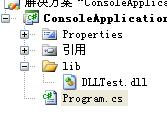
DLL 置於 lib 資料夾,C# 專案以相對路徑引用
P/Invoke 是 C# 與 C/C++ 互操作的基石。掌握「呼叫慣例、字元集、記憶體佈局、錯誤碼傳遞」四大核心,即可安全高效地重用既有原生程式碼資產。