數位簽名結合雜湊演算法與非對稱加密,實現身分驗證、資料完整性、防抵賴等核心安全功能。本文解析其工作流程、主要作用,並提供基於 RSA + SHA1 的 C# 完整實作程式碼。
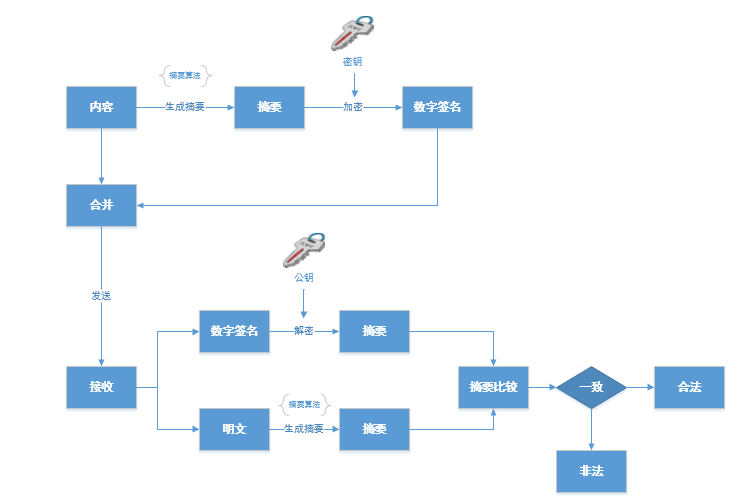
數位簽名:對明文先用雜湊演算法產生摘要,再用私鑰加密摘要得到簽名。驗證時用公鑰解密簽名得摘要,並比對重新計算的摘要。
網路銀行、電子商務、電子政務、網路通訊、數位憑證等。
/// <summary> 數位簽名 </summary>
/// <param name="plaintext">原文</param>
/// <param name="privateKey">私鑰 (XML 格式)</param>
/// <returns>Base64 編碼的簽名</returns>
public static string HashAndSignString(string plaintext, string privateKey) {
    UnicodeEncoding ByteConverter = new UnicodeEncoding();
    byte[] dataToEncrypt = ByteConverter.GetBytes(plaintext);
    using (RSACryptoServiceProvider RSAalg = new RSACryptoServiceProvider()) {
        RSAalg.FromXmlString(privateKey);
        // 使用 SHA1 雜湊並簽名
        byte[] encryptedData = RSAalg.SignData(dataToEncrypt, new SHA1CryptoServiceProvider());
        return Convert.ToBase64String(encryptedData);
    }
}

/// <summary> 驗證簽名 </summary>
public static bool VerifySigned(string plaintext, string signedData, string publicKey) {
    using (RSACryptoServiceProvider RSAalg = new RSACryptoServiceProvider()) {
        RSAalg.FromXmlString(publicKey);
        UnicodeEncoding ByteConverter = new UnicodeEncoding();
        byte[] dataToVerify = ByteConverter.GetBytes(plaintext);
        byte[] signedBytes = Convert.FromBase64String(signedData);
        return RSAalg.VerifyData(dataToVerify, new SHA1CryptoServiceProvider(), signedBytes);
    }
}
public static void TestSign() {
    string originalData = "文章不錯,這是我的簽名:奧巴馬!";
    Console.WriteLine("原文:{0}", originalData);
    // 假設 Encrypter.CreateRSAKey() 回傳公私鑰對
    var keyPair = Encrypter.CreateRSAKey();
    string privateKey = keyPair.Value;
    string publicKey = keyPair.Key;

    // 簽名
    string signedData = Encrypter.HashAndSignString(originalData, privateKey);
    Console.WriteLine("數位簽名:{0}", signedData);

    // 驗證
    bool verify = Encrypter.VerifySigned(originalData, signedData, publicKey);
    Console.WriteLine("驗證結果:{0}", verify);
}
完整原始碼下載:EncriptSample.zip