判斷兩個檔案內容是否完全相同,最直觀的方法是逐位元組比對。本文提供一個高效的 FileCompare 方法,包含快速預檢(同一路徑、檔案大小)與逐位元組比對邏輯,並說明關鍵細節與潛在陷阱。
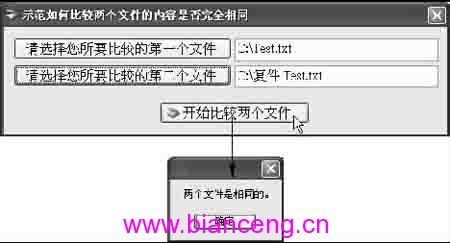
private void btnGoToCompare_Click(object sender, EventArgs e)
{
    if (FileCompare(this.TextBox1.Text, this.TextBox2.Text))
    {
        MessageBox.Show("兩個檔案是相同的。");
    }
    else
    {
        MessageBox.Show("兩個檔案並不相同。");
    }
}

///
/// 比較兩個檔案內容是否完全相同
///
/// 第一個檔案路徑
/// 第二個檔案路徑
/// 相同傳回 true,否則 false
private bool FileCompare(string file1, string file2)
{
    // 1. 快速檢查:同一個檔案路徑
    if (file1 == file2)
        return true;

    int file1Byte = 0;
    int file2Byte = 0;

    // 2. 使用 FileStream 讀取
    using (FileStream fs1 = new FileStream(file1, FileMode.Open),
                       fs2 = new FileStream(file2, FileMode.Open))
    {
        // 3. 快速檢查:檔案大小不同直接判定不相同
        if (fs1.Length != fs2.Length)
            return false;

        // 4. 逐位元組比對
        do
        {
            file1Byte = fs1.ReadByte();
            file2Byte = fs2.ReadByte();
        }
        while ((file1Byte == file2Byte) && (file1Byte != -1));
    }

    // 5. 回傳結果:迴圈結束時若兩值相等(皆為 -1 表示都讀到結尾),則相同
    return (file1Byte - file2Byte) == 0;
}
int 而非 byte 可直接判斷結尾。| 方法 | 優點 | 缺點 | 適用場景 |
|---|---|---|---|
| 逐位元組 ReadByte | 記憶體佔用極低、邏輯簡單 | 大檔案極慢(每位元組一個系統呼叫) | 小檔案、教學示範 |
| 緩衝區批次讀取 (Read(byte[], offset, count)) | 大幅減少系統呼叫、速度快 | 程式碼稍複雜、需管理緩衝區 | 大檔案、生產環境 |
| 雜湊比對 (MD5/SHA256) | 可預先計算雜湊、支援多檔案快速查重 | 首次計算需讀完整檔案、極微小碰撞機率 | 頻繁比對同組檔案、去重 |
| File.Equals (第三方庫) | API 簡潔 | 需引入額外依賴 | 追求開發效率 |
private bool FileCompareBuffered(string file1, string file2)
{
    if (file1 == file2) return true;
    const int BufferSize = 81920; // 80KB
    using (FileStream fs1 = new FileStream(file1, FileMode.Open, FileAccess.Read, FileShare.Read, BufferSize))
    using (FileStream fs2 = new FileStream(file2, FileMode.Open, FileAccess.Read, FileShare.Read, BufferSize))
    {
        if (fs1.Length != fs2.Length) return false;
        byte[] buf1 = new byte[BufferSize];
        byte[] buf2 = new byte[BufferSize];
        while (true)
        {
            int read1 = fs1.Read(buf1, 0, BufferSize);
            int read2 = fs2.Read(buf2, 0, BufferSize);
            if (read1 != read2) return false;
            if (read1 == 0) return true; // 都讀到結尾
            for (int i = 0; i < read1; i++)
                if (buf1[i] != buf2[i]) return false;
        }
    }
}
逐位元組比對雖直觀,但大檔案效能不佳。實務上建議:小檔案用 ReadByte 簡潔明瞭;大檔案或高頻比對改用緩衝區批次讀取或預計算雜湊值。理解 FileStream、ReadByte 回傳值語意與 using 釋放機制,是處理檔案 I/O 的基本功。