承接前三篇,本文實作三項關鍵互動功能:滑鼠滾輪控制縮放、讀取並顯示地標 (PlaceMarks) 與圖層 (Layers) 於樹狀檢視、支援勾選切換可見度。完整程式碼展示如何透過 COM 介面與 Windows 訊息鉤子實現豐富的 Google Earth 嵌入應用體驗。
利用全域滑鼠鉤子 (HookAPI.dll) 攔截 WM_MOUSEWHEEL,判斷滑鼠是否在 Google Earth 渲染視窗內,送出自訂縮放訊息。
// 滾輪縮放常數 (WPARAM 值)
private const long ZoomIn = 0x00780000;   // 向前滾動
private const long ZoomOut = 0xFF880000;  // 向後滾動

// 鉤子事件註冊
mouseHook.MouseWheel += mouseHook_MouseWheel;

void mouseHook_MouseWheel(object sender, MouseEventArgs e)
{
    IntPtr hWnd = NativeMethods.WindowFromPoint(e.Location);
    if (hWnd == this.GeRenderHWnd) // 滑鼠在 GE 渲染視窗上
    {
        Point clientPt = this.Control.PointToClient(e.Location);
        if (this.Control.ClientRectangle.Contains(clientPt))
        {
            // 送出 WM_MOUSEWHEEL 給 GE 視窗
            NativeMethods.PostMessage(GeRenderHWnd,
                (int)WM_MOUSE.WM_MOUSEWHEEL,
                e.Delta > 0 ? ZoomIn : ZoomOut, 0);
        }
    }
}
GE COM API 提供兩個根節點:GetMyPlaces() (我的位置) 與 GetTemporaryPlaces() (暫存位置)。遞迴走訪 FeatureGE.GetChildren() 建立樹狀結構,Visibility 屬性對應勾選狀態。
protected void ShowPlaces()
{
    Thread.Sleep(500); // 等待 GE 就緒
    var myPlaces = GeApp.GetMyPlaces();
    var tempPlaces = GeApp.GetTemporaryPlaces();

    var places = new List { myPlaces, tempPlaces };
    var toolPad = GetToolPad();
    toolPad.ShowPlaces(places); // 傳給工具面板 UI
}

// 工具面板顯示邏輯 (跨執行緒安全)
public void ShowPlaces(List places)
{
    if (this.InvokeRequired)
    {
        this.Invoke(new Action(() => InternalShowPlaces(places)));
    }
    else InternalShowPlaces(places);
}

protected void InternalShowPlaces(List places)
{
    tvPlaces.Nodes.Clear();
    foreach (var place in places)
    {
        var node = new TreeNode(place.Name)
        {
            Checked = place.Visibility > 0,
            Tag = place
        };
        ShowChildrenPlaces(place, node);
        node.Expand();
        tvPlaces.Nodes.Add(node);
    }
}

protected void ShowChildrenPlaces(FeatureGE place, TreeNode parentNode)
{
    foreach (FeatureGE child in place.GetChildren())
    {
        var node = new TreeNode(child.Name)
        {
            Checked = child.Visibility > 0,
            Tag = child
        };
        ShowChildrenPlaces(child, node);
        parentNode.Nodes.Add(node);
    }
}
GeApp.GetLayersDatabases() 取得內建圖層資料庫集合,結構與 PlaceMarks 相同,同樣遞迴建樹並綁定 Visibility。
protected void ShowLayers()
{
    Thread.Sleep(500);
    var layers = GeApp.GetLayersDatabases();
    var toolPad = GetToolPad();
    toolPad.ShowLayers(layers);
}

public void ShowLayers(FeatureCollectionGE layers)
{
    if (this.InvokeRequired)
        this.Invoke(new Action(() => InternalShowLayers(layers)));
    else
        InternalShowLayers(layers);
}

protected void InternalShowLayers(FeatureCollectionGE layers)
{
    tvLayers.Nodes.Clear();
    foreach (FeatureGE layer in layers)
    {
        var node = new TreeNode(layer.Name)
        {
            Checked = layer.Visibility > 0,
            Tag = layer
        };
        ShowChildrenLayers(layer, node);
        node.Expand();
        tvLayers.Nodes.Add(node);
    }
}

protected void ShowChildrenLayers(FeatureGE layer, TreeNode parentNode)
{
    foreach (FeatureGE child in layer.GetChildren())
    {
        var node = new TreeNode(child.Name)
        {
            Checked = child.Visibility > 0,
            Tag = child
        };
        ShowChildrenLayers(child, node);
        parentNode.Nodes.Add(node);
    }
}
使用者勾選/取消勾選節點時,更新對應 FeatureGE.Visibility 屬性即可即時控制 GE 顯示:
private void tvPlaces_AfterCheck(object sender, TreeViewEventArgs e)
{
    if (e.Action != TreeViewAction.Unknown) // 僅使用者操作觸發
    {
        var feature = e.Node.Tag as FeatureGE;
        if (feature != null)
            feature.Visibility = e.Node.Checked ? 1 : 0;
    }
}
| 技術 | 用途 | 關鍵 API |
|---|---|---|
| 全域滑鼠鉤子 | 攔截滾輪訊息並轉發給 GE | HookAPI.dll, PostMessage, WM_MOUSEWHEEL |
| FeatureGE 型別 | 代表地標、圖層、資料夾等節點 | GetChildren(), Visibility, Name |
| 跨執行緒 UI 更新 | GE 事件回呼非 UI 執行緒 | Control.InvokeRequired, Invoke |
| TreeView Tag 屬性 | 綁定 FeatureGE 物件實現雙向同步 | node.Tag = feature |
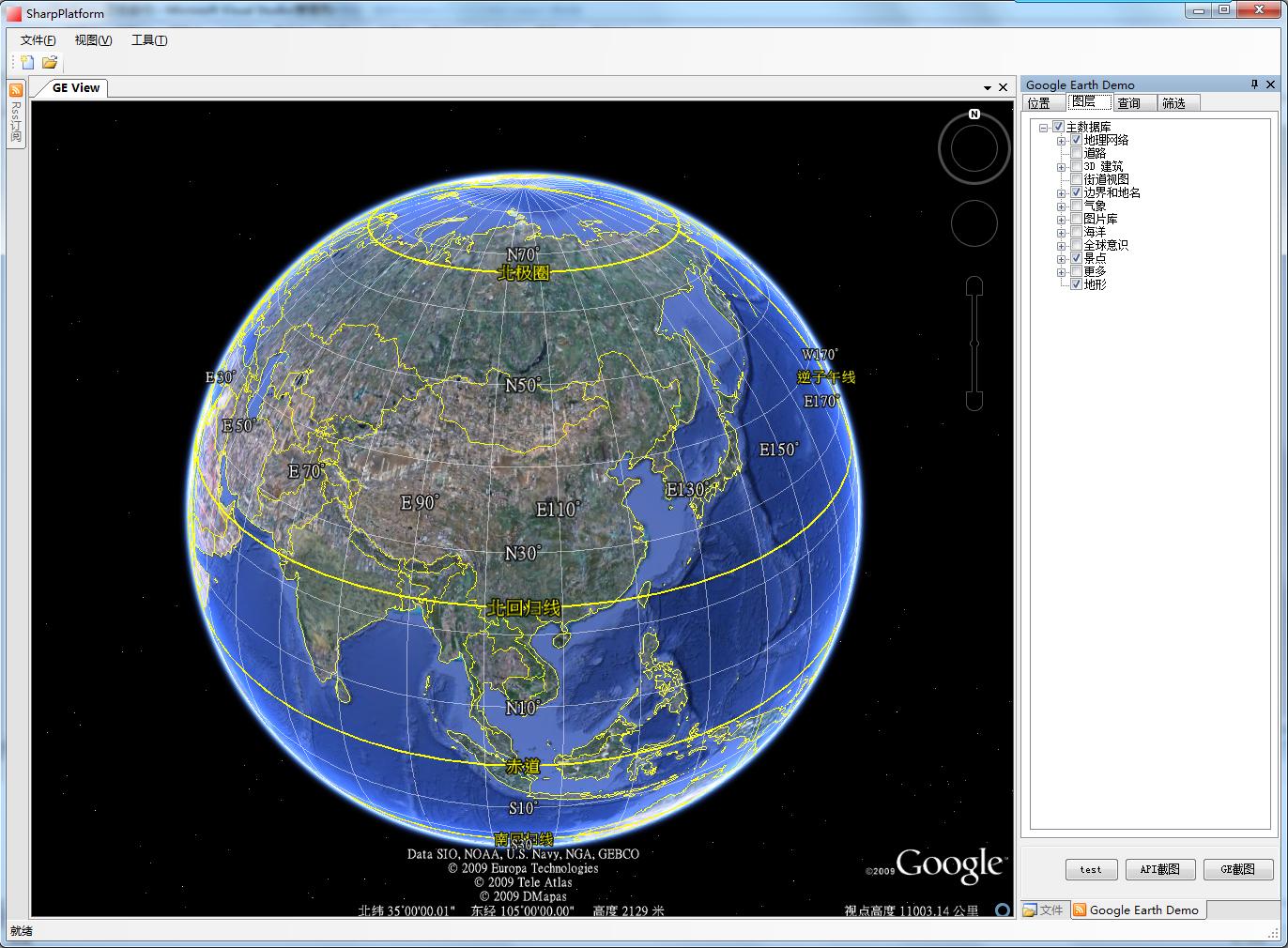
完整專案包含前四篇所有功能:GEDemo_2009-05-22.rar
透過 COM API 與 Windows 訊息機制,我們成功將 Google Earth 轉化為可程式化控制的 3D 地球元件。滾輪縮放提供直觀導航,樹狀地標/圖層面板賦予專業 GIS 應用的資料管理能力。後續可擴充:KML 動態載入、GPS 軌跡回放、空間查詢分析等企業級地理資訊功能。