除了類別,結構與列舉也是封裝資料的重要工具。結構為實值型別,適合小型資料群組;列舉定義有序常數集合。本文對比類別與結構、示範列舉多種定義方式、Java 列舉進階功能、字型樣式列舉實戰。
public class Books
{
    public int bookId;
    public string bookName;
    public string bookAuthor;
    public double bookPrice;
}public struct Book
{
public int bookId;
public string bookName;
public string bookAuthor;
public double bookPrice;
}public struct Book
{
// 無參數建構函式:若已有帶參數建構式,不可再定義無參數版本
// public Book() { }
// 帶參數建構函式
public Book(int id, string name, string author, double price)
{
bookId = id;
bookName = name;
bookAuthor = author;
bookPrice = price;
}
public int bookId;
public string bookName;
public string bookAuthor;
public double bookPrice;
}Book b = new Book(1, "C# 入門", "作者", 350.0);public interface IBook
{
DataSet QueryAll();
}
public struct BookComponent : IBook
{
public DataSet QueryAll() { return null; }
}| 特性 | 類別 | 結構 |
|---|---|---|
| 型別分類 | 參考型別 | 實值型別 |
| 繼承 | 支援繼承 | 不可繼承(隱含 sealed) |
| 建構/解構 | 可定義建構式與解構子 | 可定義建構式,不可定義解構子 |
| 初始化 | new 或手動 | new 或手動 |
| 介面實作 | 支援 | 支援多介面 |
| 多型 | 支援 | 透過介面支援多型 |
修飾符 enum 列舉名
{
    識別符1,
    識別符2,
    ...
    識別符n
}public enum TechnologyDirection
{
CPlusPlus程式設計師,
Java程式設計師,
DotNet程式設計師,
架構設計師,
開發組長,
需求分析師
}// 寫法一:隱含從 0 起始
public enum Season
{
SPRING, // 0
SUMMER, // 1
AUTUMN, // 2
WINTER // 3
}
// 寫法二:顯式指定
public enum SeasonTwo
{
SPRING = 0,
SUMMER = 1,
AUTUMN = 2,
WINTER = 3
}
// 測試
Console.WriteLine(Season.AUTUMN); // AUTUMN
Console.WriteLine(SeasonTwo.AUTUMN); // AUTUMN已偏離 enum 本質,不建議常規使用,僅供理解列舉物件化概念。
public class SeasonOne
{
    public static readonly SeasonOne SPRING = new SeasonOne("春天");
    public static readonly SeasonOne SUMMER = new SeasonOne("夏天");
    public static readonly SeasonOne AUTUMN = new SeasonOne("秋天");
    public static readonly SeasonOne WINTER = new SeasonOne("冬天");

    private string name;
    public string Name { get { return name; } set { name = value; } }

    public SeasonOne(string name) { this.name = name; }
}

// 使用
Console.WriteLine(SeasonOne.AUTUMN.Name); // 秋天列舉成員實作抽象方法
enum Operator {
    ADD { public double calculate(double a,double b){ return a+b; } },
    SUBSTRACT { public double calculate(double a,double b){ return a-b; } },
    MULTIPLY { public double calculate(double a,double b){ return a*b; } },
    DIVIDE { public double calculate(double a,double b){ return a/b; } };
    public abstract double calculate(double a,double b);
}
列舉含欄位、建構函式
enum Course {
    COREJAVA("zhangsan"), WEB("lisi"), EJB("wangwu");
    String name;
    Course(String name){ this.name=name; }
    public String getName(){ return this.name; }
}
欄位、建構函式、抽象方法並存
enum Course {
    COREJAVA("zhangsan"){ public void study(){ println("Study Corejava"); } },
    WEB("lisi"){ public void study(){ println("Study Web"); } },
    EJB("wangwu"){ public void study(){ println("Study EJB"); } };
    String teachName;
    Course(String name){ this.teachName=name; }
    public String getName(){ return this.teachName; }
    public abstract void study();
}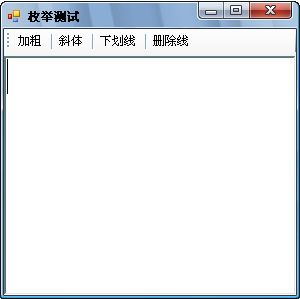
[Flags]
public enum FontStyle
{
    Regular    = 0,
    Bold       = 1,
    Italic     = 2,
    Underline  = 4,
    Strikeout  = 8
}private void SetStyle(object sender, EventArgs e)
{
ToolStripButton btn = sender as ToolStripButton;
FontStyle fontStyleContent = this.rchTxtContent.SelectionFont.Style;
FontStyle BtnFont = (FontStyle)Enum.Parse(typeof(FontStyle), btn.Tag.ToString());
if ((fontStyleContent | BtnFont) == fontStyleContent)
{
// 已套用該樣式 -> 移除
fontStyleContent = ~BtnFont & fontStyleContent;
}
else
{
// 未套用 -> 加入
fontStyleContent = fontStyleContent | BtnFont;
}
this.rchTxtContent.SelectionFont = new Font(
this.rchTxtContent.SelectionFont.FontFamily,
this.rchTxtContent.SelectionFont.Size,
fontStyleContent,
this.rchTxtContent.SelectionFont.Unit);
}int,可指定 byte、short 等節省記憶體。[Flags] 屬性讓列舉支援位元組合,配合 |、&、~ 運算子極適合選項切換場景。