Windows 8 提供三種推播通知管道,適用不同情境:
NotificationsExtensions.winmd(簡化 XML 模板操作)Package.appxmanifest 設定各尺寸徽標Package.appxmanifest → 應用程式 UI:支援 Toast 通知 = 是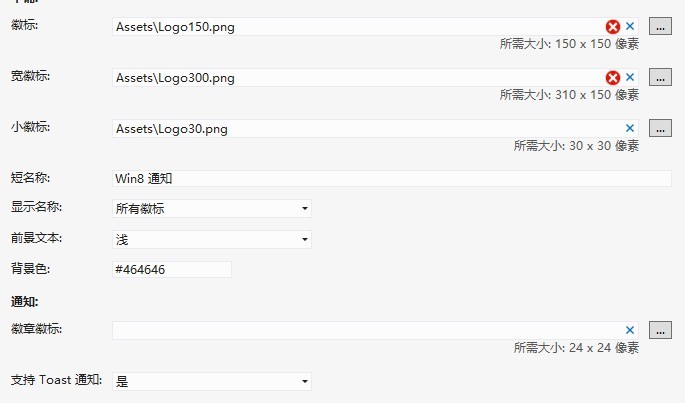
private void ToastNotice_Click(object sender, RoutedEventArgs e) {
    var toast = ToastContentFactory.CreateToastImageAndText01();
    toast.TextBodyWrap.Text = "今日世界末日倒數 10 天!";
    toast.Image.Src = "https://news.shangdu.com/301/20120512/P_5626361_0__1686841290.jpg";
    ToastNotificationManager.CreateToastNotifier().Show(toast.CreateNotification());
}
private void TileNotice_Click(object sender, RoutedEventArgs e) {
    // 寬磚模板
    var wideTile = TileContentFactory.CreateTileWideImageAndText01();
    wideTile.TextCaptionWrap.Text = "小資情有獨鐘 10 款合資熱銷時尚車型導購";
    wideTile.Image.Src = "https://news.mycar168.com/uploadfile/2011/1030/20111030040816628.jpg";

    // 方磚備用內容
    var squareTile = TileContentFactory.CreateTileSquareImage();
    squareTile.Image.Src = "https://news.mycar168.com/uploadfile/2011/1030/20111030040816628.jpg";
    wideTile.SquareContent = squareTile;

    TileUpdateManager.CreateTileUpdaterForApplication().Update(wideTile.CreateNotification());
}

private void ClearTile_Click(object sender, RoutedEventArgs e) {
    TileUpdateManager.CreateTileUpdaterForApplication().Clear();
}
// 數字 Badge (1-99)
private void BadgeNotice_Click(object sender, RoutedEventArgs e) {
    var badge = new BadgeNumericNotificationContent(29);
    BadgeUpdateManager.CreateBadgeUpdaterForApplication().Update(badge.CreateNotification());
}

// 圖示 Badge (播放/暫停/新訊息等)
private void BadgeImage_Click(object sender, RoutedEventArgs e) {
    var badge = new BadgeGlyphNotificationContent(GlyphValue.Paused);
    BadgeUpdateManager.CreateBadgeUpdaterForApplication().Update(badge.CreateNotification());
}

private void BadgeClear_Click(object sender, RoutedEventArgs e) {
    BadgeUpdateManager.CreateBadgeUpdaterForApplication().Clear();
}

<Grid Background="{StaticResource ApplicationPageBackgroundThemeBrush}">
    <Button Name="ToastNotice" Content="Toast 通知" Click="ToastNotice_Click" .../>
    <Button Name="TileNotice" Content="Tile 通知" Click="TileNotice_Click" .../>
    <Button Name="ClearTile" Content="清除 Tile" Click="ClearTile_Click" .../>
    <Button Name="BadgeNotice" Content="Badge 數字" Click="BadgeNotice_Click" .../>
    <Button Name="BadgeImage" Content="Badge 圖示" Click="BadgeImage_Click" .../>
    <Button Name="BadgeClear" Content="Badge 清除" Click="BadgeClear_Click" .../>
</Grid>原始碼下載:Win8Notice.rar