「若需使用同類型的多個物件,可使用集合與陣列。」陣列大小固定,元素數量動態變化時應改用集合類別。.NET Framework 提供豐富集合:List<T>、ArrayList、佇列、堆疊、鏈結清單、字典等。本文聚焦最常用的陣列與列表集合。
class Program
{
    static void Main(string[] args)
    {
        int[] users = new int[5];
        users[0] = 10;
        users[1] = 20;
        // ...
    }
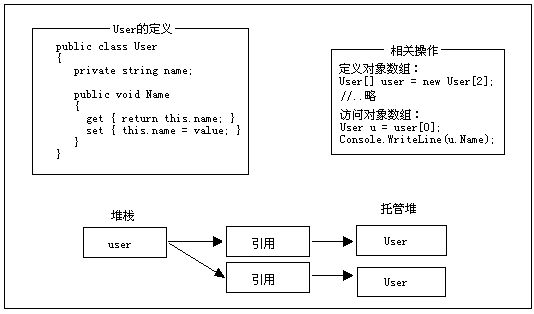
}先定義類別封裝屬性,再建立該類別的陣列。
///
/// 自訂型別 User,封裝 Name 屬性
///
public class User
{
    private string name;
    public string Name
    {
        get { return name; }
        set { name = value; }
    }
}

// 使用自訂型別陣列
class Program
{
    static void Main(string[] args)
    {
        User[] user = new User[2]; // 定義 User 型別陣列
        User u = new User();
        u.Name = "Beniao";
        user[0] = u;
        Console.WriteLine(user[0].Name); // 輸出: Beniao
    }
}
System.Collections,儲存 object,需裝箱/拆箱,不具型別安全。System.Collections.Generic,型別安全、效能優(值型別免裝箱),.NET 2.0+ 首選。IList(列表)、ICollection、IEnumerable、IDictionary(字典)等。using System;
using System.Collections;
using System.Collections.Generic;
class Program
{
static void Main(string[] args)
{
// 非泛型 ArrayList
ArrayList list = new ArrayList();
list.Add("張三");
list.Insert(1, "李四");
string name = list[0].ToString();
list.RemoveAt(1);
int index = list.IndexOf("張三");
list.Sort();
// 泛型 List - 推薦使用
List l = new List();
l.Add(1); l.Add(7); l.Add(3); l.Add(9); l.Add(6); l.Add(10);
l.Sort();
foreach (int i in l) Console.Write(i + " "); // 1 3 6 7 9 10
l.Remove(10); // 依值移除
}
} 
System.Collections.Queue(非泛型)System.Collections.Generic.Queue<T>(泛型,強型別)鏈結清單(LinkedList<T>)適合頻繁插入刪除;堆疊(Stack<T>)後進先出;字典(Dictionary<TKey, TValue>)鍵值對快速查找。實務上視需求選用,建議查閱《C# 2005 & .NET 3.0 高級程式設計 (第 5 版)》深入學習。
List<T>、Dictionary<TKey, TValue> 等),型別安全且效能最佳。Queue<T>,LIFO 用 Stack<T>,鍵值查找用 Dictionary<TKey, TValue>。