在 ASP.NET WebForms 開發中,GridView 常用於顯示表格資料。當某欄位內容過長(如地址、備註)會撐破版面,影響閱讀體驗。本文示範如何在資料繫結後,於 RowDataBound 或繫結完成事件中,將超長字串截斷並以省略號(...)替代,同時正確處理分頁情況。
public string SubStr(string sString, int nLeng) {
    if (sString.Length <= nLeng) return sString;
    return sString.Substring(0, nLeng) + "...";
}using System;
using System.Data;
using System.Configuration;
using System.Web;
using System.Web.UI;
using System.Web.UI.WebControls;
using System.Data.SqlClient;
public partial class _Default : System.Web.UI.Page {
SqlConnection sqlcon;
SqlCommand sqlcom;
string strCon = "Data Source=(local);Database=Northwind;Uid=sa;Pwd=sa";
protected void Page_Load(object sender, EventArgs e) {
if (!IsPostBack) {
ViewState["SortOrder"] = "EmployeeID";
ViewState["OrderDire"] = "ASC";
BindGrid();
}
}
private void BindGrid() {
string sqlstr = "SELECT TOP 5 * FROM Employees";
sqlcon = new SqlConnection(strCon);
SqlDataAdapter myda = new SqlDataAdapter(sqlstr, sqlcon);
DataSet myds = new DataSet();
sqlcon.Open();
myda.Fill(myds, "Employees");
GridView1.DataSource = myds;
GridView1.DataKeyNames = new string[] { "EmployeeID" };
GridView1.DataBind();
// 資料繫結後處理過長字串
for (int i = 0; i < GridView1.Rows.Count; i++) {
DataRowView mydrv;
string gIntro;
// 處理分頁索引偏移
int dataIndex = i + (GridView1.PageSize * GridView1.PageIndex);
mydrv = myds.Tables["Employees"].DefaultView[dataIndex];
gIntro = Convert.ToString(mydrv["Address"]); // 假設 Address 為長字串欄位
GridView1.Rows[i].Cells[3].Text = SubStr(gIntro, 20); // 顯示前20字
}
sqlcon.Close();
}
// 其他事件處理:RowEditing, RowDeleting, RowUpdating, RowCancelingEdit, RowDataBound 略
// RowDataBound 可額外處理滑鼠懸停變色、刪除確認等 UI 增強
}dataIndex = i + (PageSize * PageIndex) 確保跨頁面時能正確對應資料來源列。Cells[3] 對應第 4 欄(索引從 0 起),需依實際欄位位置調整。SubStr(gIntro, 20) 保留前 20 字元,可依設計需求調整。LEFT 或 SUBSTRING 預先截斷。若不想修改後台邏輯,可針對 GridView 欄位套用 CSS:
.ellipsis {
    white-space: nowrap;
    overflow: hidden;
    text-overflow: ellipsis;
    max-width: 200px; /* 依版面調整 */
    display: inline-block;
    vertical-align: bottom;
}
在 RowDataBound 中為目標儲存格加上 CssClass="ellipsis" 即可,瀏覽器原生支援省略號顯示,且滑鼠懸停可配合 title 屬性顯示完整內容。
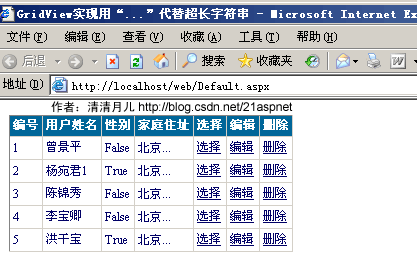
上圖展示 Address 欄位過長內容自動截斷並顯示省略號,版面保持整齊。