MVVM(Model-View-ViewModel)將 UI 與業務邏輯解耦,利於單元測試與設計師/開發者並行工作。本文在 Windows 8 應用中建構最小可用 MVVM 框架:`ViewModelBase`(`INotifyPropertyChanged`)、`DelegateCommand`(`ICommand`)、Model、ViewModel 與 XAML View 繫結。
public class ViewModelBase : INotifyPropertyChanged {
    public event PropertyChangedEventHandler PropertyChanged;
    protected void OnPropertyChanged(string propertyName) {
        var handler = PropertyChanged;
        if (handler != null) handler(this, new PropertyChangedEventArgs(propertyName));
    }
}
public class DelegateCommand : ICommand {
    private readonly Action _execute;
    private readonly Func _canExecute;
    public DelegateCommand(Action execute, Func canExecute = null) {
        _execute = execute; _canExecute = canExecute;
    }
    public bool CanExecute(object parameter) => _canExecute?.Invoke() ?? true;
    public event EventHandler CanExecuteChanged;
    public void Execute(object parameter) { if (CanExecute(parameter)) _execute(); }
    public void RaiseCanExecuteChanged() => CanExecuteChanged?.Invoke(this, EventArgs.Empty);
}
public class BookModel : ViewModelBase {
    private string _txtTitle, _txtContent, _imageUrl;
    public string TxtTitle { get => _txtTitle; set { _txtTitle = value; OnPropertyChanged(nameof(TxtTitle)); } }
    public string TxtContent { get => _txtContent; set { _txtContent = value; OnPropertyChanged(nameof(TxtContent)); } }
    public string ImageUrl { get => _imageUrl; set { _imageUrl = value; OnPropertyChanged(nameof(ImageUrl)); } }
}
public class MainPageViewModel : ViewModelBase {
    public ICommand BtnCommand { get; private set; }
    public ICommand GetTextCommand { get; private set; }
    public string ShowText { get; set; }
    public string GetText { get; set; }
    public ObservableCollection Books { get; } = new ObservableCollection {
        new BookModel { TxtTitle="盤龍", TxtContent="...", ImageUrl="https://image.qidian.com/books/1017141/1017141.jpg" },
        new BookModel { TxtTitle="縱橫輪回", TxtContent="...", ImageUrl="https://image.qidian.com/books/1.jpg" },
        new BookModel { TxtTitle="巫師世界", TxtContent="...", ImageUrl="https://image.qidian.com/books/2443169/2443169.jpg" },
        new BookModel { TxtTitle="殺神", TxtContent="...", ImageUrl="https://image.qidian.com/books/1911245/1911245.jpg" }
    };

    public MainPageViewModel() {
        BtnCommand = new DelegateCommand(Btn_Executed);
        GetTextCommand = new DelegateCommand(GetText_Executed);
    }
    private void Btn_Executed() => ShowText = "您已經點擊了按鈕,請在這裡輸入值";
    private void GetText_Executed() => GetText = $"'{ShowText}'是我獲取到的值";
}
<Page.DataContext>
  <local:MainPageViewModel />
</Page.DataContext>
<Grid Background="{StaticResource ApplicationPageBackgroundThemeBrush}">
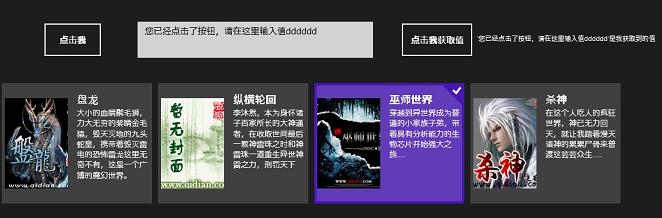
  <Button Command="{Binding BtnCommand}" Content="點擊我" Margin="72,138,0,494" Height="60" Width="100"/>
  <TextBox Text="{Binding ShowText, Mode=TwoWay}" Margin="230,176,744,532" Height="60"/>
  <GridView ItemsSource="{Binding Books}" VerticalAlignment="Center">
    <GridView.ItemsPanel>
      <ItemsPanelTemplate><StackPanel Orientation="Horizontal"/></ItemsPanelTemplate>
    </GridView.ItemsPanel>
    <GridView.ItemTemplate>
      <DataTemplate>
        <Grid Width="250" Height="200" Background="#33CCCCCC">
          <Grid.ColumnDefinitions><ColumnDefinition Width="110"/><ColumnDefinition/></Grid.ColumnDefinitions>
          <Image Grid.Column="0" Margin="5,0,0,0" Source="{Binding ImageUrl}" Stretch="None"/>
          <TextBlock Grid.Column="1" Margin="15,15,0,0" Foreground="White" Text="{Binding TxtTitle}" FontWeight="Bold" FontSize="18" TextWrapping="Wrap"/>
          <TextBlock Grid.Column="1" Margin="15,40,0,0" Foreground="White" Text="{Binding TxtContent}" FontWeight="Light" FontSize="13" TextWrapping="Wrap"/>
        </Grid>
      </DataTemplate>
    </GridView.ItemTemplate>
  </GridView>
  <Button Command="{Binding GetTextCommand}" Content="點擊我獲取值" Margin="667,176,0,532" Height="60" Width="123"/>
  <TextBlock Text="{Binding GetText, Mode=TwoWay}" Margin="795,198,0,0" Height="22" Width="379"/>
</Grid>
原始碼下載:Win8MVVM.rar
延伸建議: 實際專案可引入成熟框架(MVVM Light、Prism、Caliburn.Micro)獲得導航、依賴注入、訊息總線等完整支援。