**偽彩色** 將灰度影像映射為彩色,利用人眼對色彩分辨力遠高於灰階的特性,**增強細節可視性**,廣泛應用於熱成像、醫學影像、科學視覺化。本文實現兩大經典演算法並給出生產級 C# 代碼。

///
/// 偽彩色處理主入口
///
/// 輸入 24bpp 灰度影像
/// true=灰度級彩色變換, false=強度分層
/// 分層數(僅分層法有效)
/// 24bpp 偽彩色影像
private Bitmap ApplyPseudoColor(Bitmap bmp, bool useColorTransform, byte segments) {
    // 僅支援 24bpp RGB
    if (bmp == null || bmp.PixelFormat != PixelFormat.Format24bppRgb) return null;

    var rect = new Rectangle(0, 0, bmp.Width, bmp.Height);
    var bmpData = bmp.LockBits(rect, ImageLockMode.ReadWrite, bmp.PixelFormat);
    IntPtr ptr = bmpData.Scan0;
    int bytes = bmp.Width * bmp.Height * 3;
    byte[] gray = new byte[bytes];
    Marshal.Copy(ptr, gray, 0, bytes);
    bmp.UnlockBits(bmpData);

    byte[] rgb = new byte[bytes];
    Array.Clear(rgb, 0, bytes);

    if (!useColorTransform) {
        // === 強度分層法 ===
        byte step = (byte)(256 / segments);
        for (int i = 0; i < bytes; i += 3) {
            byte level = (byte)(gray[i] / step);  // 0 ~ segments-1
            // 任意映射:這裡示範 R=反相, G=正相, B=0
            rgb[i]   = (byte)((segments - 1 - level) * step); // R
            rgb[i+1] = (byte)(level * step);                  // G
            rgb[i+2] = 0;                                     // B
        }
    } else {
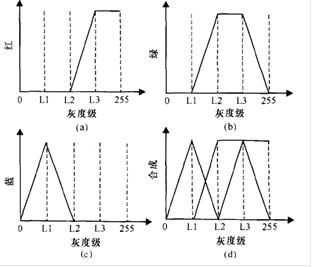
        // === 灰度級-彩色變換法 ===
        for (int i = 0; i < bytes; i += 3) {
            byte g = gray[i];  // 灰度值 (三通道相同)
            if (g < 64) {           // 0-63: 藍→青
                rgb[i+2] = 0;           rgb[i+1] = (byte)(4 * g);     rgb[i] = 255;
            } else if (g < 128) {     // 64-127: 青→綠
                rgb[i+2] = 0;           rgb[i+1] = 255;               rgb[i] = (byte)(-4 * g + 510);
            } else if (g < 192) {     // 128-191: 綠→黃
                rgb[i+2] = (byte)(4 * g - 510); rgb[i+1] = 255;       rgb[i] = 0;
            } else {                  // 192-255: 黃→紅
                rgb[i+2] = 255;         rgb[i+1] = (byte)(-4 * g + 1020); rgb[i] = 0;
            }
        }
    }

    // 寫回新 Bitmap
    var result = new Bitmap(bmp.Width, bmp.Height, PixelFormat.Format24bppRgb);
    var outData = result.LockBits(rect, ImageLockMode.ReadWrite, PixelFormat.Format24bppRgb);
    Marshal.Copy(rgb, 0, outData.Scan0, bytes);
    result.UnlockBits(outData);
    return result;
}Format24bppRgb(3 字節/像素),PNG 等 32bpp 含 Alpha 通道需另行處理。LockBits → Marshal.Copy → 陣列運算 → Marshal.Copy → UnlockBits,標準高性能管線。Color[256] 查表替代運算,進一步提速。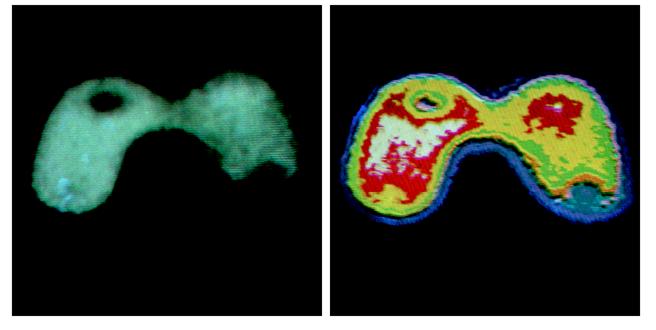
預建 Dictionary<byte, Color> 或 Color[256] 映射表,灰度值直接查表取色,**靈活度最高**、支援任意色盤(如 Jet、Hot、Viridis 經典色盤),推薦作為通用擴展方案。