繪圖設備指繼承自 QPaintDevice 的子類別。Qt 提供四種:QPixmap、QBitmap、QImage、QPicture,各有優化導向:
QPixmap 子類,色深固定為 1(黑白兩色),適合游標、筆刷等低儲存需求場景。QPainter 命令序列,平台無關,可儲存為二進位元檔(meta-file),支援列印、PDF、SVG 等輸出。void PaintedWidget::paintEvent(QPaintEvent *event)
{
QPainter painter(this);
QPixmap pixmap("Cat.png");
QBitmap bitmap("Cat.png");
painter.drawPixmap(10, 10, 128, 128, pixmap);
painter.drawPixmap(140, 10, 128, 128, bitmap);
QPixmap pixmap2("Cat2.png");
QBitmap bitmap2("Cat2.png");
painter.drawPixmap(10, 140, 128, 128, pixmap2);
painter.drawPixmap(140, 140, 128, 128, bitmap2);
}
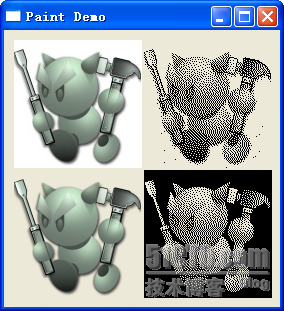
測試兩張 PNG:Cat.png 白底無透明,Cat2.png 具透明背景。觀察差異:
QPixmap 提供 grabWidget()、grabWindow() 截圖功能,並支援隱式共享(傳值無需指標)。
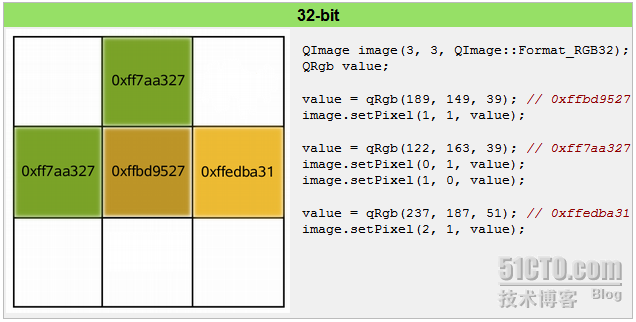
可視為 RGB 二維陣列。範例建立 3×3 RGB32 影像,逐像素設定顏色值。適用於影像處理、像素演算、跨平台一致渲染。
// 錄製
QPicture picture;
QPainter painter;
painter.begin(&picture);
painter.drawEllipse(10, 20, 80, 70);
painter.end();
picture.save("drawing.pic");

// 重現
QPicture picture;
picture.load("drawing.pic");
QPainter painter;
painter.begin(&myImage);
painter.drawPicture(0, 0, picture);
painter.end();
QPicture 序列化 QPainter 命令,格式平台無關,無內容限制(字型、Pixmap、變換皆可記錄)。使用系統解析度並可調整 QPainter 消除裝置差異,適合列印、匯出向量圖等場景。