二進位資料呈現方式取決於類型:圖片渲染為 <img>,文件提供下載連結。本文示範在 GridView 與 DetailsView 中顯示 Northwind Categories 表的 Picture (位圖含 OLE 報頭) 與 BrochurePath (PDF 路徑)。
因尚未建立上傳介面,先在資料庫手動設定 7 類別的 PDF 路徑 (Seafood 留空測試無檔案情況):
UPDATE Categories SET BrochurePath = '~/Brochures/Beverages.pdf' WHERE CategoryID = 1;
UPDATE Categories SET BrochurePath = '~/Brochures/Condiments.pdf' WHERE CategoryID = 2;
-- ... 其他類別
UPDATE Categories SET BrochurePath = NULL WHERE CategoryName = 'Seafood';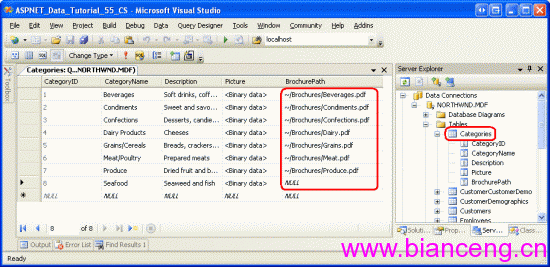
Northwind 來源為 Access,Picture 為 OLE 物件欄位,前 78 位元組為報頭,直接輸出無法顯示。需移除報頭後輸出純位圖資料。
<%@ Page Language="C#" %>
<%@ Import Namespace="System.Data" %>
<%@ Import Namespace="System.Data.SqlClient" %>
<%@ Import Namespace="System.Configuration" %>
<script runat="server">
    protected void Page_Load(object sender, EventArgs e)
    {
        string catId = Request.QueryString["CategoryID"];
        if (string.IsNullOrEmpty(catId)) return;

        string connStr = ConfigurationManager.ConnectionStrings["NorthwindConnectionString"].ConnectionString;
        using (SqlConnection conn = new SqlConnection(connStr))
        using (SqlCommand cmd = new SqlCommand("SELECT Picture FROM Categories WHERE CategoryID = @CategoryID", conn))
        {
            cmd.Parameters.AddWithValue("@CategoryID", catId);
            conn.Open();
            object result = cmd.ExecuteScalar();

            if (result != null && result != DBNull.Value)
            {
                byte[] oleData = (byte[])result;
                // 移除前 78 位元組 OLE 報頭
                const int OleHeaderSize = 78;
                if (oleData.Length > OleHeaderSize)
                {
                    byte[] imageData = new byte[oleData.Length - OleHeaderSize];
                    Buffer.BlockCopy(oleData, OleHeaderSize, imageData, 0, imageData.Length);

                    Response.ContentType = "image/bmp"; // 原為 16 色 BMP
                    Response.BinaryWrite(imageData);
                }
            }
        }
    }
</script><asp:GridView ID="gvCategories" runat="server"
DataSourceID="odsCategories"
AutoGenerateColumns="False"
DataKeyNames="CategoryID">
<Columns>
<asp:BoundField DataField="CategoryID" HeaderText="ID" />
<asp:BoundField DataField="CategoryName" HeaderText="類別名稱" />
<asp:BoundField DataField="Description" HeaderText="描述" />
<asp:TemplateField HeaderText="圖片">
<ItemTemplate>
<asp:Image ID="imgPic" runat="server"
ImageUrl='<%# "GetImage.aspx?CategoryID=" + Eval("CategoryID") %>'
AlternateText='<%# Eval("CategoryName") %>'
Height="80px" />
</ItemTemplate>
</asp:TemplateField>
<asp:TemplateField HeaderText="小冊子">
<ItemTemplate>
<%# !String.IsNullOrEmpty(Convert.ToString(Eval("BrochurePath"))) ?
$"<a href='{Eval("BrochurePath")}' target='_blank' class='download-link'><i class='icon-pdf'></i> 下載 PDF</a>" :
"無" %>
</ItemTemplate>
</asp:TemplateField>
</Columns>
</asp:GridView>
<asp:ObjectDataSource ID="odsCategories" runat="server"
TypeName="BLL.CategoriesBLL"
SelectMethod="GetCategories" /><asp:DetailsView ID="dvCategory" runat="server"
DataSourceID="odsCategories"
AutoGenerateRows="False"
DataKeyNames="CategoryID">
<Fields>
<asp:BoundField DataField="CategoryID" HeaderText="ID" ReadOnly="True" />
<asp:BoundField DataField="CategoryName" HeaderText="類別名稱" />
<asp:BoundField DataField="Description" HeaderText="描述" HtmlEncode="False" />
<asp:TemplateField HeaderText="圖片">
<ItemTemplate>
<asp:Image ID="imgDetail" runat="server"
ImageUrl='<%# "GetImage.aspx?CategoryID=" + Eval("CategoryID") %>'
AlternateText='<%# Eval("CategoryName") %>' />
</ItemTemplate>
</asp:TemplateField>
<asp:TemplateField HeaderText="小冊子">
<ItemTemplate>
<asp:HyperLink ID="hlBrochure" runat="server"
NavigateUrl='<%# Eval("BrochurePath") %>'
Text="下載小冊子 (PDF)"
Target="_blank"
Visible='<%# !String.IsNullOrEmpty(Convert.ToString(Eval("BrochurePath"))) %>' />
</ItemTemplate>
</asp:TemplateField>
</Fields>
</asp:DetailsView>// BinaryHandler.ashx
public class BinaryHandler : IHttpHandler
{
public void ProcessRequest(HttpContext context)
{
string type = context.Request.QueryString["type"]; // "image" or "brochure"
string id = context.Request.QueryString["id"];
if (string.IsNullOrEmpty(id)) return;
// 從 DAL/BLL 取得 byte[] 或檔案路徑
byte[] data = GetBinaryData(type, id);
string contentType = type == "image" ? "image/bmp" : "application/pdf";
string fileName = type == "image" ? $"cat_{id}.bmp" : $"brochure_{id}.pdf";
context.Response.Clear();
context.Response.ContentType = contentType;
context.Response.AddHeader("Content-Disposition", $"inline; filename=\"{fileName}\"");
context.Response.BinaryWrite(data);
context.Response.End();
}
private byte[] GetBinaryData(string type, string id)
{
// 實作從資料庫/檔案系統讀取
return new byte[0];
}
public bool IsReusable => false;
}Web.config 註冊:<add name="BinaryHandler" verb="*" path="BinaryHandler.ashx" type="Namespace.BinaryHandler" />
| 問題 | 方案 |
|---|---|
| 每次請求查詢資料庫圖片 | 輸出 HTTP 快取標頭:Response.Cache.SetCacheability(HttpCacheability.Public); Response.Cache.SetMaxAge(TimeSpan.FromDays(30)); |
| 大量圖片併發 | 將圖片轉為實體檔案儲存於磁碟/CDN,資料庫僅存路徑 |
| OLE 報頭每次移除 | 資料遷移時一次性轉檔為標準 BMP/JPG,更新資料庫 |
| PDF 下載大檔案 | 使用 Response.TransmitFile (傳送檔案不載入記憶體) 或 FileResult (MVC/Core) |
顯示二進位資料的關鍵在於:圖片需專用輸出端點移除 OLE 報頭、文件提供下載連結而非內嵌、善用 HTTP 快取減輕資料庫壓力。現代架構建議將二進位檔案移出資料庫,改用物件儲存 (Blob Storage) + CDN,資料庫僅存 URL 與中繼資料。