本文示範使用 DetailsView 內建插入功能,結合兩個 FileUpload 控制項,讓使用者新增類別時同時上傳圖片 (存入資料庫 Picture 欄位) 與小冊子 (存入檔案系統 ~/Brochures/,路徑存入 BrochurePath)。需先擴充 DAL 與 BLL 支援帶圖片的插入方法。
主查詢不含 Picture,自動產生的 Insert 缺少此參數。手動新增:
INSERT INTO [Categories]
    ([CategoryName], [Description], [BrochurePath], [Picture])
VALUES
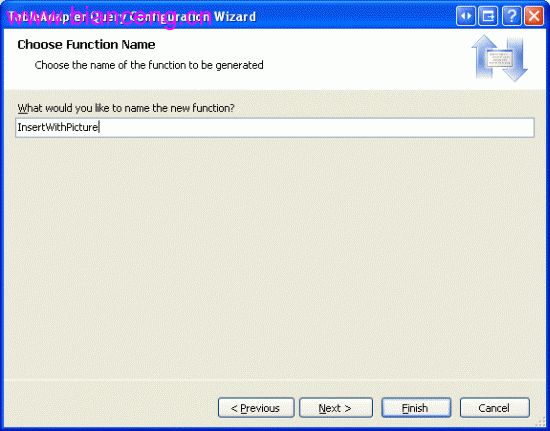
(@CategoryName, @Description, @BrochurePath, @Picture)InsertWithPicture → 完成。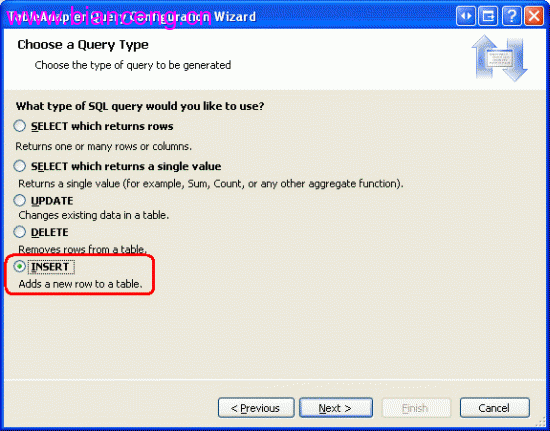
[System.ComponentModel.DataObjectMethodAttribute(
    System.ComponentModel.DataObjectMethodType.Insert, true)]
public int InsertWithPicture(string categoryName, string description,
    string brochurePath, byte[] picture)
{
    // 驗證邏輯...
    return _adapter.InsertWithPicture(categoryName, description, brochurePath, picture);
}<%@ Page Language="C#" MasterPageFile="~/Site.master" %>
<asp:Content ID="Content1" ContentPlaceHolderID="MainContent" runat="server">
<h2>新增類別 (含圖片與小冊子上傳)</h2>
<asp:DetailsView ID="dvCategory" runat="server"
DataSourceID="odsInsert"
DefaultMode="Insert"
AutoGenerateRows="False"
OnItemInserting="dvCategory_ItemInserting"
OnItemInserted="dvCategory_ItemInserted">
<Fields>
<asp:BoundField DataField="CategoryName" HeaderText="類別名稱" Required="True" />
<asp:BoundField DataField="Description" HeaderText="描述"
HtmlEncode="False" />
<asp:TemplateField HeaderText="圖片">
<InsertItemTemplate>
<asp:FileUpload ID="fuPicture" runat="server" />
<span class="hint">選填:JPG/PNG,建議 < 100KB</span>
</InsertItemTemplate>
</asp:TemplateField>
<asp:TemplateField HeaderText="小冊子">
<InsertItemTemplate>
<asp:FileUpload ID="fuBrochure" runat="server" />
<span class="hint">選填:PDF,將儲存至 ~/Brochures/</span>
</InsertItemTemplate>
</asp:TemplateField>
<asp:CommandField ShowInsertButton="True" CancelButtonText="取消" />
</Fields>
</asp:DetailsView>
<asp:ObjectDataSource ID="odsInsert" runat="server"
TypeName="BLL.CategoriesBLL"
InsertMethod="InsertWithPicture"
OnInserting="odsInsert_Inserting">
<InsertParameters>
<asp:Parameter Name="categoryName" Type="String" />
<asp:Parameter Name="description" Type="String" />
<asp:Parameter Name="brochurePath" Type="String" />
<asp:Parameter Name="picture" Type="Object" />
</InsertParameters>
</asp:ObjectDataSource>
</asp:Content>protected void dvCategory_ItemInserting(object sender, DetailsViewInsertEventArgs e)
{
FileUpload fuPicture = (FileUpload)dvCategory.FindControl("fuPicture");
FileUpload fuBrochure = (FileUpload)dvCategory.FindControl("fuBrochure");
// 圖片:轉為 byte[]
if (fuPicture.HasFile)
{
// 可選:驗證 ContentType、大小、轉檔為 JPG
e.Values["picture"] = fuPicture.FileBytes;
}
else
{
e.Values["picture"] = null; // 或 DBNull.Value
}
// 小冊子:儲存檔案並回傳相對路徑
if (fuBrochure.HasFile)
{
string fileName = Path.GetFileName(fuBrochure.FileName);
// 防止同名覆蓋:加上 Guid 前綴
string uniqueName = Guid.NewGuid().ToString("N") + "_" + fileName;
string savePath = Server.MapPath("~/Brochures/") + uniqueName;
// 確保目錄存在
string dir = Path.GetDirectoryName(savePath);
if (!Directory.Exists(dir)) Directory.CreateDirectory(dir);
fuBrochure.SaveAs(savePath);
e.Values["brochurePath"] = "~/Brochures/" + uniqueName;
}
else
{
e.Values["brochurePath"] = ""; // 或 DBNull.Value
}
}protected void dvCategory_ItemInserted(object sender, DetailsViewInsertedEventArgs e)
{
if (e.Exception == null)
{
Response.Redirect("Categories.aspx"); // 返回列表
}
else
{
// 顯示錯誤
lblError.Text = "新增失敗:" + e.Exception.Message;
e.ExceptionHandled = true;
}
}| 決策點 | 方案 A | 方案 B (本文採用) | 理由 |
|---|---|---|---|
| 圖片儲存 | 檔案系統 + 路徑 | 資料庫 varbinary(max) | Northwind Picture 欄位既定;小圖片資料庫管理較簡單 |
| 小冊子儲存 | 資料庫 | 檔案系統 + 路徑 | PDF 較大,資料庫備份膨脹;檔案系統利於下載、CDN |
| 檔案命名 | 原始檔名 | Guid + 原始檔名 | 避免同名覆蓋、路徑遍歷攻擊 |
| 驗證 | 無 | ContentType、副檔名、大小限制 | 安全性基本要求 |
private bool ValidateUpload(FileUpload fu, string[] allowedExtensions, int maxBytes, out string errorMsg)
{
    errorMsg = "";
    if (!fu.HasFile) return true; // 選填

    string ext = Path.GetExtension(fu.FileName).ToLower();
    if (!allowedExtensions.Contains(ext))
    {
        errorMsg = $"不支援的檔案類型:{ext}";
        return false;
    }

    if (fu.FileBytes.Length > maxBytes)
    {
        errorMsg = $"檔案過大:{fu.FileBytes.Length:N0} bytes,上限 {maxBytes:N0}";
        return false;
    }

    // 可選:檢查 Magic Number (檔案頭)
    return true;
}

// 在 ItemInserting 中使用
if (!ValidateUpload(fuPicture, new[]{".jpg",".jpeg",".png",".gif"}, 200*1024, out string err))
{ e.Cancel = true; lblError.Text = err; return; }DetailsView 內建插入模式配合 TemplateField FileUpload,能快速建立含檔案上傳的新增介面。核心在於:DAL 擴充 Insert 方法包含二進位參數、ItemInserting 事件協調檔案儲存與參數繫結、檔案命名策略防衝突。此模式適用於任何「主記錄 + 附件」的新增情境。