延續前幾篇二進位資料處理(上傳、顯示),本文示範使用 GridView 內建編輯/刪除功能,讓使用者替換類別圖片、更新或移除小冊子檔案。關鍵在於擴充 CategoriesTableAdapter 支援 Picture 欄位的 UPDATE 與 DELETE 指令。
CategoriesTableAdapter 主查詢未包含 Picture 欄位,自動產生的 Update 方法缺少此參數。需手動新增 TableAdapter 方法:
CategoriesTableAdapter → 加入查詢。Picture 參數:UPDATE [Categories] SET
[CategoryName] = @CategoryName,
[Description] = @Description,
[BrochurePath] = @BrochurePath,
[Picture] = @Picture
WHERE (([CategoryID] = @Original_CategoryID))UpdateWithPicture → 完成。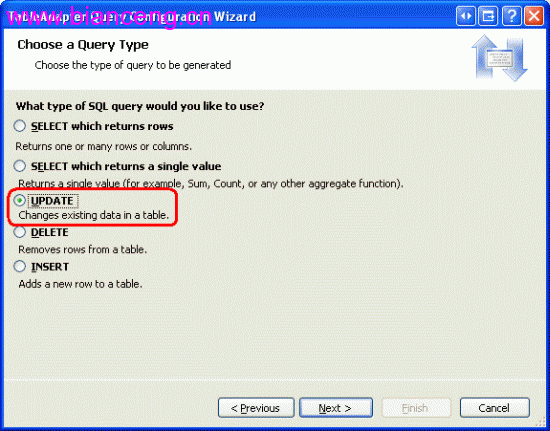
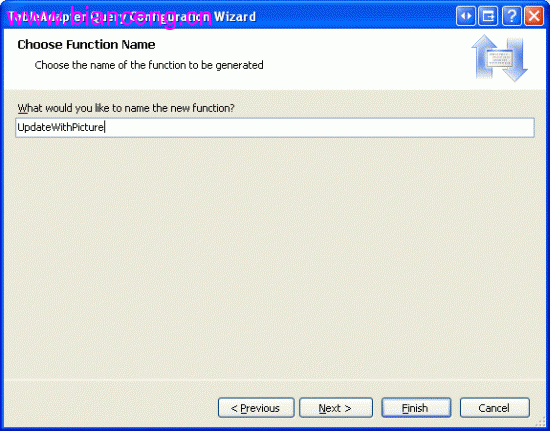
[System.ComponentModel.DataObjectMethodAttribute(
    System.ComponentModel.DataObjectMethodType.Update, true)]
public bool UpdateWithPicture(string categoryName, string description,
    string brochurePath, byte[] picture, int originalCategoryID)
{
    // 圖片為選填:若未上傳新圖片,保留原有
    if (picture == null || picture.Length == 0)
    {
        // 取得原有圖片
        var current = _adapter.GetCategoryByID(originalCategoryID);
        if (current.Rows.Count > 0)
            picture = current[0].Picture as byte[];
    }

    int rows = _adapter.UpdateWithPicture(categoryName, description, brochurePath, picture, originalCategoryID);
    return rows > 0;
}<asp:GridView ID="gvCategories" runat="server"
DataSourceID="odsCategories"
DataKeyNames="CategoryID"
AutoGenerateColumns="False"
OnRowUpdating="gvCategories_RowUpdating"
OnRowDeleting="gvCategories_RowDeleting">
<Columns>
<asp:CommandField ShowEditButton="True" ShowDeleteButton="True" />
<asp:BoundField DataField="CategoryID" HeaderText="ID" ReadOnly="True" />
<asp:BoundField DataField="CategoryName" HeaderText="類別名稱" />
<asp:TemplateField HeaderText="圖片">
<ItemTemplate>
<img src="GetImage.aspx?CategoryID=<%# Eval("CategoryID") %>"
alt="<%# Eval("CategoryName") %>" style="max-height:80px;" />
</ItemTemplate>
<EditItemTemplate>
<asp:FileUpload ID="fuPicture" runat="server" />
<br />
<asp:CheckBox ID="cbRemovePicture" runat="server" Text="移除現有圖片" />
</EditItemTemplate>
</asp:TemplateField>
<asp:TemplateField HeaderText="小冊子">
<ItemTemplate>
<%# !String.IsNullOrEmpty(Eval("BrochurePath").ToString()) ?
$"<a href='{Eval("BrochurePath")}' target='_blank'>下載</a>" : "無" %>
</ItemTemplate>
<EditItemTemplate>
<asp:FileUpload ID="fuBrochure" runat="server" />
<br />
<asp:CheckBox ID="cbRemoveBrochure" runat="server" Text="移除現有小冊子" />
</EditItemTemplate>
</asp:TemplateField>
</Columns>
</asp:GridView>
<asp:ObjectDataSource ID="odsCategories" runat="server"
TypeName="BLL.CategoriesBLL"
SelectMethod="GetCategories"
UpdateMethod="UpdateWithPicture"
DeleteMethod="DeleteCategory"
OnUpdating="odsCategories_Updating"
OnDeleting="odsCategories_Deleting">
<UpdateParameters>
<asp:Parameter Name="categoryName" Type="String" />
<asp:Parameter Name="description" Type="String" />
<asp:Parameter Name="brochurePath" Type="String" />
<asp:Parameter Name="picture" Type="Object" />
<asp:Parameter Name="originalCategoryID" Type="Int32" />
</UpdateParameters>
<DeleteParameters>
<asp:Parameter Name="categoryID" Type="Int32" />
</DeleteParameters>
</asp:ObjectDataSource>protected void gvCategories_RowUpdating(object sender, GridViewUpdateEventArgs e)
{
GridViewRow row = gvCategories.Rows[gvCategories.EditIndex];
// 取得 FileUpload 控制項
FileUpload fuPicture = (FileUpload)row.FindControl("fuPicture");
FileUpload fuBrochure = (FileUpload)row.FindControl("fuBrochure");
CheckBox cbRemovePicture = (CheckBox)row.FindControl("cbRemovePicture");
CheckBox cbRemoveBrochure = (CheckBox)row.FindControl("cbRemoveBrochure");
// 處理圖片
byte[] picture = null;
if (fuPicture.HasFile)
{
// 驗證檔案類型、大小
picture = fuPicture.FileBytes;
}
else if (cbRemovePicture.Checked)
{
picture = new byte[0]; // 明確設為空陣列表示移除
}
// 否則保持 null,BLL 會保留原圖
// 處理小冊子:儲存至 ~/Brochures/ 目錄
string brochurePath = null;
if (fuBrochure.HasFile)
{
string fileName = Path.GetFileName(fuBrochure.FileName);
string savePath = Server.MapPath("~/Brochures/") + fileName;
fuBrochure.SaveAs(savePath);
brochurePath = "~/Brochures/" + fileName;
}
else if (cbRemoveBrochure.Checked)
{
brochurePath = ""; // 空字串表示移除
}
// 更新 ObjectDataSource 參數
e.NewValues["picture"] = picture;
e.NewValues["brochurePath"] = brochurePath;
}protected void gvCategories_RowDeleting(object sender, GridViewDeleteEventArgs e)
{
int categoryID = (int)e.Keys["CategoryID"];
// 1. 取得要刪除的記錄資訊
var cat = new BLL.CategoriesBLL().GetCategoryByID(categoryID);
if (cat.Rows.Count > 0)
{
var row = cat[0];
// 2. 刪除小冊子實體檔案
if (!row.IsBrochurePathNull() && !string.IsNullOrEmpty(row.BrochurePath))
{
string physicalPath = Server.MapPath(row.BrochurePath);
if (File.Exists(physicalPath)) File.Delete(physicalPath);
}
// 3. 圖片在資料庫中,隨記錄刪除自動移除
}
}| 挑戰 | 解決方案 |
|---|---|
| TableAdapter 主查詢不含 Picture | 手動新增 UpdateWithPicture 方法,包含 @Picture 參數 |
| GridView 編輯模式上傳檔案 | TemplateField EditItemTemplate 放 FileUpload,RowUpdating 取得檔案位元組 |
| 選擇性更新圖片/小冊子 | CheckBox 標記「移除」、FileUpload.HasFile 判斷、null 表示保留原值 |
| 刪除資料庫記錄時清理檔案 | RowDeleting 事件中取得路徑並 File.Delete |
| OLE 報頭問題 | Northwind Picture 欄位含 78 位元組 OLE 報頭,顯示時需移除 (GetImage.aspx 處理) |
GridView 內建編輯/刪除配合自訂 TableAdapter 方法,能以最少程式碼完成二進位資料的完整 CRUD。關鍵在於:DAL 層擴充方法包含二進位參數、BLL 層處理選擇性更新邏輯、表現層 RowUpdating/RowDeleting 協調檔案與資料庫操作。此模式可推廣至任何二進位欄位(文件、簽章、縮圖)管理。