ASP.NET MVC 框架本質上是透過自訂 HttpModule(UrlRoutingModule)與 HttpHandler(MvcHandler)擴展 ASP.NET 管線實現。為了讓讀者掌握整體運作機制,本文構建一個「迷你版」MVC 框架並示範上層應用開發。
建立空白 ASP.NET Web 應用(非 MVC 專案),不引用 System.Web.Mvc.dll,自行定義核心類別:
public class SimpleModel { public string Controller { get; set; } public string Action { get; set; } }

public class HomeController : ControllerBase
{
    public ActionResult Index(SimpleModel model)
    {
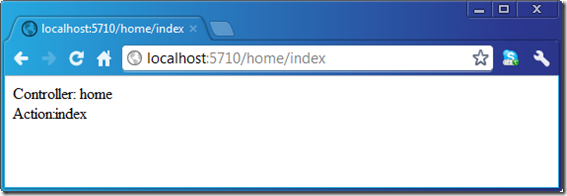
        string content = string.Format("Controller: {0}<br/>Action:{1}", model.Controller, model.Action);
        return new RawContentResult(content);
    }
}
在 Global.asax 註冊路由與 Controller Factory:
public class Global : System.Web.HttpApplication
{
    protected void Application_Start(object sender, EventArgs e)
    {
        RouteTable.Routes.Add("default", new Route { Url = "{controller}/{action}" });
        ControllerBuilder.Current.SetControllerFactory(new DefaultControllerFactory());
        ControllerBuilder.Current.DefaultNamespaces.Add("WebApp");
    }
}
註冊自訂 UrlRoutingModule 至 web.config:
<system.webServer>
  <modules>
    <add name="UrlRoutingModule" type="Artech.MiniMvc.UrlRoutingModule, Artech.MiniMvc" />
  </modules>
</system.webServer>
瀏覽 /Home/Index 即可觸發對應 Action 並顯示 Controller/Action 名稱。