登入頁是系統唯一入口,雖然筆者非美工專長,但仍嘗試打造整潔、現代化的登入介面。本講提供完整的 Razor 視圖代碼,包含表單驗證、鍵盤快捷鍵支援與 EasyUI 風格按鈕。
@{
Layout = null;
}
<!DOCTYPE html>
<html>
<head>
<title>系統登錄</title>
<script src="/Scripts/jquery.min.js" type="text/javascript"></script>
@Styles.Render("~/Content/themes/blue/css")
<link href="~/Content/Site.css" rel="stylesheet" />
<style type="text/css">
body { letter-spacing: 1px; color: #444; }
#LoginTb { font-size: 14px; }
#LoginTb input { width: 190px; height: 24px; line-height: 24px; }
</style>
<script type="text/javascript">
$(function () {
$("#LoginSys").click(function () { LoginSys(); });
$("#UserName, #Password, #ValidateCode").keydown(function (e) {
if (e.which == 13) { LoginSys(); return false; }
});
});
function LoginSys() {
$("#mes").html("");
$("#UserName, #Password, #ValidateCode").removeClass("input-validation-error");
if ($.trim($("#UserName").val()) == "") {
$("#UserName").addClass("input-validation-error").focus();
$("#mes").html("用戶名不能為空!"); return;
}
if ($.trim($("#Password").val()) == "") {
$("#Password").addClass("input-validation-error").focus();
$("#mes").html("密碼不能為空!"); return;
}
if ($.trim($("#ValidateCode").val()) == "") {
$("#ValidateCode").addClass("input-validation-error").focus();
$("#mes").html("驗證碼不能為空!"); return;
}
$("#Loading").show();
// 此處應呼叫後端驗證 API
alert("表單驗證通過,準備送出登入請求");
return false;
}
</script>
</head>
<body>
<div>
<div class="define-head" style="height: 67px;">
<div class="define-logo">
<div id="LoginTopLine">YmNets.cnblogs.com</div>
<div id="LoginBotoomLine">MVC4+EF5.0+EasyUI</div>
</div>
</div>
</div>
<div style="margin: 0 auto; margin-top: 100px; width: 800px;">
<table style="width: 800px; margin: 0 auto;">
<tr>
<td><img src="/Content/Images/account.jpg" alt="登入圖示" /></td>
<td style="width: 310px;">
<table id="LoginTb" style="margin-top: 10px; background: #fff; width: 100%; height: 230px; border: 1px #ccc solid;">
<tr>
<td colspan="2" style="font-size: 18px; font-weight: bold; padding: 5px 20px;">歡迎登錄</td>
</tr>
<tr>
<td style="width: 80px; text-align: right">用戶名:</td>
<td><input id="UserName" name="UserName" type="text" /></td>
</tr>
<tr>
<td style="width: 80px; text-align: right">密 碼:</td>
<td><input id="Password" name="Password" type="password" /></td>
</tr>
<tr>
<td style="width: 80px; text-align: right">驗證碼:</td>
<td><img src="/ValidateCode.ashx" alt="驗證碼" /></td>
</tr>
<tr>
<td colspan="2">
<table style="width: 100%;">
<tr>
<td style="width:40px;"> </td>
<td>
<div id="mes" class="field-validation-error"></div>
<div id="Loading" style="display: none" class='panel-loading'><font color='#000'>加載中...</font></div>
</td>
<td style="width: 100px;">
<a id="LoginSys" href="javascript:void(0)" class="easyui-linkbutton l-btn">
<span class="l-btn-left"><span class="l-btn-text icon-ok" style="padding-left: 20px;">登錄</span></span>
</a>
</td>
</tr>
</table>
</td>
</tr>
</table>
</td>
</tr>
</table>
</div>
<div style="background:#f1f1f1; height:40px; width:100%; text-align:center; line-height:40px; border-top:1px #ccc solid; bottom:0; position:absolute">
Copyright ymnet2010-2013
</div>
</body>
</html>
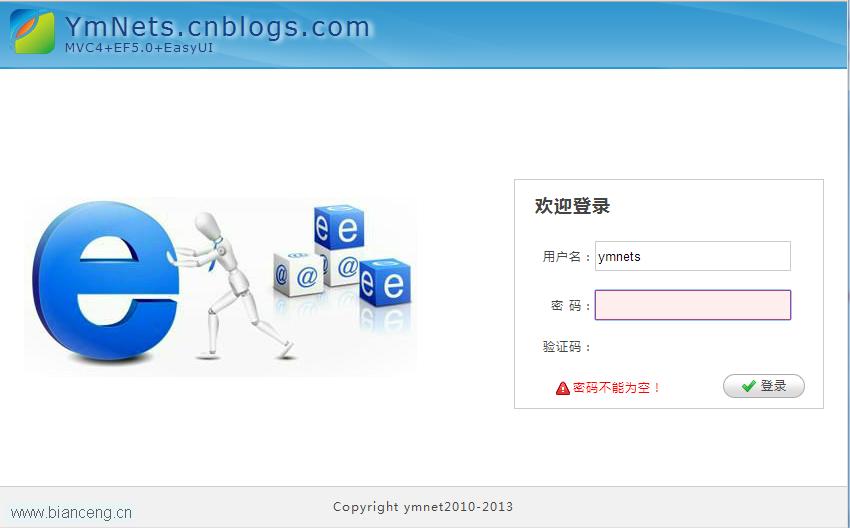
歡迎提供更優質的圖片素材或改良版代碼至 ymnets@sina.com,感謝分享!