本示例演示對一組繼承關係實體進行視覺化元數據配置,並自動生成資料庫建立腳本。完整代碼含配置檔與 SQL 腳本位於原始碼包 NBear\samples\Sample_Entity_Configuration_By_Entity_Configurator。
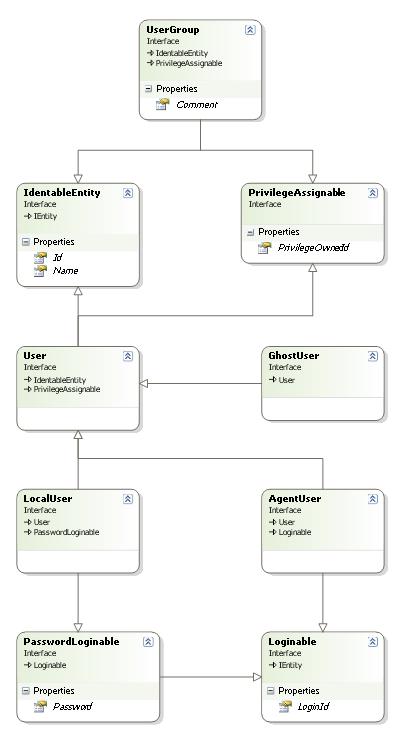
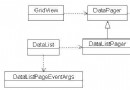
所有實體均為介面,使用 VS2005 內建類別設計器設計結構。
[Table(IsContract = true)]
public interface IdentableEntity : IEntity {
  [PrimaryKey] int Id { get; set; }
  string Name { get; set; }
}

[Table(IsContract = true)]
public interface Loginable : IEntity {
  string LoginId { get; set; }
}

[Table(IsContract = true)]
public interface PasswordLoginable : Loginable {
  string Password { get; set; }
}

[Table(IsContract = true)]
public interface PrivilegeAssignable : IEntity {
  int PrivilegeOwnerId { get; set; }
}

[Table("User", UpdateTableName = "User", UpdateExtendedOnly = true)]
public interface User : IdentableEntity, PrivilegeAssignable { }

[Table("select User.*, LocalUser.LoginId, LocalUser.Password from LocalUser inner join User on LocalUser.Id = User.Id", UpdateTableName = "LocalUser", IsView = true, UpdateExtendedOnly = true)]
public interface LocalUser : PasswordLoginable, User { }

[Table("select User.*, AgentUser.LoginId from AgentUser inner join User on AgentUser.Id = User.Id", UpdateTableName = "AgentUser", IsView = true, UpdateExtendedOnly = true)]
public interface AgentUser : Loginable, User { }

[Table("select User.* from GhostUser inner join User on GhostUser.Id = User.Id", UpdateTableName = "GhostUser", IsView = true, UpdateExtendedOnly = true)]
public interface GhostUser : User { }

[Table("UserGroup", UpdateTableName = "UserGroup", UpdateExtendedOnly = true)]
public interface UserGroup : IdentableEntity, PrivilegeAssignable {
  string Comment { get; set; }
}
透過 Entity Configurator 載入組件、設置元數據,點擊「Code → Generate EntityQuery Code」即可生成強型別查詢代碼,同步產出資料庫建立腳本,實現模型驅動開發。