複合控件 (如 GridView, Login, Wizard) 包含多個子控件,每個子控件可能需要獨立樣式。若將所有樣式屬性平鋪為頂層屬性,屬性視窗會極度混亂。ASP.NET 採用 Style 物件 + 內屬性持久化 模式,將樣式封裝為子物件,透過 DesignerSerializationVisibility.Content 實現設計時編輯與視圖狀態自動持久化。
public class Style : Component, IStateManager
{
    // 核心樣式屬性
    public Color BackColor { get; set; }
    public Color ForeColor { get; set; }
    public FontInfo Font { get; }
    public Unit Height { get; set; }
    public Unit Width { get; set; }
    public string CssClass { get; set; }
    // ... BorderColor, BorderWidth, BorderStyle 等

    // 視圖狀態管理 (IStateManager)
    private StateBag _viewState;
    public StateBag ViewState => _viewState ??= new StateBag();

    public virtual void LoadViewState(object savedState) { ... }
    public virtual object SaveViewState() { ... }
    public virtual void TrackViewState() { ... }

    // 套用至 WebControl
    public virtual void ApplyTo(WebControl control) { ... }
    public virtual void CopyFrom(Style s) { ... }
    public virtual void MergeWith(Style s) { ... }
}
public class LoginCompositeControl : CompositeControl
{
    // 樣式欄位
    private Style _textBoxStyle;
    private Style _buttonStyle;
    private Style _labelStyle;
    private Style _validatorStyle;
    private Style _containerStyle;

    // 1. TextBox 樣式
    [Category("Styles")]
    [DefaultValue(null)]
    [DesignerSerializationVisibility(DesignerSerializationVisibility.Content)]
    [PersistenceMode(PersistenceMode.InnerProperty)]
    [Description("輸入框樣式")]
    public Style TextBoxStyle
    {
        get
        {
            if (_textBoxStyle == null)
            {
                _textBoxStyle = new Style();
                if (IsTrackingViewState)
                    ((IStateManager)_textBoxStyle).TrackViewState();
            }
            return _textBoxStyle;
        }
    }

    // 2. Button 樣式
    [Category("Styles")]
    [DefaultValue(null)]
    [DesignerSerializationVisibility(DesignerSerializationVisibility.Content)]
    [PersistenceMode(PersistenceMode.InnerProperty)]
    [Description("按鈕樣式")]
    public Style ButtonStyle
    {
        get
        {
            if (_buttonStyle == null)
            {
                _buttonStyle = new Style();
                if (IsTrackingViewState)
                    ((IStateManager)_buttonStyle).TrackViewState();
            }
            return _buttonStyle;
        }
    }

    // 3. Label 樣式
    [Category("Styles")]
    [DefaultValue(null)]
    [DesignerSerializationVisibility(DesignerSerializationVisibility.Content)]
    [PersistenceMode(PersistenceMode.InnerProperty)]
    [Description("訊息標籤樣式")]
    public Style LabelStyle
    {
        get
        {
            if (_labelStyle == null)
            {
                _labelStyle = new Style();
                if (IsTrackingViewState)
                    ((IStateManager)_labelStyle).TrackViewState();
            }
            return _labelStyle;
        }
    }

    // 4. 驗證器樣式
    [Category("Styles")]
    [DefaultValue(null)]
    [DesignerSerializationVisibility(DesignerSerializationVisibility.Content)]
    [PersistenceMode(PersistenceMode.InnerProperty)]
    [Description("驗證錯誤訊息樣式")]
    public Style ValidatorStyle
    {
        get
        {
            if (_validatorStyle == null)
            {
                _validatorStyle = new Style();
                if (IsTrackingViewState)
                    ((IStateManager)_validatorStyle).TrackViewState();
            }
            return _validatorStyle;
        }
    }

    // 5. 容器樣式 (整體外框)
    [Category("Styles")]
    [DefaultValue(null)]
    [DesignerSerializationVisibility(DesignerSerializationVisibility.Content)]
    [PersistenceMode(PersistenceMode.InnerProperty)]
    [Description("整體容器樣式")]
    public Style ContainerStyle
    {
        get
        {
            if (_containerStyle == null)
            {
                _containerStyle = new Style();
                if (IsTrackingViewState)
                    ((IStateManager)_containerStyle).TrackViewState();
            }
            return _containerStyle;
        }
    }
}
protected override void CreateChildControls()
{
    Controls.Clear();

    _txtUsername = new TextBox { ID = "txtUsername" };
    _txtPassword = new TextBox { ID = "txtPassword", TextMode = TextBoxMode.Password };
    _btnLogin = new Button { ID = "btnLogin", Text = LoginButtonText };
    _lblMessage = new Label { ID = "lblMessage" };
    _valUsername = new RequiredFieldValidator { ID = "valUsername", ControlToValidate = "txtUsername" };
    _valPassword = new RequiredFieldValidator { ID = "valPassword", ControlToValidate = "txtPassword" };

    // 套用樣式 (複製非空屬性)
    TextBoxStyle.ApplyTo(_txtUsername);
    TextBoxStyle.ApplyTo(_txtPassword);
    ButtonStyle.ApplyTo(_btnLogin);
    LabelStyle.ApplyTo(_lblMessage);
    ValidatorStyle.ApplyTo(_valUsername);
    ValidatorStyle.ApplyTo(_valPassword);

    // 容器樣式套用至最外層 Table
    Table layout = new Table();
    ContainerStyle.ApplyTo(layout);

    // ... 建立佈局結構 ...
    Controls.Add(layout);
    ChildControlsCreated = true;
}
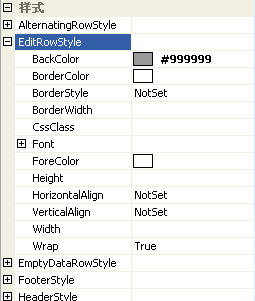
GridView 定義多種項目類型樣式,對應不同渲染狀態:
public class GridView : CompositeDataBoundControl
{
    // 項目類型樣式
    public TableItemStyle RowStyle { get; }
    public TableItemStyle AlternatingRowStyle { get; }
    public TableItemStyle HeaderStyle { get; }
    public TableItemStyle FooterStyle { get; }
    public TableItemStyle EditRowStyle { get; }
    public TableItemStyle SelectedRowStyle { get; }
    public TableItemStyle PagerStyle { get; }
    public TableItemStyle EmptyDataRowStyle { get; }

    // 欄位樣式
    public DataControlFieldHeaderStyle HeaderStyle { get; }
    // ...
}
protected override void RenderContents(HtmlTextWriter writer)
{
    // 為每一列決定樣式
    for (int i = 0; i < Rows.Count; i++)
    {
        GridViewRow row = Rows[i];
        Style rowStyle = GetRowStyle(row);
        rowStyle.ApplyTo(row);
        row.RenderControl(writer);
    }
}

private Style GetRowStyle(GridViewRow row)
{
    switch (row.RowType)
    {
        case DataControlRowType.Header: return HeaderStyle;
        case DataControlRowType.Footer: return FooterStyle;
        case DataControlRowType.Pager: return PagerStyle;
        case DataControlRowType.DataRow:
            if ((row.RowState & DataControlRowState.Edit) != 0)
                return EditRowStyle;
            if ((row.RowState & DataControlRowState.Selected) != 0)
                return SelectedRowStyle;
            if ((row.RowState & DataControlRowState.Alternate) != 0)
                return AlternatingRowStyle;
            return RowStyle;
        default: return new Style();
    }
}
// 在屬性 getter 中自動啟動追蹤
public Style TextBoxStyle
{
    get
    {
        if (_textBoxStyle == null)
        {
            _textBoxStyle = new Style();
            // 關鍵:若父控件已進入追蹤狀態,子 Style 必須同步追蹤
            if (IsTrackingViewState)
                ((IStateManager)_textBoxStyle).TrackViewState();
        }
        return _textBoxStyle;
    }
}
protected override object SaveViewState()
{
    object baseState = base.SaveViewState();
    object textBoxStyleState = _textBoxStyle != null ? ((IStateManager)_textBoxStyle).SaveViewState() : null;
    object buttonStyleState = _buttonStyle != null ? ((IStateManager)_buttonStyle).SaveViewState() : null;
    object labelStyleState = _labelStyle != null ? ((IStateManager)_labelStyle).SaveViewState() : null;
    object validatorStyleState = _validatorStyle != null ? ((IStateManager)_validatorStyle).SaveViewState() : null;
    object containerStyleState = _containerStyle != null ? ((IStateManager)_containerStyle).SaveViewState() : null;

    return new object[] { baseState, textBoxStyleState, buttonStyleState, labelStyleState, validatorStyleState, containerStyleState };
}

protected override void LoadViewState(object savedState)
{
    if (savedState == null) return;

    object[] states = (object[])savedState;
    base.LoadViewState(states[0]);

    if (states[1] != null) ((IStateManager)TextBoxStyle).LoadViewState(states[1]);
    if (states[2] != null) ((IStateManager)ButtonStyle).LoadViewState(states[2]);
    if (states[3] != null) ((IStateManager)LabelStyle).LoadViewState(states[3]);
    if (states[4] != null) ((IStateManager)ValidatorStyle).LoadViewState(states[4]);
    if (states[5] != null) ((IStateManager)ContainerStyle).LoadViewState(states[5]);
}
| 層級 | 優先序 | 說明 |
|---|---|---|
| 內建預設樣式 | 最低 | 控件預設外觀 |
| ControlStyle (Control.Style) | 低 | 控件層級基本樣式 |
| CssClass | 中 | CSS 類別樣式 |
| Style 物件屬性 (BackColor 等) | 高 | Style 物件直接設定屬性 |
| 內嵌 style 屬性 | 最高 | 渲染時直接輸出 style="..." |
// 合併多個 Style 來源
Style finalStyle = new Style();
finalStyle.MergeWith(ControlStyle);        // 基礎控件樣式
finalStyle.MergeWith(RowStyle);            // 列類型樣式
finalStyle.MergeWith(itemStyle);           // 項目特定樣式
finalStyle.ApplyTo(targetControl);         // 一次套用
[Editor(typeof(StyleEditor), typeof(UITypeEditor))]
[DesignerSerializationVisibility(DesignerSerializationVisibility.Content)]
public Style TextBoxStyle { get; ... }
VS 內建 StyleEditor 提供完整的樣式屬性網格編輯介面。
複合控件樣式管理核心在於:
DesignerSerializationVisibility.Content + PersistenceMode.InnerPropertyIsTrackingViewState 同步啟動子物件追蹤ApplyTo/MergeWith 實現層疊規則StyleEditor 提供專業編輯體驗此架構不僅解決屬性管理混亂,更提供了企業級的樣式客製化與維護能力。