早期 IIS 透過 ISAPI 擴充 (Extension) 與過濾器 (Filter) 讓開發者以 C/C++ 擴展伺服器功能,但開發門檻高、除錯困難、記憶體管理風險大。ASP.NET 重新設計請求處理管線,提供 HttpModule (HTTP 模組) 與 HttpHandler (HTTP 處理常式) 兩種 managed 代碼擴展點,大幅降低開發複雜度並提升安全性。
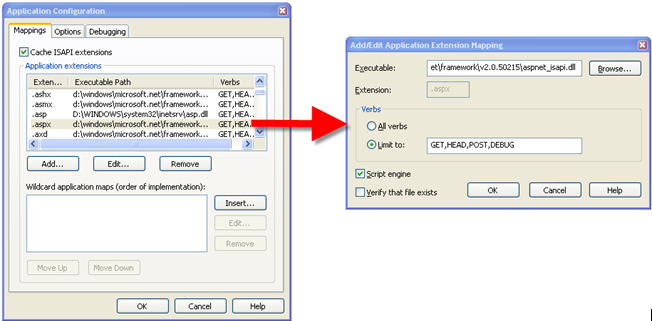
aspnet_isapi.dll (經典模式) 或直接進入 managed 管線 (整合模式)。HttpApplication 實例,觸發 BeginRequest 事件。IHttpModule):context.Response.End())。IHttpHandler) 執行核心邏輯:PageHandlerFactory → Page 類別;WebServiceHandlerFactory。EndRequest 等事件)。關鍵原則:一個請求只能由一個 HttpHandler 處理,但可經過多個 HttpModule。
Public Interface IHttpHandler
    ReadOnly Property IsReusable As Boolean  ' 實例是否可重用處理同類請求
    Sub ProcessRequest(context As HttpContext)  ' 核心處理邏輯
End Interface
Public Class ChartHandler : Implements IHttpHandler

    Public ReadOnly Property IsReusable As Boolean Implements IHttpHandler.IsReusable
        Get : Return True : End Get
    End Property

    Public Sub ProcessRequest(context As HttpContext) Implements IHttpHandler.ProcessRequest
        Dim width As Integer = 400, height As Integer = 300
        Using bmp As New Bitmap(width, height), g As Graphics = Graphics.FromImage(bmp)
            g.Clear(Color.White)
            g.DrawString("Dynamic Chart " & DateTime.Now.ToString("HH:mm:ss"),
                         New Font("Arial", 14), Brushes.Blue, 10, 10)
            context.Response.ContentType = "image/png"
            bmp.Save(context.Response.OutputStream, Imaging.ImageFormat.Png)
        End Using
    End Sub
End Class
當需根據請求參數動態決定具體 Handler 類別時,實作 IHttpHandlerFactory:
Public Class DynamicHandlerFactory : Implements IHttpHandlerFactory
    Public Function GetHandler(context As HttpContext, requestType As String, url As String, pathTranslated As String) As IHttpHandler Implements IHttpHandlerFactory.GetHandler
        Dim action As String = context.Request.QueryString("action")
        Select Case action
            Case "chart" : Return New ChartHandler()
            Case "pdf" : Return New PdfHandler()
            Case Else : Return New DefaultHandler()
        End Select
    End Function
    Public Sub ReleaseHandler(handler As IHttpHandler) Implements IHttpHandlerFactory.ReleaseHandler
        ' 可實作物件池回收邏輯
    End Sub
End Class
Public Interface IHttpModule
    Sub Init(app As HttpApplication)
    Sub Dispose()
End Interface

Public Class SecurityModule : Implements IHttpModule
    Public Sub Init(app As HttpApplication) Implements IHttpModule.Init
        AddHandler app.BeginRequest, AddressOf OnBeginRequest
        AddHandler app.AuthenticateRequest, AddressOf OnAuthenticateRequest
        AddHandler app.AuthorizeRequest, AddressOf OnAuthorizeRequest
        AddHandler app.EndRequest, AddressOf OnEndRequest
    End Sub

    Private Sub OnBeginRequest(sender As Object, e As EventArgs)
        Dim app As HttpApplication = CType(sender, HttpApplication)
        ' 記錄請求 IP、URL、UserAgent
        Trace.Write("Security", $"Request from {app.Context.Request.UserHostAddress}: {app.Context.Request.RawUrl}")
    End Sub

    Private Sub OnAuthenticateRequest(sender As Object, e As EventArgs)
        ' 自訂驗證邏輯:檢查 Token、API Key、JWT 等
    End Sub

    Private Sub OnAuthorizeRequest(sender As Object, e As EventArgs)
        ' 自訂授權邏輯:角色、權限檢查
    End Sub

    Private Sub OnEndRequest(sender As Object, e As EventArgs)
        ' 記錄回應狀態碼、處理時間
    End Sub

    Public Sub Dispose() Implements IHttpModule.Dispose
        ' 清理資源
    End Sub
End Class
<system.webServer>
  <modules>
    <add name="SecurityModule" type="MyApp.Modules.SecurityModule, MyApp" />
    <remove name="FormsAuthentication" /> <!-- 移除內建模組 -->
  </modules>
  <handlers>
    <add name="ChartHandler" verb="*" path="chart.ashx" type="MyApp.Handlers.ChartHandler, MyApp" />
    <add name="DynamicFactory" verb="*" path="api/*" type="MyApp.Factories.DynamicHandlerFactory, MyApp" />
  </handlers>
</system.webServer>
<system.web>
  <httpModules>
    <add name="SecurityModule" type="MyApp.Modules.SecurityModule, MyApp" />
  </httpModules>
  <httpHandlers>
    <add verb="*" path="chart.ashx" type="MyApp.Handlers.ChartHandler, MyApp" />
    <add verb="*" path="api/*" type="MyApp.Factories.DynamicHandlerFactory, MyApp" />
  </httpHandlers>
</system.web>
| 場景 | 推薦擴展點 | 說明 |
|---|---|---|
| 全站請求記錄、效能監控 | HttpModule (BeginRequest/EndRequest) | 不侵入業務邏輯,集中處理横切關注點 |
| 自訂驗證/授權機制 | HttpModule (AuthenticateRequest/AuthorizeRequest) | 替代或補充內建 Forms/Windows 驗證 |
| URL 重寫、友善網址 | HttpModule (BeginRequest) + HttpHandler | Module 重寫路徑,Handler 處理特定路由 |
| 動態圖片/PDF/Excel 產生 | HttpHandler (.ashx) | 無 ViewState/Page 生命週期開銷,效能最佳 |
| RESTful API 端點 | HttpHandler 或 ASP.NET Web API | 現代專案建議直接使用 Web API / ASP.NET Core |
| 多租戶依請求決定 Handler | IHttpHandlerFactory | Factory 模式解耦路由與實作 |
<modules runAllManagedModulesForAllRequests="true"> 或對特定路徑設定 preCondition=""。HttpModule 與 HttpHandler 是 ASP.NET 擴展管線的雙支柱:Module 處理橫切關注點 (驗證、記錄、重寫),Handler 專注於特定請求類型的核心回應產生。掌握管線事件順序、註冊配置差異 (system.web vs system.webServer)、Factory 模式應用,能讓你在不修改核心框架的前提下,靈活實現各種進階 Web 架構需求。