TDIB.AntialiasedLine 使用 Wu 反鋸齒演算法繪製平滑邊緣的直線,有效消除鋸齒狀階梯效果,適合高品質向量繪圖、UI 邊框、圖表繪製。本文提供對角線交叉對比範例。
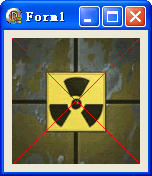
unit Unit1;
interface
uses Windows, Messages, SysUtils, Variants, Classes, Graphics, Controls, Forms,
  Dialogs, DIB, StdCtrls;
type
  TForm1 = class(TForm)
    DXPaintBox1: TDXPaintBox;
    procedure FormCreate(Sender: TObject);
  end;
var Form1: TForm1;
implementation {$R *.dfm}

procedure TForm1.FormCreate(Sender: TObject);
const ImgPath1 = 'C:\Temp\DX.jpg';
begin
  DXPaintBox1.DIB.LoadFromFile(ImgPath1);
  DXPaintBox1.Width := DXPaintBox1.DIB.Width;
  DXPaintBox1.Height := DXPaintBox1.DIB.Height;
  // AntialiasedLine(X1, Y1, X2, Y2, Color)
  DXPaintBox1.DIB.AntialiasedLine(0, 0, DXPaintBox1.Width, DXPaintBox1.Height, clRed);
  DXPaintBox1.DIB.AntialiasedLine(0, DXPaintBox1.Height, DXPaintBox1.Width, 0, clRed);
end;
end.
AntialiasedLine(X1, Y1, X2, Y2: Integer; Color: TColor)
| 特性 | Canvas.LineTo (GDI) | TDIB.AntialiasedLine |
|---|---|---|
| 邊緣品質 | 鋸齒明顯 | 平滑過渡 |
| 線寬控制 | 支援任意寬度 | 固定 1px 等效 |
| 效能 | 硬體加速快 | CPU 計算較慢 |
| 透明度支援 | 需額外設定 | 內建 Alpha 混合 |
Canvas.LineTo + 多重採樣若需粗反鋸齒線,可繪製多條平行反鋸齒線並疊加:
procedure ThickAALine(DIB: TDIB; X1, Y1, X2, Y2: Integer; Width: Integer; Color: TColor);
var dx, dy, len, nx, ny, i: Real;
begin
  dx := X2 - X1; dy := Y2 - Y1;
  len := Sqrt(dx*dx + dy*dy);
  if len = 0 then Exit;
  nx := -dy / len * (Width - 1) / 2; // 法向量
  ny := dx / len * (Width - 1) / 2;
  for i := -(Width - 1) / 2 to (Width - 1) / 2 do
    DIB.AntialiasedLine(Round(X1 + nx * i), Round(Y1 + ny * i),
                        Round(X2 + nx * i), Round(Y2 + ny * i), Color);
end;