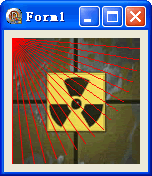
TDIB.LinePolar 以極座標方式繪製線條:從原點 (0,0) 以指定角度 (度數) 與長度 (半徑) 畫線。本文提供扇形掃描線效果範例。
unit Unit1;
interface
uses Windows, Messages, SysUtils, Variants, Classes, Graphics, Controls, Forms,
  Dialogs, DIB, StdCtrls;
type
  TForm1 = class(TForm)
    DXPaintBox1: TDXPaintBox;
    procedure FormCreate(Sender: TObject);
  end;
var Form1: TForm1;
implementation {$R *.dfm}

procedure TForm1.FormCreate(Sender: TObject);
const ImgPath1 = 'C:\Temp\DX.jpg';
var r: Real;
begin
  DXPaintBox1.DIB.LoadFromFile(ImgPath1);
  DXPaintBox1.Width := DXPaintBox1.DIB.Width;
  DXPaintBox1.Height := DXPaintBox1.DIB.Height;
  r := 0;
  while r < 90 do begin
    // LinePolar(CenterX, CenterY, AngleDeg, Length, Color)
    DXPaintBox1.DIB.LinePolar(0, 0, r, DXPaintBox1.Width, clRed);
    r := r + 5; // 每 5 度一條線
  end;
end;
end.
LinePolar(CenterX, CenterY: Integer; AngleDeg: Real; Length: Integer; Color: TColor)
r = f(θ) 繪圖var Angle: Real = 0;
procedure TForm1.Timer1Timer(Sender: TObject);
begin
DXPaintBox1.DIB.Assign(BackgroundDIB); // 重置背景
// 繪製掃描線
DXPaintBox1.DIB.LinePolar(CX, CY, Angle, MaxRadius, clLime);
// 繪製殘留軌跡(半透明)
DXPaintBox1.DIB.LinePolar(CX, CY, Angle - 10, MaxRadius, clGreen, fmMix50);
Angle := Angle + 2; if Angle >= 360 then Angle := 0;
DXPaintBox1.Repaint;
end;