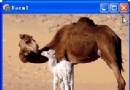
TDIB.FilterLine 與 FilterRect 以指定顏色與濾鏡模式繪製線段與矩形,支援 4 種混合模式,適合程序化 UI 繪製、網格線、選取框等。本文提供循環切換 4 種模式的展示範例。
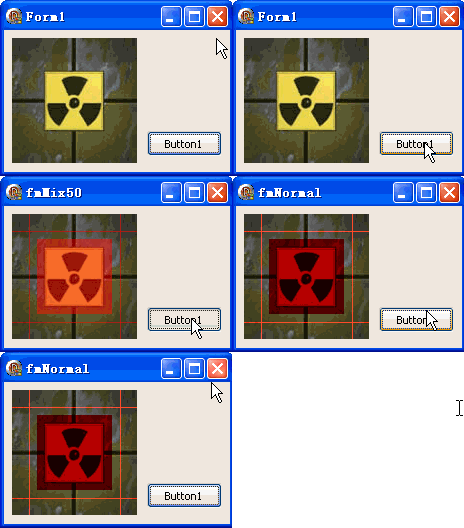
unit Unit1;
interface
uses Windows, Messages, SysUtils, Variants, Classes, Graphics, Controls, Forms,
  Dialogs, DIB, StdCtrls;
type
  TForm1 = class(TForm)
    DXPaintBox1: TDXPaintBox;
    Button1: TButton; // 循環切換濾鏡模式
    procedure FormCreate(Sender: TObject);
    procedure FormDestroy(Sender: TObject);
    procedure Button1Click(Sender: TObject);
  end;
var Form1: TForm1;
implementation {$R *.dfm}
uses TypInfo;
var dib: TDIB; f: Integer;

procedure TForm1.Button1Click(Sender: TObject);
const clr = clRed;
var w, h, a, b: Integer;
begin
  DXPaintBox1.DIB.Assign(dib); // 重置原圖
  w := DXPaintBox1.ClientWidth; h := DXPaintBox1.ClientHeight;
  a := w div 7; b := h div 7;
  // 繪製十字網格線
  DXPaintBox1.DIB.FilterLine(0, b, w, b, clr, TFilterMode(f));
  DXPaintBox1.DIB.FilterLine(0, h-b, w, h-b, clr, TFilterMode(f));
  DXPaintBox1.DIB.FilterLine(a, 0, a, h, clr, TFilterMode(f));
  DXPaintBox1.DIB.FilterLine(w-a, 0, w-a, h, clr, TFilterMode(f));
  // 繪製中心矩形
  DXPaintBox1.DIB.FilterRect(w div 5, h div 5, w div 5*3, h div 5*3, clr, TFilterMode(f));
  DXPaintBox1.Repaint;
  // 顯示目前模式名稱
  Caption := GetEnumName(TypeInfo(TFilterMode), f);
  Inc(f); f := f and 3; // 0~3 循環
end;

procedure TForm1.FormCreate(Sender: TObject);
const ImgPath1 = 'C:\Temp\DX.jpg';
begin
  dib := TDIB.Create;
  dib.LoadFromFile(ImgPath1);
  DXPaintBox1.DIB.Assign(dib);
  DXPaintBox1.Width := dib.Width;
  DXPaintBox1.Height := dib.Height;
  DXPaintBox1.Repaint;
end;

procedure TForm1.FormDestroy(Sender: TObject); begin dib.Free; end;
end.
| 值 | 常數 | 效果 |
|---|---|---|
| 0 | fmNormal | 正常覆蓋 |
| 1 | fmMix75 | 75% 混合 |
| 2 | fmMix50 | 50% 混合 |
| 3 | fmMix25 | 25% 混合 |
FilterLine(X1, Y1, X2, Y2: Integer; Color: TColor; Mode: TFilterMode);
FilterRect(Left, Top, Right, Bottom: Integer; Color: TColor; Mode: TFilterMode);