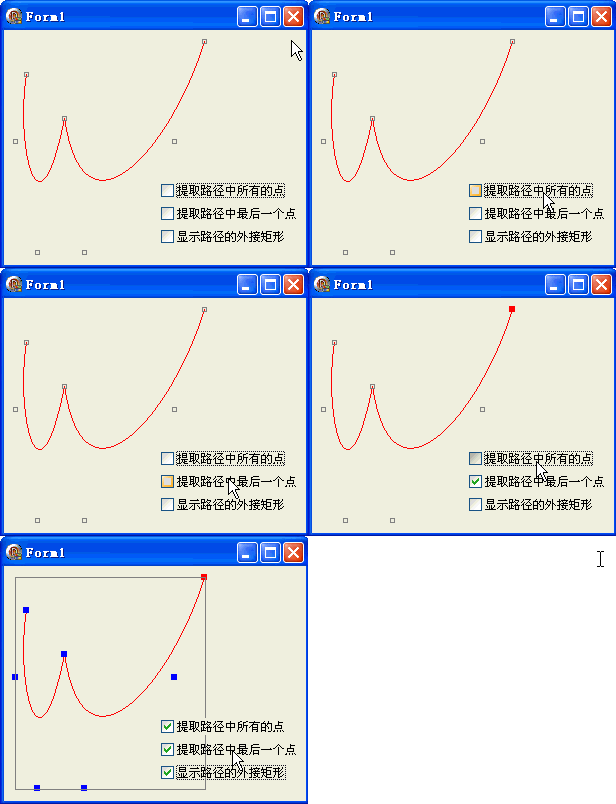
路徑的基本屬性查詢是進行幾何分析、碰撞偵測、邊界計算的基礎。本文示範四個核心查詢方法:總點數、所有頂點、最後一點、外接矩形。
| 方法 | 回傳值 | 用途 |
|---|---|---|
GetPointCount | Integer | 配置陣列大小、迴圈邊界 |
GetPathPoints(points, count) | 填充 TGPPoint 陣列 | 幾何分析、序列化、編輯器 |
GetLastPoint(var pt: TGPPointF) | 單一 TGPPointF | 路徑延續、連接下一段 |
GetBounds(var rect: TGPRect) | 外接矩形 TGPRect | 碰撞偵測、視窗裁剪、佈局 |
procedure TForm1.FormPaint(Sender: TObject);
var
  g: TGPGraphics;
  path: TGPGraphicsPath;
  p: TGPPen;
  b: TGPBrush;
  pts: array[0..6] of TGPPoint;  {原始 7 點貝塞爾控制點}
  ptf: TGPPointF;
  ppts: array of TGPPoint;
  rect: TGPRect;
  i: Integer;
begin
  {建立雙貝塞爾路徑}
  path := TGPGraphicsPath.Create;
  path.AddBeziers(PGPPoint(@pts), Length(pts));

  g := TGPGraphics.Create(Canvas.Handle);
  p := TGPPen.Create(aclRed);
  g.DrawPath(p, path);  {繪製原始曲線}

  {灰色顯示原始控制點}
  p.SetColor(aclGray);
  for i := 0 to Length(pts)-1 do
    g.DrawRectangle(p, MakeRect(pts[i].X-2, pts[i].Y-2, 4, 4));

  b := TGPSolidBrush.Create(aclBlue);
  {CheckBox1: 所有路徑頂點}
  if CheckBox1.Checked then begin
    SetLength(ppts, path.GetPointCount);
    path.GetPathPoints(PGPPoint(ppts), Length(pts));
    for i := 0 to Length(ppts)-1 do
      g.FillRectangle(b, MakeRect(ppts[i].X-3, ppts[i].Y-3, 6, 6));
  end;

  {CheckBox2: 最後一點}
  TGPSolidBrush(b).SetColor(aclRed);
  if CheckBox2.Checked then begin
    path.GetLastPoint(ptf);
    g.FillRectangle(b, MakeRect(ptf.X-3, ptf.Y-3, 6, 6));
  end;

  {CheckBox3: 外接矩形}
  if CheckBox3.Checked then begin
    path.GetBounds(rect);
    g.DrawRectangle(p, rect);
  end;

  b.Free; p.Free; path.Free; g.Free;
end;
object Form1: TForm1
  Left = 0
  Top = 0
  Caption = 'Form1'
  ClientHeight = 235
  ClientWidth = 302
  Color = clBtnFace
  Font.Charset = DEFAULT_CHARSET
  Font.Color = clWindowText
  Font.Height = -11
  Font.Name = 'Tahoma'
  Font.Style = []
  OldCreateOrder = False
  Position = poDesktopCenter
  OnCreate = FormCreate
  OnPaint = FormPaint
  PixelsPerInch = 96
  TextHeight = 13
  object CheckBox1: TCheckBox ... {三個 CheckBox}
end