GDI+ 路徑由一或多個子圖形組成。StartFigure 開始新子圖形,CloseFigure 閉合當前子圖形,CloseAllFigures 一次閉合所有開啟的子圖形。本文透過三組折線示範三種方法的行為差異。
| 方法 | 作用 | 影響範圍 | PathTypes 標記 |
|---|---|---|---|
StartFigure | 開始新子圖形,後續點屬於新子圖形 | 後續 AddLine/AddCurve 等 | 下一點標記 $00 (Start) |
CloseFigure | 連接當前點到子圖形起點並標記閉合 | 當前子圖形 | 當前點加上 $80 (CloseSubpath) |
CloseAllFigures | 遍歷所有未閉合子圖形並閉合 | 所有開啟的子圖形 | 各子圖形最後點加 $80 |
建立三個平移的三角形折線(各 3 點),CheckBox 控制閉合行為。
procedure TForm1.FormPaint(Sender: TObject);
var
  g: TGPGraphics;
  path: TGPGraphicsPath;
  p: TGPPen;
  b: TGPBrush;
  pts1, pts2, pts3: array[0..2] of TGPPoint;
  i: Integer;
begin
  {三組平移的三角形頂點}
  pts1[0] := MakePoint(0, 30); pts1[1] := MakePoint(30, 0); pts1[2] := MakePoint(60, 30);
  for i := 0 to 2 do begin
    pts2[i].X := pts1[i].X + 80; pts2[i].Y := pts1[i].Y + 20;
    pts3[i].X := pts2[i].X + 80; pts3[i].Y := pts2[i].Y + 20;
  end;

  g := TGPGraphics.Create(Canvas.Handle);
  path := TGPGraphicsPath.Create;
  path.StartFigure; path.AddLines(PGPPoint(@pts1), 3);
  path.StartFigure; path.AddLines(PGPPoint(@pts2), 3);
  path.StartFigure; path.AddLines(PGPPoint(@pts3), 3);

  if CheckBox1.Checked then path.CloseFigure;      {閉合最後一個}
  if CheckBox2.Checked then path.CloseAllFigures;  {閉合所有}

  p := TGPPen.Create(aclRed, 2);
  b := TGPSolidBrush.Create(aclYellow);
  g.DrawPath(p, path);  {觀察邊框閉合情況}

  b.Free; p.Free; path.Free; g.Free;
end;
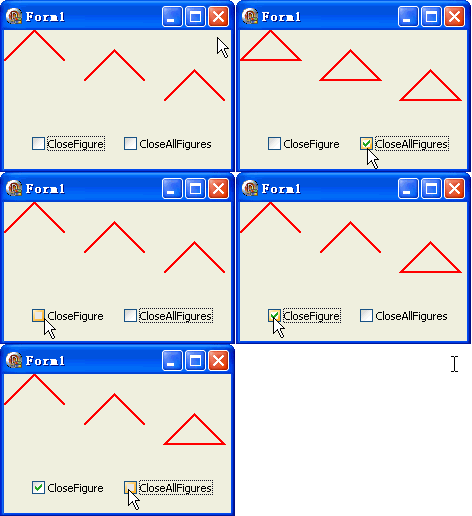
| 設定 | 子圖形1 | 子圖形2 | 子圖形3 | 視覺結果 |
|---|---|---|---|---|
| 無勾選 | 開放 | 開放 | 開放 | 三條開放折線 |
| CloseFigure | 開放 | 開放 | 閉合 | 僅最後一個三角形閉合 |
| CloseAllFigures | 閉合 | 閉合 | 閉合 | 三個三角形全閉合 |
| 兩者皆勾選 | 閉合 | 閉合 | 閉合 | 同上(CloseFigure 重複無效) |
object Form1: TForm1
  Left = 0
  Top = 0
  Caption = 'Form1'
  ClientHeight = 139
  ClientWidth = 227
  Color = clBtnFace
  Font.Charset = DEFAULT_CHARSET
  Font.Color = clWindowText
  Font.Height = -11
  Font.Name = 'Tahoma'
  Font.Style = []
  OldCreateOrder = False
  Position = poDesktopCenter
  OnCreate = FormCreate
  OnPaint = FormPaint
  PixelsPerInch = 96
  TextHeight = 13
  object CheckBox1: TCheckBox ... {CloseFigure / CloseAllFigures}
end