理解路徑的點座標陣列與點類型陣列是掌握 GDI+ 向量圖形核心。本文對比兩種存取方式:傳統 GetPathPoints/GetPathTypes 組合,與封裝類 TPathData 的簡化操作。
| 常數值 | Delphi 列舉 | 含義 | 典型用途 |
|---|---|---|---|
| $00 | PathPointTypeStart | 路徑/子路徑起始點 | MoveTo 起點 |
| $01 | PathPointTypeLine | 直線終點 | LineTo 終點 |
| $03 | PathPointTypeBezier | 貝塞爾曲線控制點/終點 | AddBezier/AddBeziers |
| $07 | PathPointTypePathTypeMask | 類型遮罩 (低 3 位) | 提取基本類型 |
| $10 | PathPointTypeDashMode | 虛線模式標記 | 虛線路徑段落 |
| $20 | PathPointTypePathMarker | 路徑標記點 | 自定義標記 |
| $80 | PathPointTypeCloseSubpath | 子路徑閉合點 | CloseFigure 產生 |
var
  points: array of TGPPoint;
  types: PByte;
  typestr: string;
  i: Integer;
begin
  SetLength(points, path.GetPointCount);
  GetMem(types, path.GetPointCount);
  path.GetPathPoints(PGPPoint(points), Length(points));
  path.GetPathTypes(types, Length(points));
  for i := 0 to Length(points) - 1 do begin
    case types^ of
      $00: typestr := '路徑起始點';
      $01: typestr := '直線點';
      $03: typestr := '貝塞爾線點';
      $07: typestr := '遮蓋點';
      $10: typestr := '虛線點';
      $20: typestr := '路徑標記';
      $80: typestr := '子路徑結束點';
    end;
    StringGrid.Cells[0,i+1] := IntToStr(points[i].X);
    StringGrid.Cells[1,i+1] := IntToStr(points[i].Y);
    StringGrid.Cells[2,i+1] := typestr;
    Inc(types);
  end;
  Dec(types, Length(points)); FreeMem(types);
end;
var
  PathData: TPathData;
  Points: PGPPointF;
  Types: PByte;
  TypeStr: string;
  i: Integer;
begin
  PathData := TPathData.Create;
  path.GetPathData(PathData);  {一次取得所有資料}
  Points := PathData.Points;   {Single 精度點陣列}
  Types := PathData.Types;
  StringGrid.RowCount := PathData.Count + 1;
  for i := 0 to PathData.Count - 1 do begin
    case Types^ of ... {同樣 case 判斷}
    StringGrid.Cells[0,i+1] := IntToStr(Trunc(Points.X));
    StringGrid.Cells[1,i+1] := IntToStr(Trunc(Points.Y));
    StringGrid.Cells[2,i+1] := TypeStr;
    Inc(Points); Inc(Types);
  end;
  PathData.Free;
end;
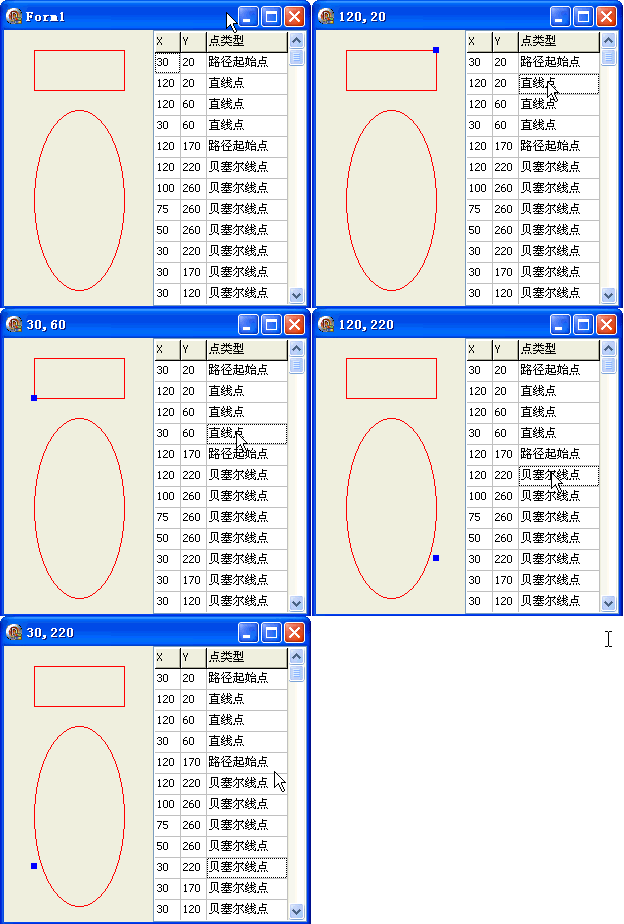
| 特性 | GetPathPoints/Types | TPathData |
|---|---|---|
| 精度 | Integer (TGPPoint) | Single (TGPPointF) |
| 記憶體管理 | 手動 GetMem/FreeMem | 自動管理 |
| 資料存取 | 分離呼叫 | 統一物件 |
| 修改回寫 | 需重建路徑 | 修改後可重建 |
| 推薦場景 | 舊代碼維護、整數座標需求 | 新專案、高精度、編輯器 |
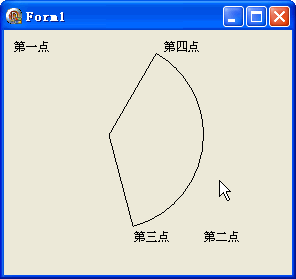
選中儲存格時,在畫布上繪製藍色方塊標示對應頂點位置。
object Form1: TForm1
  Left = 0
  Top = 0
  Caption = 'Form1'
  ClientHeight = 276
  ClientWidth = 303
  Color = clBtnFace
  Font.Charset = DEFAULT_CHARSET
  Font.Color = clWindowText
  Font.Height = -11
  Font.Name = 'Tahoma'
  Font.Style = []
  OldCreateOrder = False
  Position = poDesktopCenter
  OnCreate = FormCreate
  OnPaint = FormPaint
  PixelsPerInch = 96
  TextHeight = 13
  object StringGrid1: TStringGrid ... {3 欄:X, Y, 點類型}
end