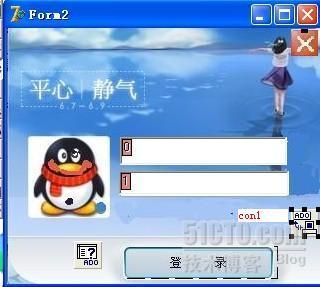
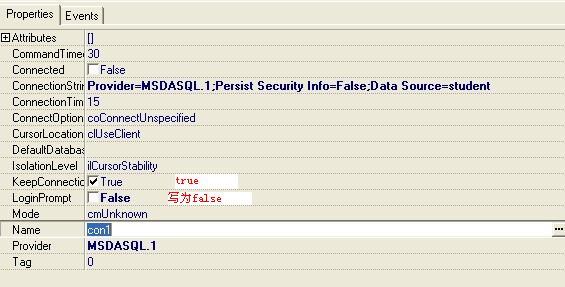
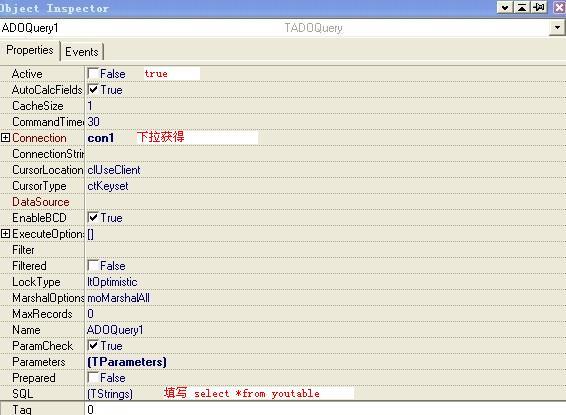
實作一個霸氣登入介面,使用資料庫驗證帳號密碼,登入成功後隱藏登入視窗、顯示主視窗,並將使用者資訊寫入狀態列。
procedure TForm2.btn1Click(Sender: TObject);
begin
  if (edt1.Text = '') or (edt2.Text = '') then
    ShowMessage('帳號或密碼不能為空')
  else
  begin
    with ADOQuery1 do
    begin
      Close;
      SQL.Clear;
      { 直接字串拼接 - 存在 SQL 注入風險,教學用 }
      SQL.Add('select * from admins where 學號=''' + edt1.Text + ''' and 密碼=''' + edt2.Text + '''');
      Open;

      if Eof then
      begin
        ShowMessage('帳號或密碼錯誤');
        Exit;
      end
      else
      begin
        { 介面跳轉 }
        Form2.Hide; { 隱藏登入視窗 }
        Form1.Show; { 顯示主視窗 }

        { 寫入狀態列資訊 }
        Form1.stat1.Panels[1].Text := edt1.Text; { 帳號 }
        Form1.stat1.Panels[3].Text := FieldValues['權限']; { 權限 }
        Form1.stat1.Panels[5].Text := getTimeNow(); { 登入時間 }
      end;
    end;
  end;
end;
原始碼使用字串拼接 SQL,存在嚴重 SQL 注入漏洞! 實務上必須使用參數化查詢:
with ADOQuery1 do
begin
  Close;
  SQL.Text := 'select * from admins where 學號 = :uid and 密碼 = :pwd';
  Parameters.ParamByName('uid').Value := edt1.Text;
  Parameters.ParamByName('pwd').Value := edt2.Text;
  Open;
  { 後續邏輯相同 }
end;
Form2.Hide; Form1.Show;:隱藏/顯示模式,保持表單實例與狀態OnClose 呼叫 Application.Terminate 或重新 Form2.Showhttps://7071976.blog.51cto.com/7061976/1220038
此範例展示了 Delphi 傳統資料庫應用的典型登入流程,但請務必在實務專案中採用參數化查詢保護資料安全。