在 Windows 多線程同步體系中,Mutex、Semaphore、Event、WaitableTimer 等所有核心同步物件,最終都仰賴 WaitForSingleObject(或其變體 WaitForMultipleObjects)來進行等待。它是同步編程的「通用鑰匙」,掌握它就能駕馭幾乎所有核心同步機制。
function WaitForSingleObject(
  hHandle: THandle;       // 待等待的核心物件句柄
  dwMilliseconds: DWORD   // 等待逾時毫秒數,INFINITE 表示永久等待
): DWORD; stdcall;
主要返回值:
此例展示如何用 CreateProcess 啟動外部進程,取得其進程句柄,再建立一條監視線程呼叫 WaitForSingleObject 等待進程結束,最後在主視窗顯示通知。
unit Unit1;
interface
uses Windows, Messages, SysUtils, Variants, Classes, Graphics, Controls, Forms, Dialogs, StdCtrls;
type
  TForm1 = class(TForm)
    Button1: TButton;
    procedure Button1Click(Sender: TObject);
  end;
var Form1: TForm1;
implementation {$R *.dfm}
var hProcess: THandle; // 進程句柄

function MyThreadFun(p: Pointer): DWORD; stdcall;
begin
  // 無限等待進程結束
  if WaitForSingleObject(hProcess, INFINITE) = WAIT_OBJECT_0 then
    Form1.Caption := Format('進程 %d 已關閉', [hProcess]);
  Result := 0;
end;

procedure TForm1.Button1Click(Sender: TObject);
var pInfo: TProcessInformation; sInfo: TStartupInfo;
    Path: array[0..MAX_PATH-1] of Char; ThreadID: DWORD;
begin
  GetSystemDirectory(Path, MAX_PATH);
  StrCat(Path, '\notepad.exe');
  FillChar(sInfo, SizeOf(sInfo), 0);
  sInfo.cb := SizeOf(sInfo);
  if CreateProcess(Path, nil, nil, nil, False, 0, nil, nil, sInfo, pInfo) then
  begin
    hProcess := pInfo.hProcess;
    Caption := Format('進程 %d 已啟動', [hProcess]);
    CreateThread(nil, 0, @MyThreadFun, nil, 0, ThreadID); // 監視線程
  end;
end;
end.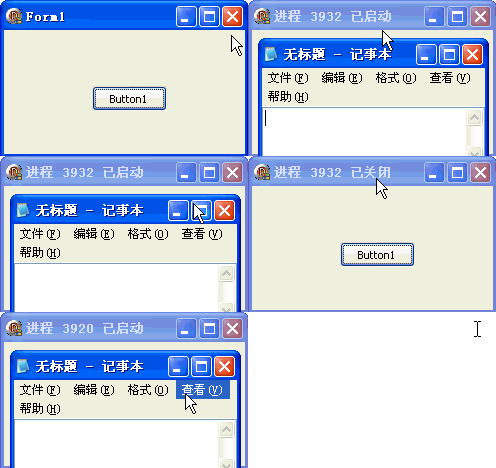
點擊按鈕啟動記事本,關閉記事本後主視窗標題自動更新為「進程 xxx 已關閉」,證明等待函數正確捕捉到進程終止訊號。
WaitForSingleObject 可等待的物件不只進程/線程,還包括 Event、Mutex、Semaphore、Timer、Console Input 等所有可同步的核心物件。INFINITE 使用,但需警惕死結;若需回應使用者介面,可考慮短逾時配合 MsgWaitForMultipleObjects 處理訊息佇列。