 Android AlertDialog.Builder 中 findViewById 返回 Null:需先獲取對話框 View
錯誤代碼 AlertDialog.Builder adb = new AlertDialog.Builder(context); adb.setView(Lay
Android Button setOnClickListener 報錯:Activity 必須實現 OnClickListener 接口
錯誤信息 The method setOnClickListener(View.OnClickListener) in the type View is not
iOS UITableViewController 中調整 TableView 寬度並避免黑邊
問題 在 UITableViewController 中直接修改 tableView.frame 導致標題欄未同步移動、兩側出現黑邊。 解決方案:在 view
 Android GPS 定位獲取經緯度:需請求位置更新而非依賴 getLastKnownLocation
常見誤區 LocationManager.getLastKnownLocation() 僅返回**上次已知位置**,若設備近期未定位(如剛啟動、室內、GPS 未
iOS 運行時動態訪問屬性:使用 KVC 替代 for 循環拼接變量名
錯誤嘗試 for(int i = 0; i <= 3; i++) { lblTeamName(i).text = @something; // 編譯錯誤
Android ImageView 觸摸坐標轉換為 Bitmap 原圖坐標
核心邏輯 計算顯示區域與原圖的縮放比例,將觸摸點相對 ImageView 的偏移量按比例映射回原圖。 完整工具方法 public static PointF
Android AlarmManager 通知無聲音解決:設置 Notification.defaults
問題 自定義 BroadcastReceiver 發送通知,彈出提示但**無鈴聲、無震動**。 原因 未設置 Notification.defaults,系統
 Android 傳遞 Context 到普通類時的空指針陷阱:賦值順序顛倒
錯誤代碼 public class LocalStorage { Context ctx; public LocalStorage(Contex
Android 判斷 USB 存儲設備掛載路徑並區分 U 盤與 TF 卡
核心思路 遍歷 /mnt 或 /storage 目錄,排除主 SD 卡,根據設備節點名稱關鍵字(usb、udisk、sda)判斷 U 盤;但**不同廠商路徑命名
iOS 藍牙鍵盤連接時隱藏 Safari 虛擬鍵盤的限制
結論 **無法在非越獄設備上實現**。iOS 系統設計: Safari 虛擬鍵盤顯示邏輯由 WebKit 內部控制,不暴露公開 API 供 App 隱藏。 藍
iOS 判斷數組是否包含特定 UIImage 對象
錯誤代碼 for (platforms in platforms) { // 語法錯誤,且 platforms 既是數組又是循環變量 if (CGRec
 Android ListView 項目中 ImageView 下方文字居中顯示
問題 RelativeLayout 中 TextView 設置 layout_below=@id/icon 但無法水平居中於 ImageView 下方。 解決
Android 代碼動態設置 RelativeLayout 子視圖對齊規則
核心 API RelativeLayout.LayoutParams.addRule(int verb) 及 addRule(int verb, int anc
Android ViewPager 添加頁面切換監聽與子 View 點擊事件
頁面切換監聽 使用 ViewPager.OnPageChangeListener: viewPager.addOnPageChangeListener(new
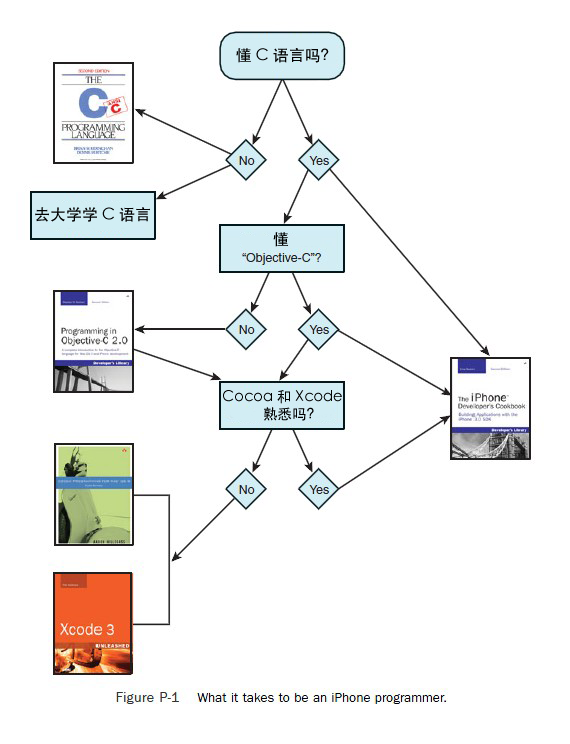 資深 C++ 程序員快速上手 iOS 開發:學習路線圖與資源推薦
時間預估 Objective-C 語法適應:**2 週**(C++ 基礎可類比指針、內存管理、多態)。 Xcode、Interface Builder、Coc
Android 獲取 SD 卡指定目錄的 URI 路徑
標準做法 使用 Environment.getExternalStorageDirectory() 獲取外部存儲根目錄,拼接子目錄後轉為 URI: String
iOS 將 UITextView 內容導出為 PDF 文件並保存本地
核心思路 利用 UIKit 的 UIGraphicsBeginPDFContextToFile 開啟 PDF 上下文,逐頁繪製 UITextView 的內容,最


