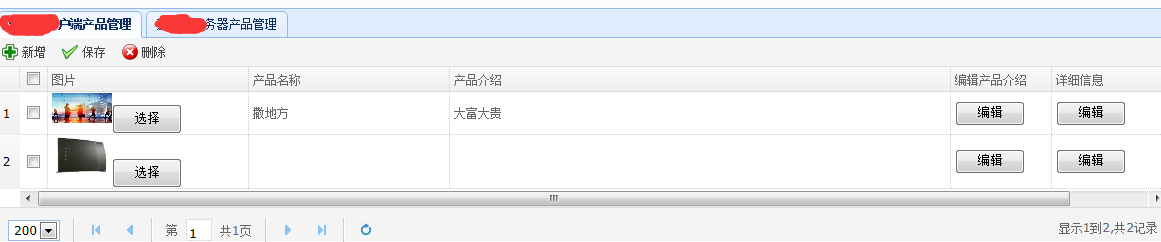
開發者將圖片以 BLOB 型別儲存在 MySQL 資料庫中,嘗試在 EasyUI DataGrid 中直接顯示,但發現無法正常渲染圖片。原始嘗試程式碼存在幾個關鍵問題:
url 屬性期望回傳 JSON 格式資料,而非圖片二進位流採用「資料介面 + 圖片介面」分離模式:
<?php
// list.php
header('Content-Type: application/json; charset=utf-8');

$sql = "SELECT uid, username, pic_id FROM e_user WHERE uid = '1dff5b51f862e6d181577e3ca34248be'";
$result = mysqli_query($conn, $sql);

$rows = array();
while ($row = mysqli_fetch_assoc($result)) {
    // 關鍵:圖片欄位回傳圖片服務的 URL,而非二進位資料
    $row['pic_url'] = "get_image.php?pic_id=" . $row['pic_id'];
    $rows[] = $row;
}

echo json_encode(array('total' => count($rows), 'rows' => $rows));
?><?php
// get_image.php
$pic_id = $_GET['pic_id'];
$sql = "SELECT pic FROM e_user_pic WHERE pic_id = '$pic_id'";
$result = mysqli_query($conn, $sql);
$row = mysqli_fetch_assoc($result);
if ($row && $row['pic']) {
header("Content-Type: image/png");
header("Content-Length: " . strlen($row['pic']));
echo $row['pic'];
} else {
// 回傳預設佔位圖
header("Content-Type: image/png");
readfile('default_avatar.png');
}
?><table id="dg" class="easyui-datagrid" url="list.php" method="get" fitColumns="true">
<thead>
<tr>
<th field="username" width="100">用戶名</th>
<th field="pic_url" width="120" formatter="formatPic">頭像</th>
</tr>
</thead>
</table>
<script>
function formatPic(value, row, index) {
// value 就是 pic_url,直接渲染 img 標籤
return '<img src="' + value + '" width="80" height="80" style="border-radius:4px;" />';
}
</script>❌ 錯誤:在同一個 PHP 檔案中同時 echo $blob 和 echo '<img...>'
❌ 錯誤:DataGrid url 直接指向輸出圖片的 PHP
✅ 正確:資料與圖片分離,透過 URL 參考關聯