XAMPP 修改 MySQL 端口 3306 → 3307 (避開 Lantern 衝突) 後,phpMyAdmin 報錯:
#2002 - The server is not responding
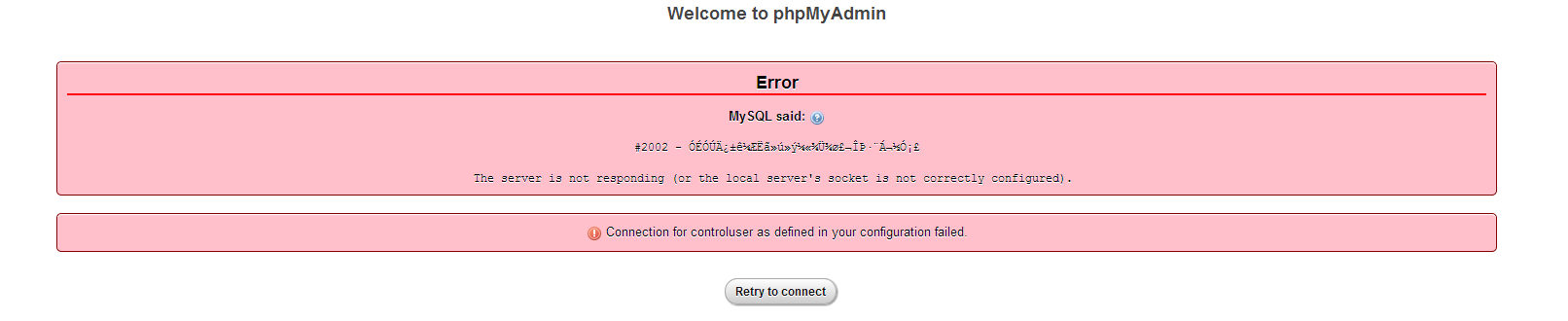
已嘗試修改 config.inc.php 和 my.ini 中的 host 為 127.0.0.1,無效。
phpMyAdmin 配置文件 config.default.php 中端口配置留空,默認讀取 3306,與實際 3307 不符。
xampp\phpMyAdmin\libraries\config.default.php$cfg['Servers'][$i]['port']// 原
$cfg['Servers'][$i]['port'] = '';
// 改
$cfg['Servers'][$i]['port'] = '3307';
| 文件 | 作用 | 需修改項 |
|---|---|---|
my.ini | MySQL 服務端配置 | port=3307 |
php.ini | PHP MySQL 擴展默認連接 | mysqli.default_port=3307 |
config.inc.php | phpMyAdmin 用戶配置 (優先) | $cfg['Servers'][$i]['port'] = '3307'; |
config.default.php | phpMyAdmin 默認配置 (備用) | $cfg['Servers'][$i]['port'] = '3307'; |
config.inc.php > config.default.phpport = '' 時,PHP MySQL 驅動默認連接 3306#2002config.inc.php (用戶配置),避免升級覆蓋netstat -ano | findstr "3307" 確認端口監聽正常XAMPP 修改 MySQL 端口後 phpMyAdmin #2002 錯誤,核心在於 config.default.php 端口配置留空導致默認回退 3306。顯式設置 $cfg['Servers'][$i]['port'] = '3307' 即可解決。