Logcat 顯示第 37 行報錯,代碼嘗試將服務端返回的 JSON 對象強轉為數組:
String jsonData = (String) msg.obj;
JSONArray jsonArray = new JSONArray(jsonData); // 崩潰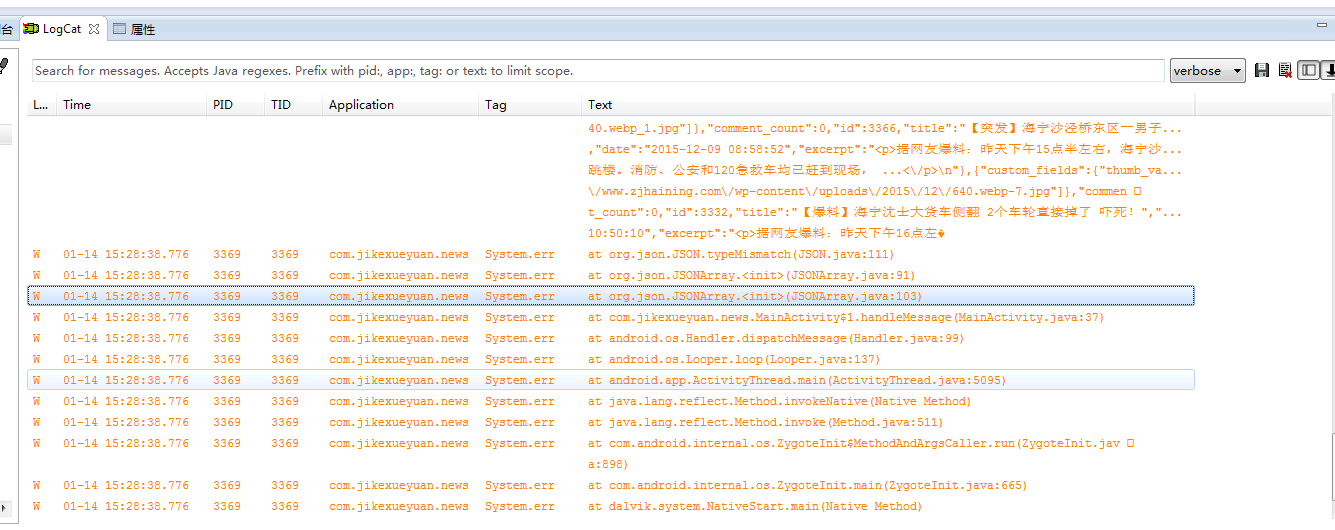
服務端返回的是 **JSONObject** (以 { 開頭),而非 JSONArray (以 [ 開頭)。直接 `new JSONArray(jsonData)` 拋出 JSONException。
JSONObject。"posts"、"data"、"list")。JSONArray 遍歷。try {
JSONObject root = new JSONObject(jsonData);
// 假設數據在 "posts" 字段
JSONArray jsonArray = root.getJSONArray("posts");
for (int i = 0; i < jsonArray.length(); i++) {
JSONObject item = jsonArray.getJSONObject(i);
String title = item.getString("title");
// ... 其他字段
newsList.add(new News(title, ...));
}
adapter.notifyDataSetChanged();
} catch (JSONException e) {
e.printStackTrace();
}jsonData 確認結構:System.out.println(jsonData);root.names() 遍歷鍵名。