四種進度條風格:
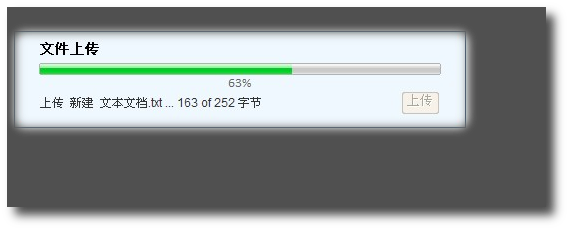



<iframe name="uploadFrame">,表單 target="uploadFrame" 提交至 Upload.aspxUpload.aspx 逐塊寫入檔案,即時更新 Session["UploadInfo"] (含已傳位元組、總大小、檔名)setInterval 呼叫 PageMethods.GetUploadStatus() 讀取 Session,更新進度條 UIvar intervalID, progressBar = $find('progress');
function onUploadClick() {
if (!fileUpload.value) return alert('請選擇檔案');
$get('upload').disabled = true;
updateMessage('info', '初始化上傳...');
form.submit(); // 提交至 iframe
Sys.UI.DomElement.addCssClass($get('uploadFrame'), 'hidden');
progressBar.set_percentage(0); progressBar.show();
intervalID = window.setInterval(function() {
PageMethods.GetUploadStatus(function(result) {
if (result) {
progressBar.set_percentage(result.percentComplete);
updateMessage('info', result.message);
if (result.percentComplete == 100) window.clearInterval(intervalID);
}
});
}, 500);
}
[WebMethod, ScriptMethod]
public static object GetUploadStatus() {
    var info = HttpContext.Current.Session["UploadInfo"] as UploadInfo;
    if (info != null && info.IsReady) {
        int pct = (int)Math.Ceiling((double)info.UploadedLength / info.ContentLength * 100);
        return new { percentComplete = pct, message = $"上傳 {info.FileName} ... {info.UploadedLength} of {info.ContentLength} 位元組" };
    }
    return null;
}
protected void Page_Load(object sender, EventArgs e) {
    if (!IsPostBack) return;
    var info = Session["UploadInfo"] as UploadInfo;
    if (info == null) { /* 錯誤處理 */ return; }
    info.IsReady = false;
    if (fileUpload.PostedFile != null && fileUpload.PostedFile.ContentLength > 0) {
        string path = Server.MapPath(@"Uploads");
        string name = Path.GetFileName(fileUpload.PostedFile.FileName);
        info.ContentLength = fileUpload.PostedFile.ContentLength;
        info.FileName = name; info.UploadedLength = 0;
        info.IsReady = true;
        int bufferSize = 10000; // 10KB 緩衝
        byte[] buffer = new byte[bufferSize];
        using (FileStream fs = new FileStream(Path.Combine(path, name), FileMode.Create)) {
            Stream input = fileUpload.PostedFile.InputStream;
            int read;
            while ((read = input.Read(buffer, 0, bufferSize)) > 0) {
                fs.Write(buffer, 0, read);
                info.UploadedLength += read;
                Session["UploadInfo"] = info; // 關鍵:每塊寫入後更新 Session
                Thread.Sleep(100); // 測試用減速,正式環境移除
            }
        }
        File.Delete(Path.Combine(path, name)); // 示範刪除
        ScriptManager.RegisterStartupScript(this, GetType(), "done",
            $"window.parent.onComplete('success', '{name} 已成功上傳');", true);
    }
    info.IsReady = false;
}
完整專案含多種進度條樣式 (MattBerseth AJAX 控制項),下載連結:https://xiazai.jb51.net/201509/yuanma/asp_net_progressbar(jb51.net).rar