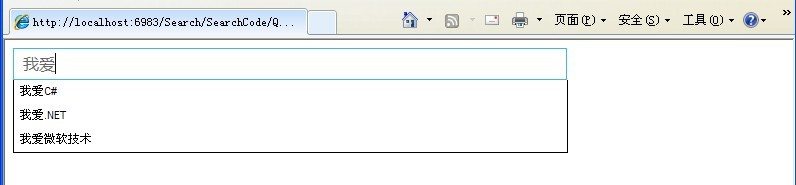
前端輸入 → JS 捕獲關鍵字 → AJAX 非同步請求 → 後端 Generic Handler 查詢 → 回傳分隔字串 → 前端動態建立建議清單 → 支援鍵盤選取/滑鼠點選填入。
function createAjaxObj() {
    var req = false;
    if (window.XMLHttpRequest) { // 標準瀏覽器
        req = new XMLHttpRequest();
        if (req.overrideMimeType) req.overrideMimeType('text/xml');
    } else if (window.ActiveXObject) { // IE
        try { req = new ActiveXObject("Msxml2.XMLHTTP"); }
        catch (e) { try { req = new ActiveXObject("Microsoft.XMLHTTP"); } catch (e) {} }
    }
    return req;
}
function getOs() {
    var txt = document.getElementById('txtSearch');
    if (navigator.userAgent.indexOf("MSIE") > 0) {
        txt.attachEvent("onpropertychange", search);
    } else if (navigator.userAgent.indexOf("Firefox") > 0) {
        txt.addEventListener("input", search, false);
    }
}

function ClearOS() {
    var txt = document.getElementById('txtSearch');
    if (navigator.userAgent.indexOf("MSIE") > 0) {
        txt.detachEvent("onpropertychange", search);
    } else {
        txt.removeEventListener("input", search, false);
    }
}
var searchReq = createAjaxObj();
var isCheckDiv = false, x = -1;

function search() {
    if (searchReq.readyState == 4 || searchReq.readyState == 0) {
        var val = escape(document.getElementById("txtSearch").value);
        searchReq.open("GET", encodeURI('Search.ashx?search=' + val + '&fresh=' + Math.random()), true);
        searchReq.onreadystatechange = handleSearch;
        searchReq.send(null);
    }
}

function handleSearch() {
    if (searchReq.readyState == 4) {
        var div = document.getElementById("search_div");
        div.innerHTML = "";
        var items = searchReq.responseText.split("^");
        for (var i = 0; i < items.length - 1; i++) {
            var html = '<div onmouseover="selectOverDiv(this,' + i + ');" ';
            html += 'onmouseout="selectOutDiv(this,' + i + ');" ';
            html += 'onclick="setSearch(this.innerHTML);" class="search_link">' + items[i] + '</div>';
            div.innerHTML += html;
        }
        ShowDiv();
        x = -1;
    }
}
document.onkeydown = function(e) {
    e = e || window.event;
    var key = e.keyCode;
    var div = document.getElementById("search_div");
    if (div.style.display == "none") return;
    var rows = div.getElementsByTagName("div");
    switch (key) {
        case 40: x = (x + 1) % rows.length; break; // Down
        case 38: x = (x - 1 + rows.length) % rows.length; break; // Up
        case 13: if (rows[x]) setSearch(rows[x].innerHTML); break; // Enter
    }
    for (var i = 0; i < rows.length; i++) rows[i].className = (i == x) ? "search_link_over" : "search_link";
};
public class Search : IHttpHandler
{
    public List<string> DataSource => new List<string> { "我愛C#", "我愛.NET", "我愛微軟技術" };

    public void ProcessRequest(HttpContext context)
    {
        context.Response.ContentType = "text/plain";
        string kw = HttpUtility.UrlDecode(context.Request.QueryString["search"], Encoding.UTF8);
        var result = DataSource.Where(s => s.Contains(kw)).ToList();
        var sb = new StringBuilder();
        foreach (var s in result) sb.Append(s + "^");
        context.Response.Write(sb.ToString());
    }
    public bool IsReusable => false;
}
<body onload="getOs()">
<form id="form1" runat="server">
<div class="myBorder" onmouseover="this.className='mainInputOver'"
     onmouseout="this.className='myBorder'" onclick="this.className='mainInputFocus'">
    <input type="text" id="txtSearch" class="mainInput" autocomplete="off" onblur="HiddenDiv()" />
</div>
<div id="search_div" style="display:none; position:absolute; border:1px solid #000; background:#fff; width:550px;"></div>
</form></body>
fetch / axios 替代原生 XMLHttpRequesttemplate literals 渲染debounce 避免頻繁請求<datalist> 原生元素簡化 UI此範例展示傳統 AJAX 完整流程,理解基礎後再引入現代庫事半功倍。