index.htm (jQuery + jQuery UI),含隱藏 iframe 接收回應UploadHandler/Default.aspx,依 GUID 寫入檔案並更新 Cache[GUID]ProgressHandler/Handler.ashx,依 GUID 讀取 Cache 回傳 XML 進度資訊ProgressHandler/Abort.ashx,設定 Cache 物件 Abort=trueProgressHandler/GenerateGuid.ashx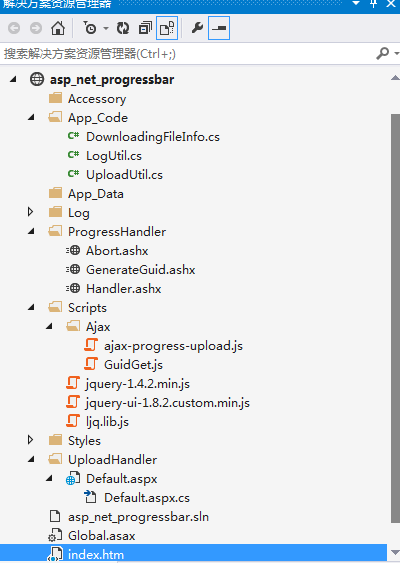
public void ProcessRequest(HttpContext context) {
    context.Response.ContentType = "application/xml";
    var guid = Guid.NewGuid().ToString();
    var doc = new XDocument(new XElement("root", new XElement("guid", guid)));
    context.Response.Write(doc.ToString());
}
public class UploadUtil {
    private const int BufferSize = 10000;
    private readonly string _filePath;
    private readonly Page _page;
    private readonly string _guid;
    public UploadUtil(Page page, string guid) { _page = page; _guid = guid;
        _filePath = page.Server.MapPath(ConfigurationManager.AppSettings["upload_folder"]); }

    public void Upload() {
        if (_page.Request.Files.Count > 0) DoUpload(_page.Request.Files[0]);
    }
    private void DoUpload(HttpPostedFile file) {
        string dir = _filePath + DateTime.Now.ToFileTime() + "//";
        Directory.CreateDirectory(dir);
        var info = new DownloadingFileInfo(file.FileName, file.ContentLength, file.ContentType);
        HttpContext.Current.Cache[_guid] = info;
        DateTime start = DateTime.Now;
        using (FileStream fs = new FileStream(dir + file.FileName, FileMode.Create))
        using (Stream reader = file.InputStream) {
            byte[] buffer = new byte[BufferSize];
            int len;
            while ((len = reader.Read(buffer, 0, BufferSize)) > 0) {
                fs.Write(buffer, 0, len);
                info.FileFinished += len;
                info.CostTime = (long)(DateTime.Now - start).TotalMilliseconds;
                HttpContext.Current.Cache[_guid] = info;
                if (info.Abort) break;
                Thread.Sleep(1000); // 測試減速
            }
        }
        if (info.Abort && File.Exists(dir + file.FileName)) File.Delete(dir + file.FileName);
    }
}
public void ProcessRequest(HttpContext context) {
    context.Response.ContentType = "application/xml";
    var guid = context.Request.Form["guid"];
    var info = context.Cache[guid] as DownloadingFileInfo;
    var root = new XElement("root");
    if (info != null) {
        root.Add(new XElement("fileName", info.FileName),
                 new XElement("fileFinished", info.FileFinished),
                 new XElement("fileSize", info.FileSize),
                 new XElement("costTime", info.CostTime),
                 new XElement("fileState", info.FileState),
                 new XElement("speed", info.Speed),
                 new XElement("percent", info.Percent),
                 new XElement("abort", info.Abort));
        if (info.Abort || info.FileState == "finished") context.Cache.Remove(guid);
    } else { root.Add(new XElement("none", "no file")); }
    context.Response.Write(new XDocument(root).ToString());
}
$("form").submit(function() {
    _guid = $("#guid").val();
    if (!$("input[name='upload_file']").val()) return alert("未指定檔案"), false;
    _timer = window.setInterval(function() {
        $.ajax({ url: _progress_url, data: { guid: _guid }, dataType: "xml", type: "post",
            success: function(xml) {
                if ($(xml).find("abort").text() == "true") { clearInterval(_timer); return; }
                var pct = parseFloat($(xml).find("percent").text()) * 100;
                $("#upload_progress").css("width", pct + "%");
                $("#finished_percent").html("完成百分比:" + pct.toFixed(2) + "%");
                // 速度、大小、耗時格式化顯示略...
                if (pct >= 100) { clearInterval(_timer); $("#finished_percent").html("上傳完成"); }
            }
        });
    }, 1000);
});
原始碼下載:https://xiazai.jb51.net/201509/yuanma/asp_net_progressbar(jb51.net).rar