MariaDB 是一個開源關聯式資料庫管理系統,設計目標是完全相容 MySQL 並取代之。自從 MySQL 被 Oracle 收購後,MariaDB 成為開源社群最受矚目的分支專案之一。
2008 年 Sun Microsystems 收購 MySQL,初期社群尚感樂觀。然而 2010 年 Oracle 收購 Sun 後,局勢急轉直下。MySQL 創始人 Michael "Monty" Widenius 等核心開發者紛紛離職,另起爐灶開發 MariaDB(以其女兒 Maria 命名),致力於維持真正的開源精神與社群驅動發展模式。
Ubuntu 官方倉庫預設不含 MariaDB 套件,需先設定官方軟體源再進行安裝。
執行以下指令匯入金鑰並新增軟體源(以 Ubuntu 14.04 Trusty 為例):
$ sudo apt-get install software-properties-common
$ sudo apt-key adv --recv-keys --keyserver hkp://keyserver.ubuntu.com:80 0xcbcb082a1bb943db
$ sudo add-apt-repository 'deb https://sfo1.mirrors.digitalocean.com/mariadb/repo/10.0/ubuntu trusty main'
$ sudo apt-get update
$ sudo apt-get install mariadb-server
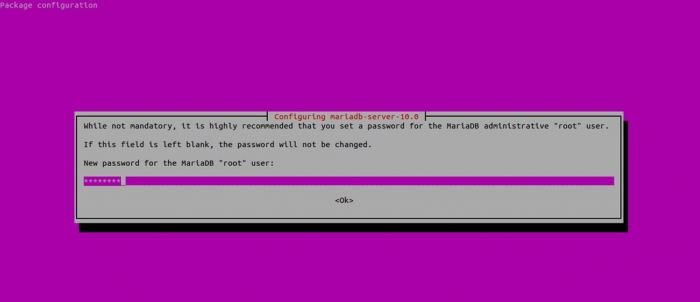
安裝過程中會提示設定 root 使用者密碼,請妥善保管。
linuxtechi@mail:~$ mysql -uroot -p
Enter password:
Welcome to the MariaDB monitor. Commands end with ; or \g.
Your MariaDB connection id is 40
Server version: 10.0.14-MariaDB-1~trusty-log mariadb.org binary distribution
...
MariaDB [(none)]>
$ sudo /etc/init.d/mysql stop
$ sudo /etc/init.d/mysql start
完成上述步驟即可在 Ubuntu 系統上成功部署 MariaDB 資料庫,後續可依專案需求進行參數調校與安全性強化。