--all-databases 無法排除庫,--ignore-table 僅能排除表數十個庫逐個寫名字?太 Low。Linux 管道 + 文本處理輕鬆搞定。
mysql -e 'SHOW DATABASES;' 列出所有庫grep -v 過濾掉系統庫(information_schema、mysql、performance_schema、test)xargs mysqldump --databases 批量備份剩餘庫
# 方法 A:備份時跳過 performance_schema
mysql -uroot -p123456 -e 'SHOW DATABASES;' | \
grep -Ev "Database|information_schema|mysql|test" | \
xargs mysqldump -uroot -p123456 --skip-lock-tables --databases > backup.sql

# 方法 B:列表階段直接過濾 performance_schema(推薦)
mysql -uroot -p123456 -e 'SHOW DATABASES;' | \
grep -Ev "Database|information_schema|mysql|performance_schema" | \
xargs mysqldump -uroot -p123456 --databases > backup.sql
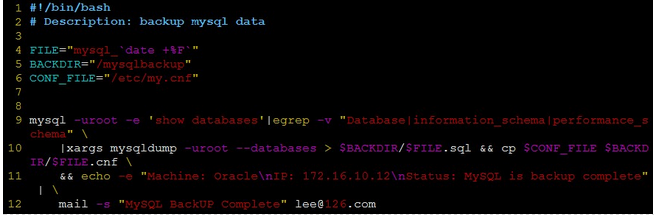
#!/bin/bash
# Description: MySQL 每日全量備份(排除系統庫)
# Author: DBA Team

FILE="mysql_$(date +%F)"
BACKDIR="/mysqlbackup"
CONF_FILE="/etc/my.cnf"
MAIL_TO="dba@company.com"

# 核心備份邏輯
mysql -uroot -e 'SHOW DATABASES' | \
egrep -v "Database|information_schema|performance_schema" | \
xargs mysqldump -uroot --databases > "$BACKDIR/$FILE.sql" && \
cp "$CONF_FILE" "$BACKDIR/$FILE.cnf" && \
echo -e "Host: $(hostname)\nIP: $(hostname -I)\nStatus: MySQL backup completed" | \
mail -s "MySQL Backup Success - $FILE" "$MAIL_TO"
#!/bin/bash
# 排除固定表名
EXCLUDE_TABLES=("mo_log" "mt_log" "report_info")

for tbl in $(mysql -uroot -e "USE spservice; SHOW TABLES" | grep -v Tables); do
    if [[ ! " ${EXCLUDE_TABLES[@]} " =~ " ${tbl} " ]]; then
        mysqldump -uroot --default-character-set=gbk --opt spservice "$tbl" > "${tbl}.sql"
    fi
done
#!/bin/bash
# 用法: ./exclude.sh mo_log mt_log report_log
declare -A exclude_map
for arg in "$@"; do exclude_map[$arg]=1; done

for tbl in $(mysql -uroot -e "USE spservice; SHOW TABLES" | grep -v Tables); do
    if [[ -z ${exclude_map[$tbl]} ]]; then
        mysqldump -uroot --default-character-set=gbk --opt spservice "$tbl" > "${tbl}.sql"
    fi
done
tables=(mo_log mt_log report_log)
./exclude.sh "${tables[@]}"
gzip 壓縮:... | gzip > backup.sql.gzrsync / scp 至備份伺服器mysql -uroot -p < backup.sql 驗證可用性--set-gtid-purged=OFF 避免 GTID 污染