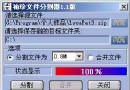
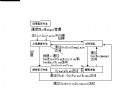
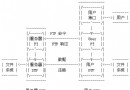
大文件需跨多張軟盤/移動介質傳輸,或受限於單文件大小上限(如 FAT32 4GB)時,需將文件等分切割,傳輸後合併還原。
序號_原文件名 的目標文件(如 1_test.zip, 2_test.zip...)。int CFileSpltDlg::SplitMe() {
// ... 打開源文件 m_SourceFile, 獲取分割大小 newlen ...
long l = 1; // 文件序號
char buff[20];
DWORD dwRead;
BYTE buffer[4096];
CFileException ex;
do {
// 構建目標文件名: 1_原文件名
_ltoa(l, buff, 10);
CString name = buff; name += _T("_");
CString newpath = m_targetpath;
if (newpath.Right(1) != _T("\\")) newpath += _T("\\");
CFile destFile;
if (!destFile.Open(newpath + name + m_SourceFile.GetFileName(),
CFile::modeWrite | CFile::shareExclusive | CFile::typeBinary | CFile::modeCreate, &ex)) {
ex.ReportError(); m_SourceFile.Close(); return 1;
}
// 循環讀寫直到達到分割大小或文件結束
do {
dwRead = m_SourceFile.Read(buffer, sizeof(buffer));
if (dwRead > 0) destFile.Write(buffer, dwRead);
} while (dwRead > 0 && destFile.GetLength() < newlen);
destFile.Close();
l++;
UpdateWindow(); // 刷新進度
} while (dwRead > 0); // 源文件讀完結束
m_SourceFile.Close();
return 0;
}int CFileSpltDlg::MergeMe() {
// ... 打開目標文件 destFile, 確定源目錄 newpath 與原文件名 m_filename ...
long l = 1;
char buff[20];
DWORD dwRead;
BYTE buffer[4096];
CFileException ex;
do {
_ltoa(l, buff, 10);
CString pref = buff; pref += _T("_");
CString name = newpath + pref + m_filename;
CFile srcFile;
if (!srcFile.Open(name, CFile::modeRead | CFile::shareExclusive | CFile::typeBinary, &ex)) {
// 文件不存在視為合併結束
destFile.Close(); return 0;
}
do {
dwRead = srcFile.Read(buffer, sizeof(buffer));
if (dwRead > 0) destFile.Write(buffer, dwRead);
} while (dwRead > 0);
srcFile.Close();
l++;
UpdateWindow();
} while (l < 500); // 安全上限,防死循環
return 0;
}