經典的「左側樹狀目錄 + 右側檔案清單」介面是檔案瀏覽器的標準範式。本文示範在 VC++ 對話方塊專案中,利用 `CTreeCtrl`、`CListCtrl`、`CImageList`、`SHGetFileInfo` 系統 API,實作邏輯磁碟機枚舉、目錄懶加載展開、檔案圖示提取與顯示、雙擊開啟檔案完整功能,代碼精簡、無第三方依賴。
BOOL CFileBrowserDlg::OnInitDialog()
{
    CDialog::OnInitDialog();
    // Tree 風格
    DWORD dwStyle = GetWindowLong(m_tree.m_hWnd, GWL_STYLE);
    dwStyle |= TVS_HASBUTTONS | TVS_HASLINES | TVS_LINESATROOT;
    SetWindowLong(m_tree.m_hWnd, GWL_STYLE, dwStyle);

    // 影像清單共用
    m_imgList.Create(16, 16, ILC_COLOR32 | ILC_MASK, 0, 10);
    m_tree.SetImageList(&m_imgList, TVSIL_NORMAL);
    m_list.SetImageList(&m_imgList, LVSIL_SMALL);

    // 根節點
    m_hRoot = m_tree.InsertItem(_T("我的電腦"), 0, 0);
    EnumLogicalDrives(m_hRoot);
    m_tree.Expand(m_hRoot, TVE_EXPAND);
    return TRUE;
}
void CFileBrowserDlg::EnumLogicalDrives(HTREEITEM hParent)
{
    TCHAR szDrives[256];
    DWORD dwLen = GetLogicalDriveStrings(256, szDrives);
    TCHAR* p = szDrives;
    while (*p)
    {
        // 取得磁碟機圖示
        SHFILEINFO sfi;
        SHGetFileInfo(p, 0, &sfi, sizeof(sfi), SHGFI_ICON | SHGFI_SMALLICON);
        int nImg = m_imgList.Add(sfi.hIcon);
        DestroyIcon(sfi.hIcon);

        HTREEITEM hDrive = m_tree.InsertItem(p, nImg, nImg, hParent);
        // 插入佔位子節點,讓節點顯示 '+' 號
        m_tree.InsertItem(_T(""), hDrive);
        p += _tcslen(p) + 1;
    }
}
void CFileBrowserDlg::OnItemExpandingTree(NMHDR* pNMHDR, LRESULT* pResult)
{
    NM_TREEVIEW* pNM = (NM_TREEVIEW*)pNMHDR;
    HTREEITEM hItem = pNM->itemNew.hItem;
    if (hItem == m_hRoot) { *pResult = 0; return; }

    // 移除佔位子節點
    HTREEITEM hChild = m_tree.GetChildItem(hItem);
    while (hChild)
    {
        HTREEITEM hNext = m_tree.GetNextItem(hChild, TVGN_NEXT);
        if (GetItemText(hChild).IsEmpty()) m_tree.DeleteItem(hChild);
        hChild = hNext;
    }

    // 取得完整路徑
    CString strPath = GetFullPath(hItem);
    if (strPath.Right(1) != _T("\\")) strPath += _T("\\");

    // 枚舉子目錄
    CFileFind finder;
    BOOL bFound = finder.FindFile(strPath + _T("*.*"));
    while (bFound)
    {
        bFound = finder.FindNextFile();
        if (finder.IsDirectory() && !finder.IsDots())
        {
            SHFILEINFO sfi;
            SHGetFileInfo(finder.GetFilePath(), 0, &sfi, sizeof(sfi), SHGFI_ICON | SHGFI_SMALLICON);
            int nImg = m_imgList.Add(sfi.hIcon);
            DestroyIcon(sfi.hIcon);
            HTREEITEM hSub = m_tree.InsertItem(finder.GetFileName(), nImg, nImg, hItem);
            m_tree.InsertItem(_T(""), hSub); // 佔位
        }
    }
    *pResult = 0;
}

CString CFileBrowserDlg::GetFullPath(HTREEITEM hItem)
{
    CString strPath, strItem;
    while (hItem && hItem != m_hRoot)
    {
        strItem = m_tree.GetItemText(hItem);
        strPath = strItem + _T("\\") + strPath;
        hItem = m_tree.GetParentItem(hItem);
    }
    return strPath;
}
void CFileBrowserDlg::OnSelChangedTree(NMHDR* pNMHDR, LRESULT* pResult)
{
    NM_TREEVIEW* pNM = (NM_TREEVIEW*)pNMHDR;
    HTREEITEM hItem = pNM->itemNew.hItem;
    if (hItem == m_hRoot) { *pResult = 0; return; }

    m_list.DeleteAllItems();
    CString strPath = GetFullPath(hItem);
    if (strPath.Right(1) != _T("\\")) strPath += _T("\\");

    CFileFind finder;
    BOOL bFound = finder.FindFile(strPath + _T("*.*"));
    int nItem = 0;
    while (bFound)
    {
        bFound = finder.FindNextFile();
        if (finder.IsDots()) continue;
        if (finder.IsDirectory()) continue; // 僅顯示檔案,目錄由左側樹狀管理

        SHFILEINFO sfi;
        SHGetFileInfo(finder.GetFilePath(), 0, &sfi, sizeof(sfi),
                      SHGFI_ICON | SHGFI_SMALLICON | SHGFI_DISPLAYNAME);
        int nImg = m_imgList.Add(sfi.hIcon);
        DestroyIcon(sfi.hIcon);

        m_list.InsertItem(nItem++, sfi.szDisplayName, nImg);
        // 可加子項:大小、修改時間、屬性
        // m_list.SetItemText(nItem-1, 1, ...);
    }
    *pResult = 0;
}
void CFileBrowserDlg::OnDblClkList(NMHDR* pNMHDR, LRESULT* pResult)
{
    LPNMITEMACTIVATE pNM = (LPNMITEMACTIVATE)pNMHDR;
    if (pNM->iItem < 0) return;

    CString strName = m_list.GetItemText(pNM->iItem, 0);
    HTREEITEM hSel = m_tree.GetSelectedItem();
    CString strPath = GetFullPath(hSel);
    if (strPath.Right(1) != _T("\\")) strPath += _T("\\");
    strPath += strName;

    // 使用 ShellExecute 開啟(關聯應用程式)
    HINSTANCE h = ShellExecute(m_hWnd, _T("open"), strPath, NULL, NULL, SW_SHOWNORMAL);
    if ((INT_PTR)h <= 32) AfxMessageBox(_T("無法開啟檔案"));
    *pResult = 0;
}
CFileBrowserDlg::~CFileBrowserDlg()
{
    // 影像清單圖示由 ImageList 管理,控制項銷毀時自動釋放
    // 若需手動釋放:m_imgList.DeleteImageList();
}
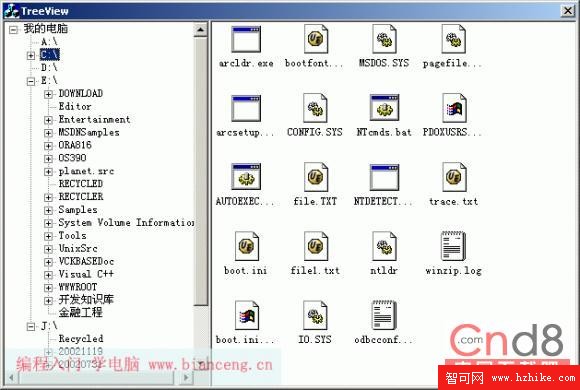
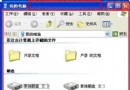
左側樹狀顯示磁碟機與目錄結構,展開時動態載入子目錄;右側列表顯示當前目錄檔案名稱與系統圖示,雙擊以關聯程式開啟。
本範例以不到 200 行核心代碼實現功能完整的檔案瀏覽器雛形,展示了 `CTreeCtrl` 懶加載、`CListCtrl` 圖示共享、`SHGetFileInfo` 系統圖示提取、`CFileFind` 枚舉、`ShellExecute` 開啟檔案等 Windows Shell 程式設計核心技術。架構清晰,易於擴充為專業級檔案管理器、專案檔案視圖、FTP 瀏覽器等應用。