<ul><li>) 渲染多級選單。visible (顯示條件)、active (當前項目高亮)、items (子選單遞迴)。label、url、template、linkOptions、itemOptions、submenuOptions。protected/views/layouts/main.php。
// protected/views/layouts/main.php
widget('zii.widgets.CMenu', [
    'items' => [
        ['label' => 'Home', 'url' => ['/site/index']],
        ['label' => 'About', 'url' => ['/site/page', 'view' => 'about']],
        ['label' => 'Contact', 'url' => ['/site/page', 'view' => 'contact']],
        ['label' => 'Login', 'url' => ['/site/login'], 'visible' => Yii::app()->user->isGuest],
        ['label' => 'Logout (' . Yii::app()->user->name . ')', 'url' => ['/site/logout'], 'visible' => !Yii::app()->user->isGuest],
        ['label' => 'Admin', 'url' => ['/admin/index'], 'visible' => Yii::app()->user->checkAccess('admin'), 'items' => [
            ['label' => 'User Management', 'url' => ['/admin/user']],
            ['label' => 'Role Management', 'url' => ['/admin/role']],
        ]],
    ],
    'htmlOptions' => ['class' => 'nav navbar-nav'], // Bootstrap 整合
    'submenuHtmlOptions' => ['class' => 'dropdown-menu'],
    'activeCssClass' => 'active',
    'encodeLabel' => false, // 允許 HTML 標籤
]); ?>
// SiteController.php
public function actions() {
    return [
        'page' => [
            'class' => 'CViewAction',
            // 'viewParam' => 'view', // 預設參數名
            // 'basePath' => 'pages', // 預設視圖子目錄
        ],
    ];
}

// 視圖檔案:protected/views/site/pages/about.php, contact.php
搭配 CMenu 使用,Controller 設定 $this->breadcrumbs 陣列:
// Controller
public function actionView($id) {
$post = Post::model()->findByPk($id);
$this->breadcrumbs = [
'Posts' => ['index'],
$post->title => [],
];
$this->render('view', ['model' => $post]);
}
// Layout (main.php)
breadcrumbs)): ?>
widget('zii.widgets.CBreadcrumbs', [
'links' => $this->breadcrumbs,
'homeLink' => 'Home ',
'tagName' => 'ul',
'separator' => '/ ',
'htmlOptions' => ['class' => 'breadcrumb'],
]); ?>
/* main.css */
.navbar-nav > li > a { padding: 15px; }
.dropdown-menu > li > a { padding: 10px 20px; }
.breadcrumb { background: #f5f5f5; padding: 8px 15px; margin-bottom: 20px; }
.breadcrumb > li + li:before { content: "/ "; color: #ccc; }
.active > a { font-weight: bold; }
套用 CSS (Bootstrap):
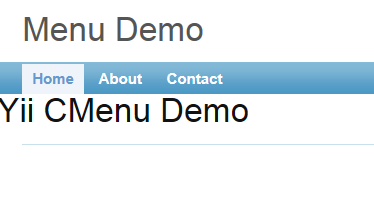
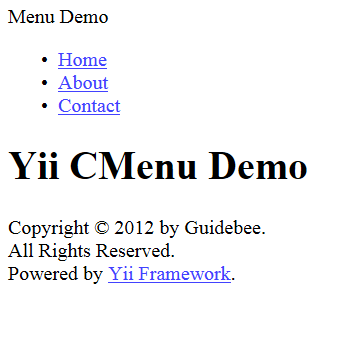
無 CSS (原始 HTML):
$items = Menu::model()->findAll(['order'=>'sort_order']);
$menuItems = [];
foreach ($items as $item) {
    $menuItems[] = [
        'label' => $item->name,
        'url' => $item->url,
        'visible' => $item->is_visible,
        'items' => $item->children ? $this->buildMenuItems($item->children) : [],
    ];
}
'visible' => Yii::app()->user->checkAccess('permissionName')。url 與當前請求路由,匹配則加 activeCssClass。可覆寫 isItemActive() 自訂邏輯。'template' => '- {menu}
' 控制單項輸出結構。| 問題 | 解決 |
|---|---|
| 子選單不顯示 | 檢查 items 陣列結構、CSS display:none 衝突、JS 未載入 (Bootstrap dropdown 需 jquery + bootstrap.js) |
| active 樣式不生效 | 確認 url 格式一致 (含/不含 index.php)、route 比對邏輯、手動設定 'active'=>true |
| 編碼問題 | 'encodeLabel'=>false 允許 HTML,但需防 XSS,確保 label 來源可信 |