FCKeditor(現更名為 CKEditor)是經典的線上富文本編輯器,支援 PHP、.NET、Java 等多平台。本文以 2.6.6 版為例,說明在 PHP 專案中安裝、配置工具列與啟用圖片上傳的完整步驟。
.zip 或 .tar.gz),解壓縮。fckeditor 資料夾複製至專案目錄(如網站根目錄)。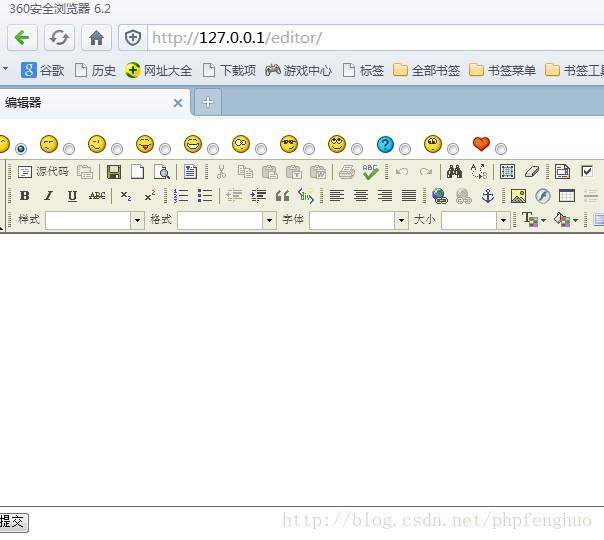
<?php require_once 'editor/fckeditor.php'; ?>
<!DOCTYPE html>
<html>
<head>
    <meta charset="gbk">
    <title>編輯器測試</title>
</head>
<body>
<form action="do.php" method="post" enctype="multipart/form-data">
    <div class="reviewFace">
        <!-- 表情選擇略 -->
    </div>
    <div class="reviewFace">
    <?php
    $FCKeditor = new FCKeditor('cContent');
    $FCKeditor->Width = '100%';
    $FCKeditor->Height = '350';
    $FCKeditor->BasePath = 'editor/';
    $FCKeditor->ToolbarSet = 'Default'; // 或 'Basic'
    echo $FCKeditor->CreateHtml();
    ?>
    </div>
    <input type="submit" value="提交">
</form>
</body>
</html>
$FCKeditor->ToolbarSet = 'Basic';在 fckeditor.js 中尋找 FCKConfig.ToolbarSets,可新增自訂組合:
FCKConfig.ToolbarSets["Leapsoulcn"] = [
    ['Bold','Italic','-','OrderedList','UnorderedList','-','Link','Unlink']
];
使用時設定 $FCKeditor->ToolbarSet = 'Leapsoulcn';。
editor/filemanager/connectors/php/config.php:$Config['Enabled'] = true; // 必須設為 true
$Config['UserFilesPath'] = '/UserFiles/'; // URL 路徑
$Config['UserFilesAbsolutePath'] = '/var/www/html/UserFiles/'; // 絕對實體路徑,需可寫入
UserFiles 目錄存在且 PHP 執行身分具寫入權限(chmod 777 或適當 ACL)。$Config['AllowedExtensions'] 陣列設定。config.php 路徑設定、目錄權限、PHP upload_max_filesize / post_max_size 限制。UserFilesPath 對應的 URL 可正常存取。BasePath 是否正確指向 editor/ 目錄。FCKeditor/CKEditor 整合 PHP 專案只需三步:複製目錄、實例化配置、啟用連接器上傳。掌握工具列切換與自訂,即可依據前後台需求提供最適編輯體驗。若為新專案,建議直接採用最新版 CKEditor 4/5,架構更現代、套件生態更豐富。