Swagger 是 RESTful API 文檔生成與測試的標準工具。Spring Boot 整合 Swagger 2 極其簡單,僅需引入依賴、啟用註解、在 Controller 添加文檔註解即可。本文演示完整接入流程與常用註解詳解。
<dependency>
    <groupId>io.springfox</groupId>
    <artifactId>springfox-swagger2</artifactId>
    <version>2.2.2</version>
</dependency>
<dependency>
    <groupId>io.springfox</groupId>
    <artifactId>springfox-swagger-ui</artifactId>
    <version>2.2.2</version>
</dependency>
@SpringBootApplication
@EnableSwagger2
public class Application {
    public static void main(String[] args) {
        SpringApplication.run(Application.class, args);
    }
}
@EnableSwagger2 啟用掃描,掃描范圍由 @ComponentScan 決定(默認主類同包及子包)。
@RestController
@RequestMapping("/user")
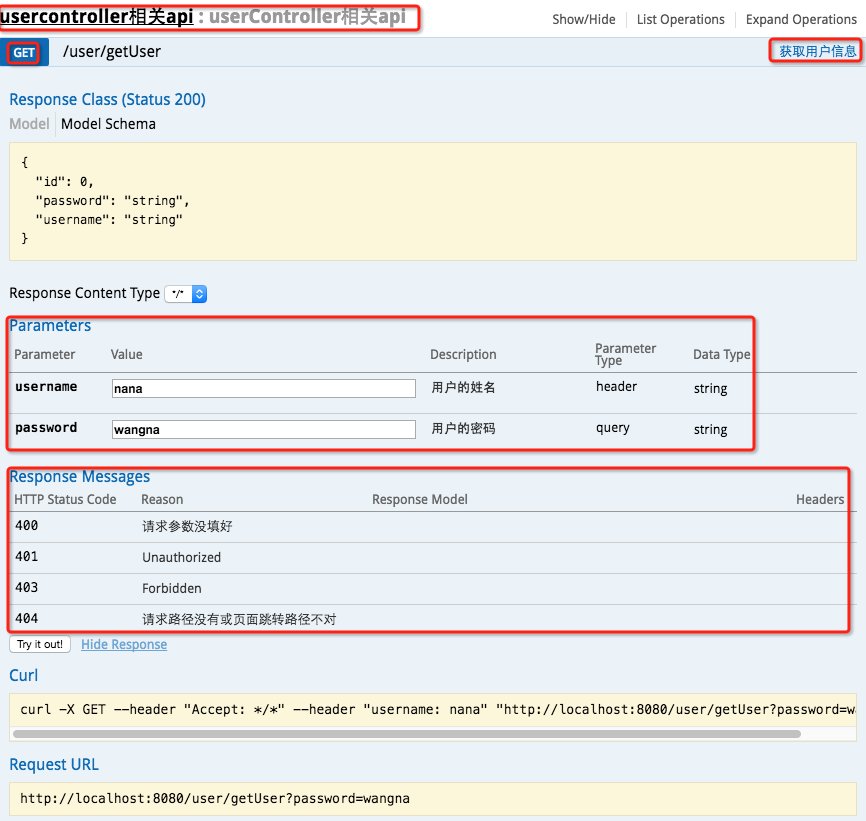
@Api("UserController 相關 API")
public class UserController {
    @Autowired
    private UserService userService;

    @ApiOperation("獲取用戶信息")
    @ApiImplicitParams({
        @ApiImplicitParam(paramType = "header", name = "username", dataType = "String", required = true, value = "用戶姓名", defaultValue = "zhaojigang"),
        @ApiImplicitParam(paramType = "query", name = "password", dataType = "String", required = true, value = "用戶密碼", defaultValue = "wangna")
    })
    @ApiResponses({
        @ApiResponse(code = 400, message = "請求參數錯誤"),
        @ApiResponse(code = 404, message = "路徑不存在")
    })
    @GetMapping("/getUser")
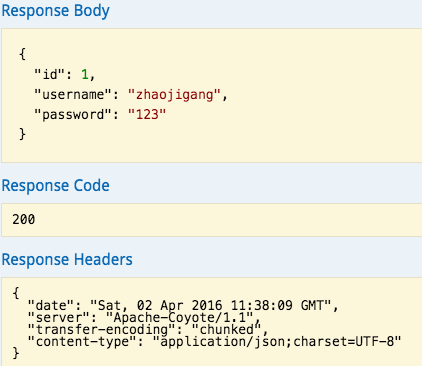
    public User getUser(@RequestHeader("username") String username, @RequestParam("password") String password) {
        return userService.getUser(username, password);
    }
}
| 註解 | 作用位置 | 關鍵屬性 |
|---|---|---|
@Api | 類 | value/description:接口分組說明 |
@ApiOperation | 方法 | value:接口說明;notes:詳細描述 |
@ApiImplicitParams | 方法 | 包含多個 @ApiImplicitParam |
@ApiImplicitParam | @ApiImplicitParams 內 | paramType(header/query/path/body/form)、name、dataType、required、value、defaultValue |
@ApiResponses | 方法 | 包含多個 @ApiResponse |
@ApiResponse | @ApiResponses 內 | code、message、response(異常類) |