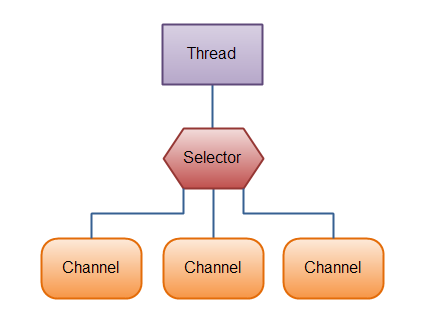
NIO(New IO / Non-blocking IO)基于 Buffer、Channel、Selector 三大核心,实现单线程处理成千上万连接。本文详解组件原理、文件 Channel 操作、服务端完整代码、Telnet 验证。
| 组件 | 角色 | 关键点 |
|---|
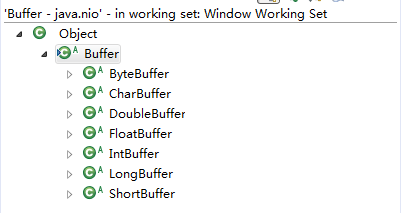
| Buffer | 数据容器 | 本质是数组(ByteBuffer 最常用),维护 position/limit/capacity,flip() 切读写模式,clear() 重置 |
| Channel | 双向通道 | 网络:ServerSocketChannel/SocketChannel(可非阻塞);文件:FileChannel(仅阻塞) |
| Selector | 多路复用器 | 单线程轮询就绪 Channel(OP_ACCEPT/OP_READ/OP_WRITE),JDK 用 epoll 替代 select,无 1024 句柄限制 |
文件 Channel 操作示例
// 写文件
FileChannel fc = new RandomAccessFile("nio-data.txt", "rw").getChannel();
ByteBuffer buf = ByteBuffer.allocate(1024);
buf.put("hi123".getBytes());
buf.flip();
fc.write(buf);

// 读文件
FileChannel fc = new FileInputStream("nio-data.txt").getChannel();
ByteBuffer buf = ByteBuffer.allocate(1024);
while (fc.read(buf) != -1) {
    buf.flip();
    while (buf.hasRemaining()) System.out.print((char) buf.get());
    buf.clear();
}

// 文件拷贝
FileChannel in = new FileInputStream("in.txt").getChannel();
FileChannel out = new FileOutputStream("out.txt").getChannel();
ByteBuffer buf = ByteBuffer.allocate(1024);
while (in.read(buf) != -1) {
    buf.flip();
    out.write(buf);
    buf.clear();
}
NIO 服务端完整实现(单线程 Reactor)
public class NioServer {
    public static void main(String[] args) throws IOException {
        ServerSocketChannel ssc = ServerSocketChannel.open();
        ssc.configureBlocking(false);
        ssc.socket().bind(new InetSocketAddress(8080));

        Selector selector = Selector.open();
        ssc.register(selector, SelectionKey.OP_ACCEPT);

        while (true) {
            selector.select();  // 阻塞等待就绪事件
            Set keys = selector.selectedKeys();
            Iterator it = keys.iterator();
            while (it.hasNext()) {
                SelectionKey key = it.next();
                it.remove();

                if (key.isAcceptable()) {
                    ServerSocketChannel server = (ServerSocketChannel) key.channel();
                    SocketChannel client = server.accept();
                    client.configureBlocking(false);
                    client.register(selector, SelectionKey.OP_WRITE); // 直接注册写,演示发送
                } else if (key.isWritable()) {
                    SocketChannel client = (SocketChannel) key.channel();
                    ByteBuffer buf = ByteBuffer.wrap("hello".getBytes());
                    client.write(buf);
                    key.cancel(); // 发完即关闭
                }
            }
        }
    }
}
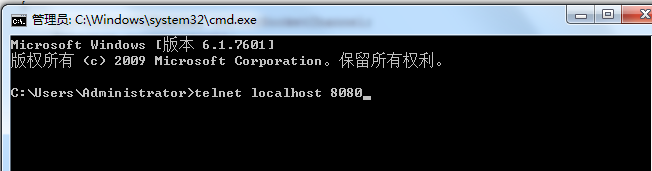
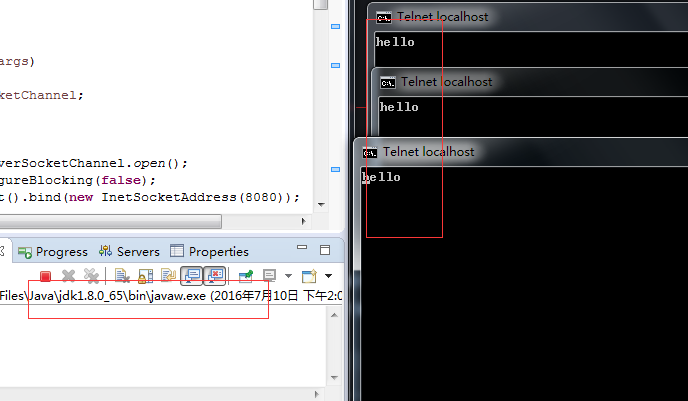
Telnet 验证
$ telnet localhost 8080
Trying 127.0.0.1...
Connected to localhost.
Escape character is '^]'.
hello
Connection closed by foreign host.
生产级扩展点
- 读事件处理:注册
OP_READ,循环 read() 直到返回 0 或 -1,组装完整消息
- 编解码器:LengthFieldBasedFrameDecoder + 自定义编解码,解决粘包/拆包
- 业务线程池:耗时业务提交
ExecutorService,Reactor 线程仅负责 IO
- Netty 框架:生产环境强烈建议直接用 Netty 4.x,封装了上述所有最佳实践
参考资料
《Netty 权威指南》(李林峰著)
- 上一篇文章: JavaSE final 关键字深度解析:修饰类/属性/方法、初始化时机、面试真题
- 下一篇文章: Java 坦克大戰經典遊戲實現全解析
Copyright ©
程式碼之家 All Rights Reserved